Unity - Scripting API: EditorGUIUtility.LookLikeControls
Success!
Thank you for helping us improve the quality of Unity Documentation. Although we cannot accept all submissions, we do read each suggested change from our users and will make updates where applicable.
Submission failed
For some reason your suggested change could not be submitted. Please <a>try again</a> in a few minutes. And thank you for taking the time to help us improve the quality of Unity Documentation.
Obsolete LookLikeControls and LookLikeInspector modes are deprecated.Use EditorGUIUtility.labelWidth and EditorGUIUtility.fieldWidth to control label and field widths.
Declaration
public static void LookLikeControls(float _labelWidth, float _fieldWidth);
Parameters
| Parameter | Description |
|---|---|
| labelWidth | Width to use for prefixed labels. |
| fieldWidth | Width of text entries. |
Description
Make all EditorGUI look like regular controls.
This will make the default styles used by EditorGUI look like controls (e.g. EditorGUI.Popup becomes a full popup menu).
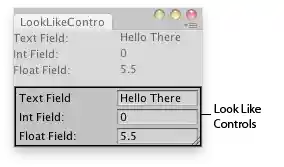
Editor window with "LookLikeControls" look.