1. The way of the program — How to Think Like a Computer Scientist: Learning with Python 3 (AoPS Edition)
The goal of this book is to teach you to think like a computer scientist. As computer scientists, we will combine some of the best features of mathematics, engineering, and natural science. Like mathematicians, we will use formal languages to communicate our ideas. Like engineers, we will design complex systems, assembling components into systems and evaluating tradeoffs among alternatives. Like scientists, we will observe the behavior of complex systems, form hypotheses, and test predictions.
The single most important skill for a computer scientist is problem solving. Problem solving is a skill that involves formulating problems, thinking creatively about solutions, and expressing a solution clearly and accurately. As it turns out, the process of learning to program is an excellent opportunity to practice problem-solving skills. That’s why this chapter is called The way of the program.
1.1. The Python programming language
The programming language you will be learning is Python. Python is an example of a high-level language; other high-level languages you might have heard of are C++, PHP, Pascal, C#, and Java.
As you might infer from the name high-level language, there are also low-level languages, sometimes referred to as machine languages or assembly languages. Loosely speaking, computers can only execute programs written in low-level languages. Thus, programs written in a high-level language have to be translated into something more suitable before they can run.
Almost all programs are written in high-level languages because of their advantages. It is much easier to program in a high-level language so programs take less time to write, they are shorter and easier to read, and they are more likely to be correct. Second, high-level languages are portable, meaning that they can run on different kinds of computers with few or no modifications.
The engine that translates and runs Python is called the Python Interpreter: There are two ways to use it: immediate mode and script mode. In immediate mode, which we also call shell mode, you type Python expressions into the Python interpreter window (which is also called the shell), and the interpreter immediately shows the result.
In AoPS classes, we will use the IDLE application that comes built-in with most Python installations. In IDLE, the Python interpreter window is labeled Python Shell.
Instructions for installing Python on your computer are including in the Course Introduction document on the AoPS class homepage, and are also posted on the class message board. When you start up IDLE on your computer, it should look something like this:
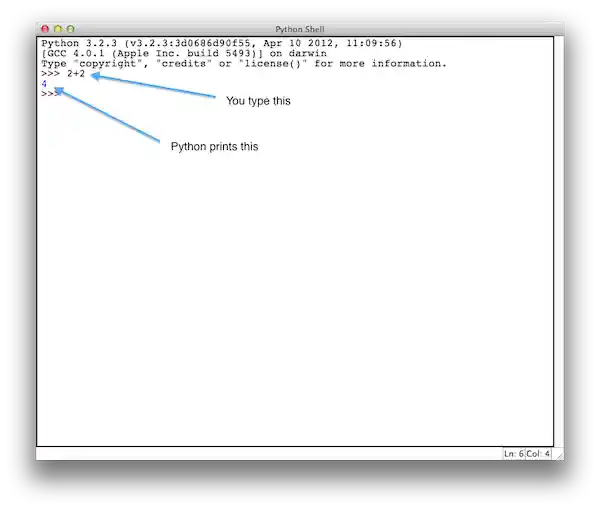
The >>> is called the Python prompt. The interpreter uses the prompt to indicate that it is ready for instructions. We typed 2 + 2, and the interpreter evaluated our expression, and replied 4, and on the next line it gave a new prompt, indicating that it is ready for more.
Alternatively, you can write a program in a file and use the interpreter to run the lines of code in the file. Such a file is called a script. Scripts have the advantage that they can be saved, printed, and so on. A Python script is often called a module.
For example, we can created a file named firstprogram.py using IDLE. By convention, files that contain Python programs have names that end with .py.) To do this, select “New File” or “New Window” from the File menu of IDLE, and then type the following two lines into the new window that appears:
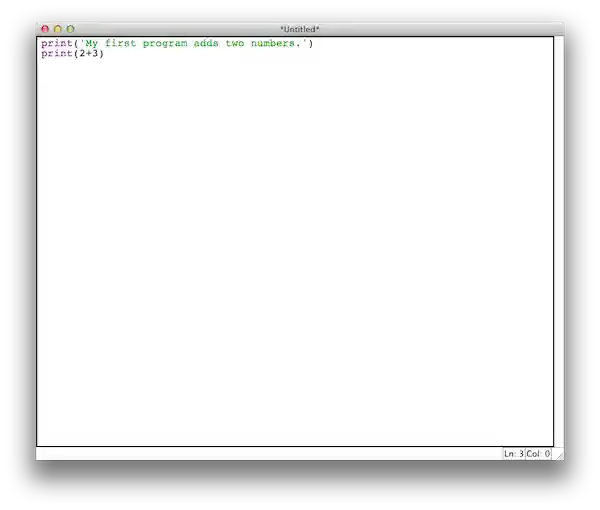
To run the program, we can select the “Run Module” or “Run Program” option from the “Run” menu of IDLE (or alternatively you can press the F5 key). IDLE will ask you to save your program before it can run it. Save it using the name firstprogram.py. Then your program will run, and it should look something like the screenshot below:
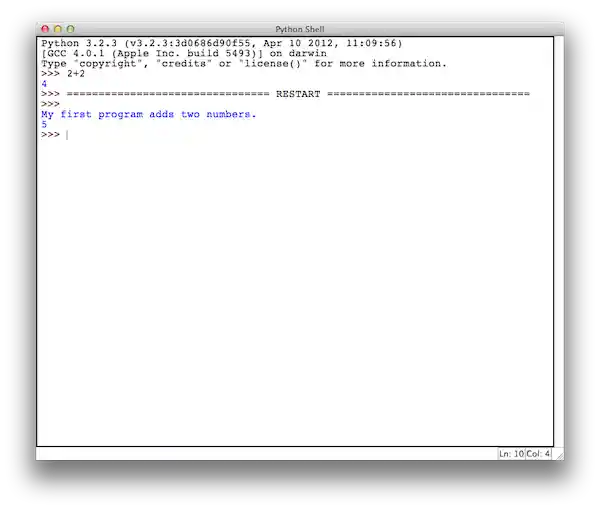
Notice that the program always runs in the Shell window.
Don’t worry, most programs are more interesting than this one.
Working directly in the interpreter is convenient for testing short bits of code because you get immediate feedback. Think of it as scratch paper used to help you work out problems. Anything longer than a few lines should be put into a script.
There’s a third way that you can run Python using this ebook. In many places in this ebook, we’ll have a Python interpreter built directly into the text. For example, our program from above can appear directly in the book as shown below:
If you click the “Run” button, the program will run and you’ll see its output above directly in the ebook. You can also edit the code directly in the window above. If you click the “Reset” button (or refresh your browser window), the code will return to what it originally was (that is, any edits that you’ve made will be removed.) The little numbers to the left are line numbers, and you don’t type them in. They appear automatically in our ebook, so that it’s easier for us to discuss our program. For example, we can say “line 1 of our program prints a sentence”.
1.2. What is a program?
A program is a sequence of instructions that specifies how to perform a computation. The computation might be something mathematical, such as solving a system of equations or finding the roots of a polynomial, but it can also be a symbolic computation, such as searching and replacing text in a document.
The details look different in different languages, but a few basic instructions appear in just about every language:
- input
- Get data from the keyboard, a file, or some other device.
- output
- Display data on the screen or send data to a file or other device.
- math
- Perform basic mathematical operations like addition and multiplication.
- conditional execution
- Check for certain conditions and execute the appropriate sequence of statements.
- repetition
- Perform some action repeatedly, usually with some variation.
Believe it or not, that’s pretty much all there is to it. Every program you’ve ever used, no matter how complicated, is made up of instructions that look more or less like these. Thus, we can describe programming as the process of breaking a large, complex task into smaller and smaller subtasks until the subtasks are simple enough to be performed with sequences of these basic instructions.
That may be a little vague, but we will come back to this topic later when we talk about algorithms.
1.3. What is debugging?
Programming is a complex process, and because it is done by human beings, it often leads to errors. Programming errors are called bugs and the process of tracking them down and correcting them is called debugging. Use of the term bug to describe small engineering difficulties dates back to at least 1889, when Thomas Edison had a bug with his phonograph.
Three kinds of errors can occur in a program: syntax errors, runtime errors, and semantic errors. It is useful to distinguish between them in order to track them down more quickly.
1.4. Syntax errors
Python can only execute a program if the program is syntactically correct; otherwise, the process fails and returns an error message. Syntax refers to the structure of a program and the rules about that structure. For example, in English, a sentence must begin with a capital letter and end with a period. this sentence contains a syntax error. So does this one
For most humans, a few syntax errors are not a significant problem, which is why we can read the above sentences and still figure out what they mean. Python is not so forgiving. If there is a single syntax error anywhere in your program, Python will display an error message and quit, and you will not be able to run your program. During the first few weeks of your programming career, you will probably spend a lot of time tracking down syntax errors. As you gain experience, though, you will make fewer errors and find them faster.
1.5. Runtime errors
The second type of error is a runtime error, so called because the error does not appear until you run the program. These errors are also called exceptions because they usually indicate that something exceptional (and bad) has happened.
Runtime errors are rare in the simple programs you will see in the first few chapters, so it might be a while before you encounter one.
1.6. Semantic errors
The third type of error is the semantic error. If there is a semantic error in your program, it will run successfully, in the sense that the computer will not generate any error messages, but it will not do the right thing. It will do something else. Specifically, it will do what you told it to do.
The problem is that the program you wrote is not the program you wanted to write. The meaning of the program (its semantics) is wrong. Identifying semantic errors can be tricky because it requires you to work backward by looking at the output of the program and trying to figure out what it is doing.
1.7. Experimental debugging
One of the most important skills you will acquire is debugging. Although it can be frustrating, debugging is one of the most intellectually rich, challenging, and interesting parts of programming.
In some ways, debugging is like detective work. You are confronted with clues, and you have to infer the processes and events that led to the results you see.
Debugging is also like an experimental science. Once you have an idea what is going wrong, you modify your program and try again. If your hypothesis was correct, then you can predict the result of the modification, and you take a step closer to a working program. If your hypothesis was wrong, you have to come up with a new one. As Sherlock Holmes pointed out: When you have eliminated the impossible, whatever remains, however improbable, must be the truth. (A. Conan Doyle, The Sign of Four)
For some people, programming and debugging are the same thing. That is, programming is the process of gradually debugging a program until it does what you want. The idea is that you should start with a program that does something and make small modifications, debugging them as you go, so that you always have a working program.
Later chapters will make more suggestions about debugging and other programming practices.
1.8. Formal and natural languages
Natural languages are the languages that people speak, such as English, Spanish, and French. They were not designed by people (although people try to impose some order on them); they evolved naturally.
Formal languages are languages that are designed by people for specific applications. For example, the notation that mathematicians use is a formal language that is particularly good at denoting relationships among numbers and symbols. Chemists use a formal language to represent the chemical structure of molecules. And most importantly:
Programming languages are formal languages that have been designed to express computations.
Formal languages tend to have strict rules about syntax. For example, 3+3=6 is a syntactically correct mathematical statement, but 3=+6$ is not. H2O is a syntactically correct chemical name, but 2Zz is not.
Syntax rules come in two flavors, pertaining to tokens and structure. Tokens are the basic elements of the language, such as words, numbers, parentheses, commas, and so on. In Python, a statement like
print("Happy New Year for ",2013)
has 6 tokens: a function name, an open parenthesis (round bracket), a string, a comma, a number, and a close parenthesis.
It is possible to make errors in the way one constructs tokens. One of the problems with 3=+6$ is that $ is not a legal token in mathematics (at least as far as we know). Similarly, 2Zz is not a legal token in chemistry notation because there is no element with the abbreviation Zz.
The second type of syntax rule pertains to the structure of a statement— that is, the way the tokens are arranged. The statement 3=+6$ is structurally illegal because you can’t place a plus sign immediately after an equal sign. Similarly, molecular formulas have to have subscripts after the element name, not before. And in our Python example, if we omitted the comma, or if we changed the two parentheses around to say
print)"Happy New Year for ",2013(
our statement would still have six legal and valid tokens, but the structure is illegal.
When you read a sentence in English or a statement in a formal language, you have to figure out what the structure of the sentence is (although in a natural language you do this subconsciously). This process is called parsing.
For example, when you hear the sentence, “The other shoe fell”, you understand that the other shoe is the subject and fell is the verb. Once you have parsed a sentence, you can figure out what it means, or the semantics of the sentence. Assuming that you know what a shoe is and what it means to fall, you will understand the general implication of this sentence.
Although formal and natural languages have many features in common — tokens, structure, syntax, and semantics — there are many differences:
- ambiguity
- Natural languages are full of ambiguity, which people deal with by using contextual clues and other information. Formal languages are designed to be nearly or completely unambiguous, which means that any statement has exactly one meaning, regardless of context.
- redundancy
- In order to make up for ambiguity and reduce misunderstandings, natural languages employ lots of redundancy. As a result, they are often verbose. Formal languages are less redundant and more concise.
- literalness
- Formal languages mean exactly what they say. On the other hand, natural languages are full of idiom and metaphor. If someone says, “The other shoe fell”, there is probably no shoe and nothing falling. You’ll need to find the original joke to understand the idiomatic meaning of the other shoe falling.
People who grow up speaking a natural language—everyone—often have a hard time adjusting to formal languages. In some ways, the difference between formal and natural language is like the difference between poetry and prose, but more so:
- poetry
- Words are used for their sounds as well as for their meaning, and the whole poem together creates an effect or emotional response. Ambiguity is not only common but often deliberate.
- prose
- The literal meaning of words is more important, and the structure contributes more meaning. Prose is more amenable to analysis than poetry but still often ambiguous.
- program
- The meaning of a computer program is unambiguous and literal, and can be understood entirely by analysis of the tokens and structure.
Here are some suggestions for reading programs (and other formal languages). First, remember that formal languages are much more dense than natural languages, so it takes longer to read them. Also, the structure is very important, so it is usually not a good idea to read from top to bottom, left to right. Instead, learn to parse the program in your head, identifying the tokens and interpreting the structure. Finally, the details matter. Little things like spelling errors and bad punctuation, which you can get away with in natural languages, can make a big difference in a formal language.
1.9. The first program
Traditionally, the first program written in a new language is called Hello, World! because all it does is display the words, Hello, World! In Python, the script looks like this:
This is an example of using the print function, which doesn’t actually print anything on paper. It displays a value on the screen. In this case, the result shown is Hello, World!.
The quotation marks in the program mark the beginning and end of the value; they don’t appear in the result.
Some people judge the quality of a programming language by the simplicity of the Hello, World! program. By this standard, Python does about as well as possible.
1.11. Glossary
- algorithm
- A set of specific steps for solving a category of problems.
- bug
- An error in a program.
- Information in a program that is meant for other programmers (or anyone reading the source code) and has no effect on the execution of the program.
- debugging
- The process of finding and removing any of the three kinds of programming errors.
- exception
- Another name for a runtime error.
- formal language
- Any one of the languages that people have designed for specific purposes, such as representing mathematical ideas or computer programs; all programming languages are formal languages.
- high-level language
- A programming language like Python that is designed to be easy for humans to read and write.
- immediate mode
- A style of using Python where we type expressions at the command prompt, and the results are shown immediately. Contrast with script, and see the entry under Python shell.
- interpreter
- The engine that executes your Python scripts or expressions.
- low-level language
- A programming language that is designed to be easy for a computer to execute; also called machine language or assembly language.
- natural language
- Any one of the languages that people speak that evolved naturally.
- object code
- The output of the compiler after it translates the program.
- parse
- To examine a program and analyze the syntactic structure.
- portability
- A property of a program that can run on more than one kind of computer.
- print function
- A function used in a program or script that causes the Python interpreter to display a value on its output device.
- problem solving
- The process of formulating a problem, finding a solution, and expressing the solution.
- program
- a sequence of instructions that specifies to a computer actions and computations to be performed.
- Python shell
- An interactive user interface to the Python interpreter. The user of a Python shell types commands at the prompt (>>>), and presses the return key to send these commands immediately to the interpreter for processing. The word shell comes from Unix.
- runtime error
- An error that does not occur until the program has started to execute but that prevents the program from continuing.
- script
- A program stored in a file (usually one that will be interpreted).
- semantic error
- An error in a program that makes it do something other than what the programmer intended.
- semantics
- The meaning of a program.
- source code
- A program in a high-level language before being compiled.
- syntax
- The structure of a program.
- syntax error
- An error in a program that makes it impossible to parse — and therefore impossible to interpret.
- token
- One of the basic elements of the syntactic structure of a program, analogous to a word in a natural language.