.gitlab-ci.yml
train-and-report:
image: iterativeai/cml:0-dvc2-base1
script:
- pip install -r requirements.txt
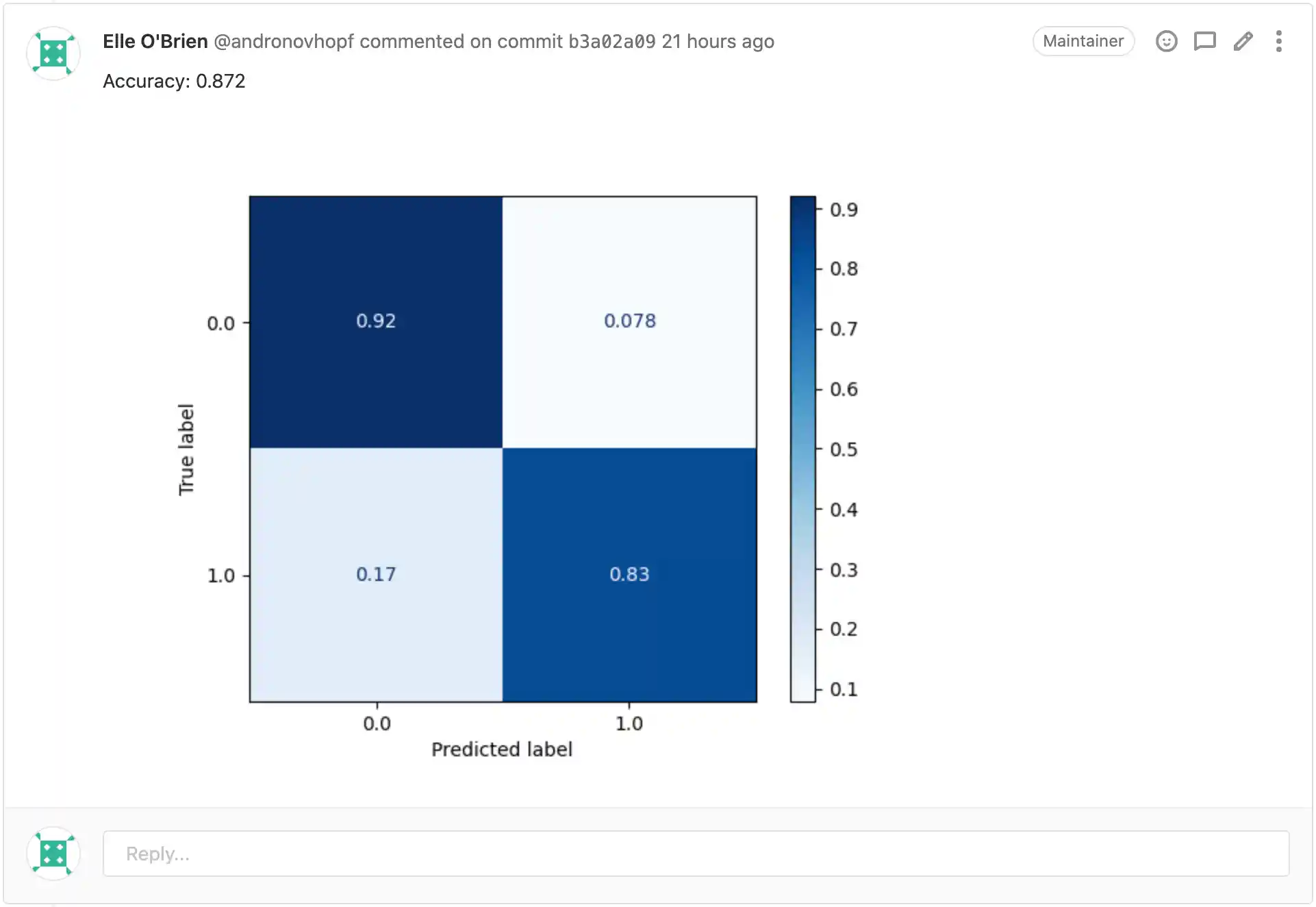
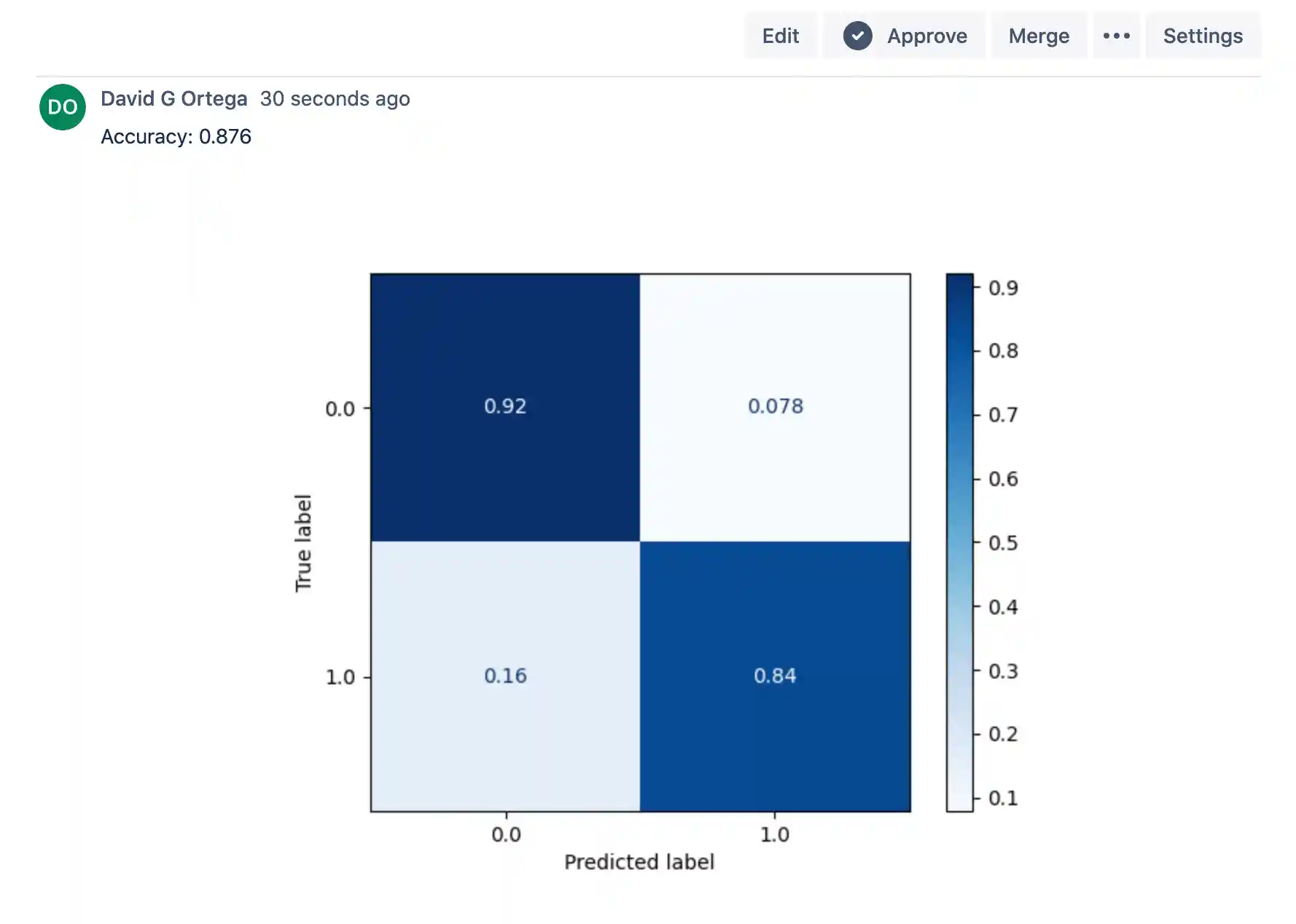
- python train.py # generate plot.png
# Create CML report
- cat metrics.txt >> report.md
- echo '' >> report.md
- cml comment create report.md
CML Report
.github/workflows/cml.yaml
name: CML
on: [push]
jobs:
train-and-report:
runs-on: ubuntu-latest
container: docker://ghcr.io/iterative/cml:0-dvc2-base1
steps:
- uses: actions/checkout@v3
- run: |
pip install -r requirements.txt
python train.py # generate plot.png
# Create CML report
cat metrics.txt >> report.md
echo '' >> report.md
cml comment create report.md
env:
REPO_TOKEN: ${{ secrets.GITHUB_TOKEN }}
CML Report

bitbucket-pipelines.yml
image: iterativeai/cml:0-dvc2-base1
pipelines:
default:
- step:
name: Train and Report
script:
- pip install -r requirements.txt
- python train.py # generate plot.png
# Create CML report
- cat metrics.txt >> report.md
- echo '' >> report.md
- cml comment create report.md
CML Report
.gitlab-ci.yml
train-and-report:
image: iterativeai/cml:0-dvc2-base1
script:
- dvc pull data
- pip install -r requirements.txt
- dvc repro
# Compare metrics to main
- git fetch --depth=1 origin main:main
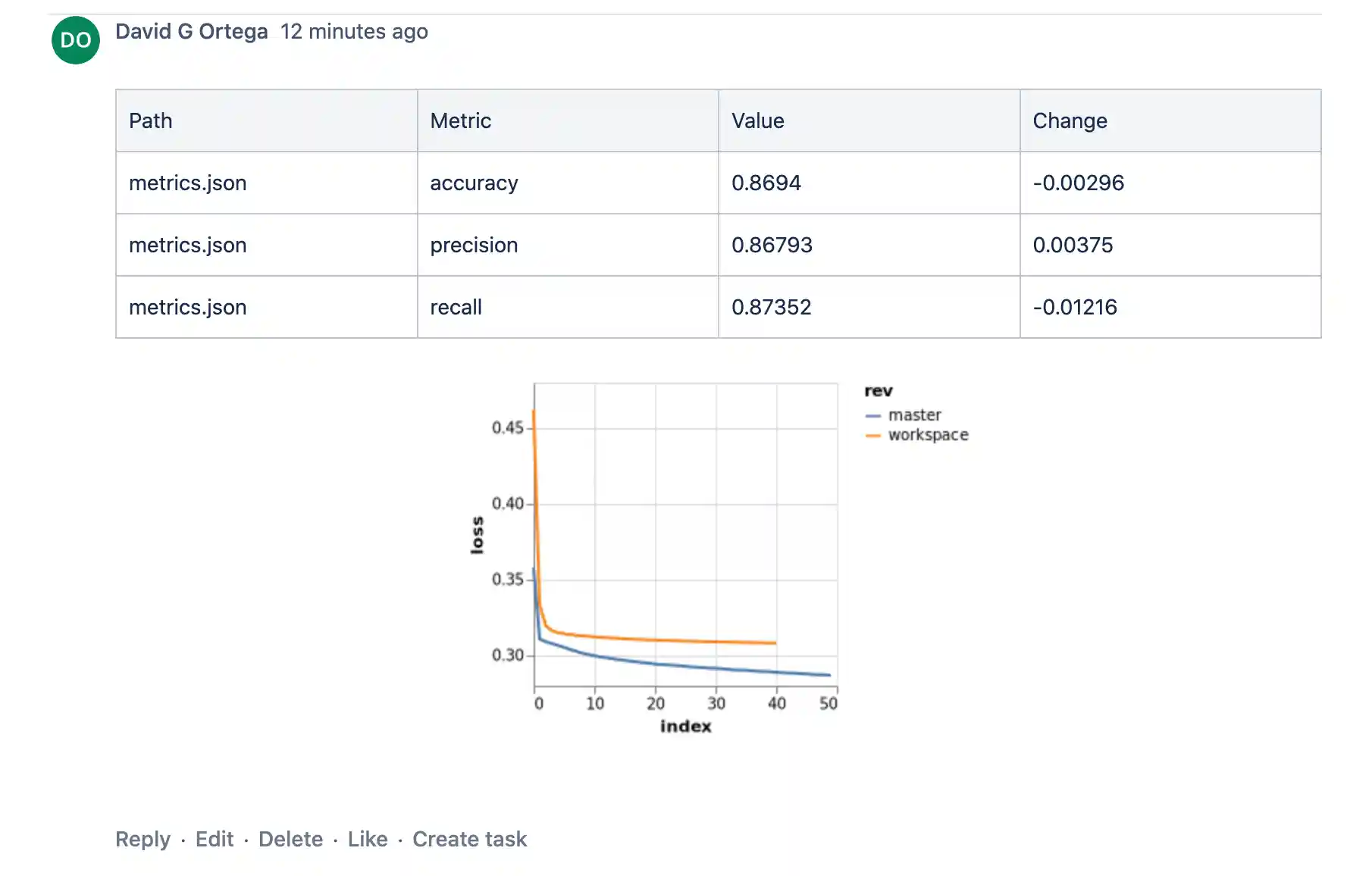
- dvc metrics diff --show-md main >> report.md
# Plot training loss function diff
- dvc plots diff
--target loss.csv --show-vega main > vega.json
- vl2png vega.json > plot.png
- echo '' >> report.md
# Post CML report as a comment in GitLab
- cml comment create report.md
CML Report

.github/workflows/cml.yaml
name: CML & DVC
on: [push]
jobs:
train-and-report:
runs-on: ubuntu-latest
steps:
- uses: actions/checkout@v3
- uses: actions/setup-python@v4
with:
python-version: '3.x'
- uses: iterative/setup-cml@v1
- uses: iterative/setup-dvc@v1
- name: Train model
env:
AWS_ACCESS_KEY_ID: ${{ secrets.AWS_ACCESS_KEY_ID }}
AWS_SECRET_ACCESS_KEY: ${{ secrets.AWS_SECRET_ACCESS_KEY }}
run: |
dvc pull data
pip install -r requirements.txt
dvc repro
- name: Create CML report
run: |
# Compare metrics to main
git fetch --depth=1 origin main:main
dvc metrics diff --show-md main >> report.md
# Plot training loss function diff
dvc plots diff \
--target loss.csv --show-vega main > vega.json
vl2png vega.json > plot.png
echo '' >> report.md
cml comment create report.md
env:
REPO_TOKEN: ${{ secrets.GITHUB_TOKEN }}
CML Report

bitbucket-pipelines.yml
image: iterativeai/cml:0-dvc2-base1
pipelines:
default:
- step:
name: Train model
script:
- dvc pull data
- pip install -r requirements.txt
- dvc repro
- step:
name: Create CML report
script:
# Compare metrics to main
- git fetch --depth=1 origin main:main
- dvc metrics diff --show-md main >> report.md
# Plot training loss function diff
- dvc plots diff
--target loss.csv --show-vega main > vega.json
- vl2png vega.json > plot.png
- echo '' >> report.md
# Post CML report as a comment in Bitbucket
- cml comment create report.md
CML Report
.gitlab-ci.yml
train-and-report:
image: iterativeai/cml:0-dvc2-base1
script:
- pip install -r requirements.txt
- cml tensorboard connect
--logdir=./logs
--name="Go to tensorboard"
--md >> report.md
- cml comment create report.md
- python train.py # generate ./logs
CML Report
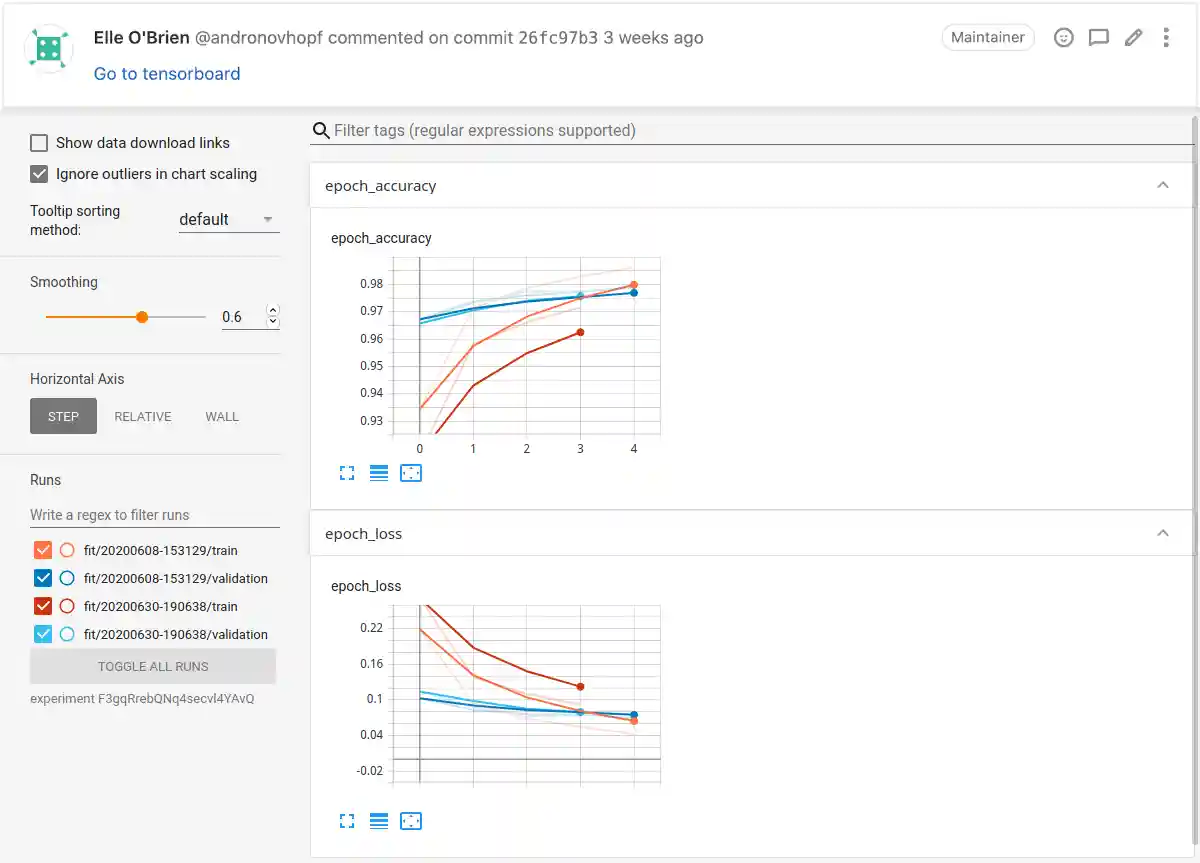
.github/workflows/cml.yaml
name: CML & TensorBoard
on: [push]
jobs:
train-and-report:
runs-on: ubuntu-latest
container: docker://ghcr.io/iterative/cml:0-dvc2-base1
steps:
- uses: actions/checkout@v3
- name: Train and Report
env:
REPO_TOKEN: ${{ secrets.GITHUB_TOKEN }}
TB_CREDENTIALS: ${{ secrets.TB_CREDENTIALS }}
run: |
pip install -r requirements.txt
cml tensorboard connect \
--logdir=./logs \
--name="Go to tensorboard" \
--md >> report.md
cml comment create report.md
python train.py # generate ./logs
CML Report

bitbucket-pipelines.yml
image: iterativeai/cml:0-dvc2-base1
pipelines:
default:
- step:
name: Train and Report
script:
- pip install -r requirements.txt
- cml tensorboard connect
--logdir=./logs
--name="Go to tensorboard"
--md >> report.md
- cml comment create report.md
- python train.py # generate ./logs
CML Report
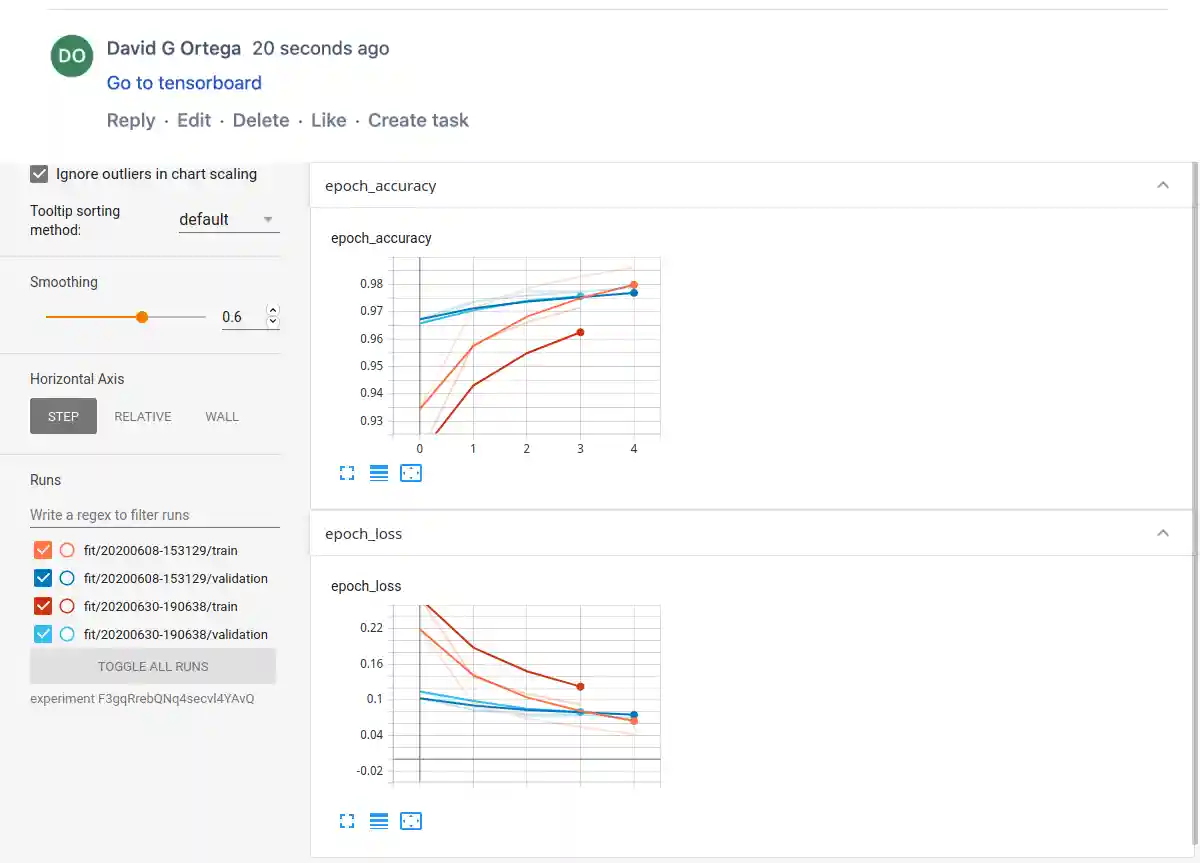
.gitlab-ci.yml
launch-runner:
image: iterativeai/cml:0-dvc2-base1
script:
# Supports AWS, Azure, GCP, K8s
- cml runner launch
--cloud=aws
--cloud-region=us-west
--cloud-type=m5.2xlarge
--cloud-spot
--labels=cml-runner
train-and-report:
tags: [cml-runner]
needs: [launch-runner]
image: iterativeai/cml:0-dvc2-base1
script:
- pip install -r requirements.txt
- python train.py # generate plot.png
- echo "## Report from your EC2 instance" >> report.md
- cat metrics.txt >> report.md
- echo '' >> report.md
- cml comment create report.md
CML Report
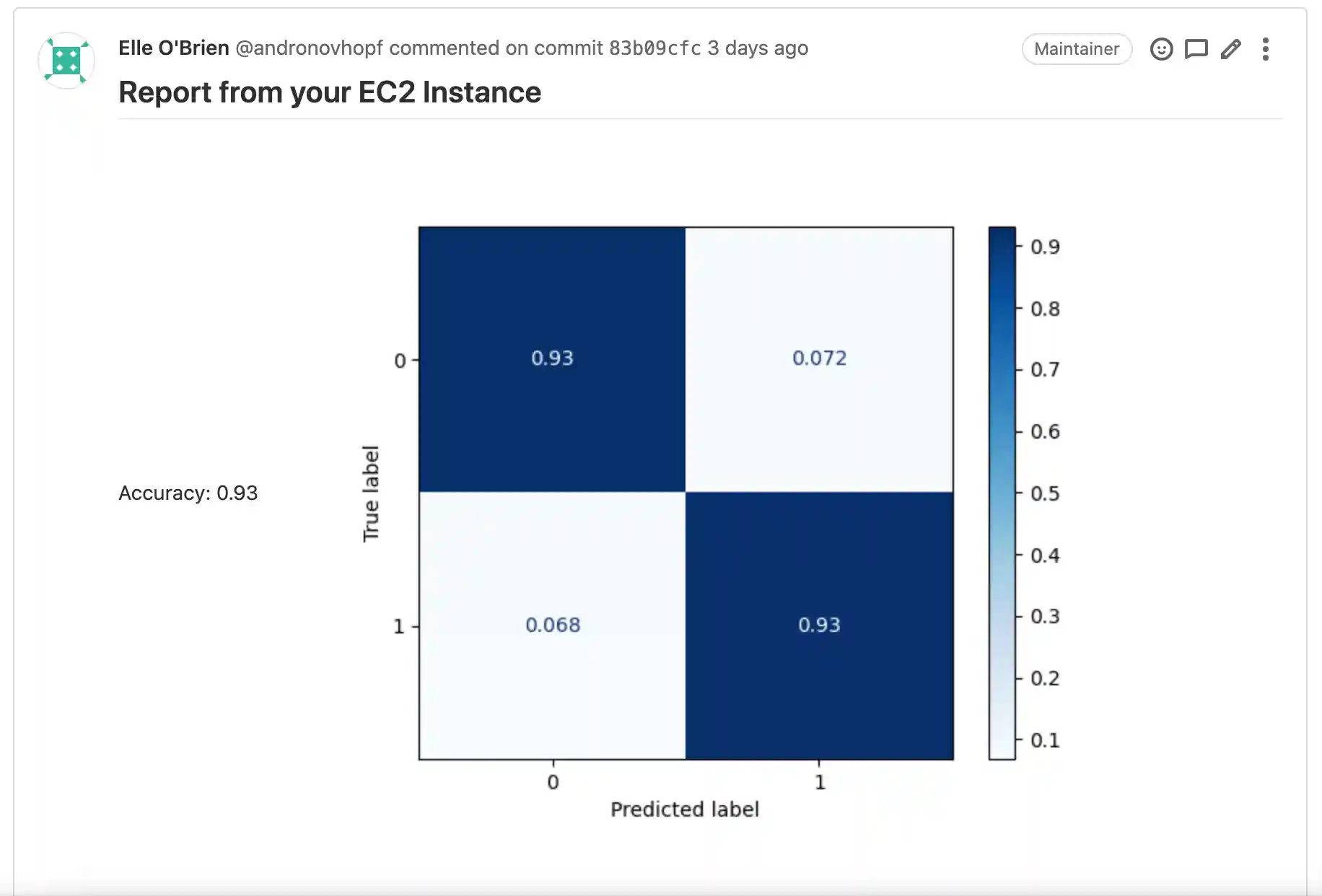
.github/workflows/cml.yaml
name: CML
on: [push]
jobs:
launch-runner:
runs-on: ubuntu-latest
steps:
- uses: actions/checkout@v3
- uses: iterative/setup-cml@v1
- name: Deploy runner on AWS EC2
# Supports AWS, Azure, GCP, K8s
env:
REPO_TOKEN: ${{ secrets.PERSONAL_ACCESS_TOKEN }}
AWS_ACCESS_KEY_ID: ${{ secrets.AWS_ACCESS_KEY_ID }}
AWS_SECRET_ACCESS_KEY: ${{ secrets.AWS_SECRET_ACCESS_KEY }}
run: |
cml runner launch \
--cloud=aws \
--cloud-region=us-west \
--cloud-type=m5.2xlarge \
--labels=cml-runner
train-and-report:
runs-on: [self-hosted, cml-runner]
needs: launch-runner
timeout-minutes: 50400 # 35 days
container: docker://iterativeai/cml:0-dvc2-base1
steps:
- uses: actions/checkout@v3
- name: Train and Report
run: |
pip install -r requirements.txt
python train.py # generate plot.png
echo "## Report from your EC2 Instance" >> report.md
cat metrics.txt >> report.md
echo '' >> report.md
cml comment create report.md
env:
REPO_TOKEN: ${{ secrets.PERSONAL_ACCESS_TOKEN }}
CML Report

bitbucket-pipelines.yml
pipelines:
default:
- step:
name: Launch Runner
image: iterativeai/cml:0-dvc2-base1
script:
# Supports AWS, Azure, GCP, K8s
- cml runner launch
--cloud=aws
--cloud-region=us-west
--cloud-type=m5.2xlarge
--cloud-spot
--labels=cml.runner
- step:
runs-on: [self.hosted, cml.runner]
name: Train and Report
image: iterativeai/cml:0-dvc2-base1
script:
- pip install -r requirements.txt
- python train.py # generate plot.png
- echo "## Report from your EC2 instance" >> report.md
- cat metrics.txt >> report.md
- echo '' >> report.md
- cml comment create report.md
CML Report
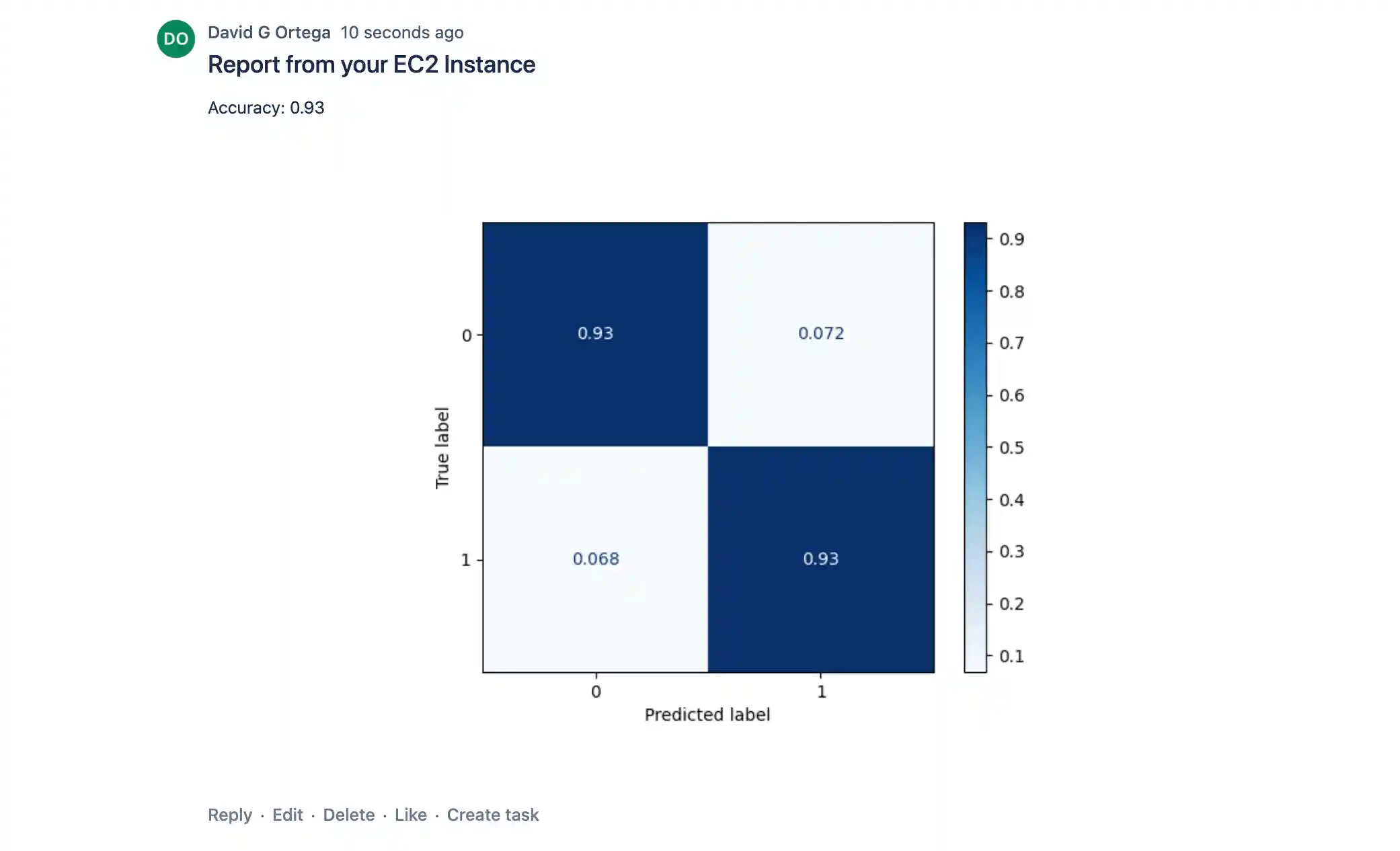
.gitlab-ci.yml
launch-runner:
image: iterativeai/cml:0-dvc2-base1
script:
# Supports AWS, Azure, GCP, K8s
- cml runner launch
--cloud=aws
--cloud-region=us-west
--cloud-type=p2.xlarge
--cloud-hdd-size=64
--cloud-spot
--labels=cml-gpu
train-and-report:
tags: [cml-gpu]
needs: [launch-runner]
image: iterativeai/cml:0-dvc2-base1-gpu
script:
- dvc pull data
- pip install -r requirements.txt
- dvc repro
- git show origin/main:image.png > image-main.png
- |
cat <<EOF > report.md
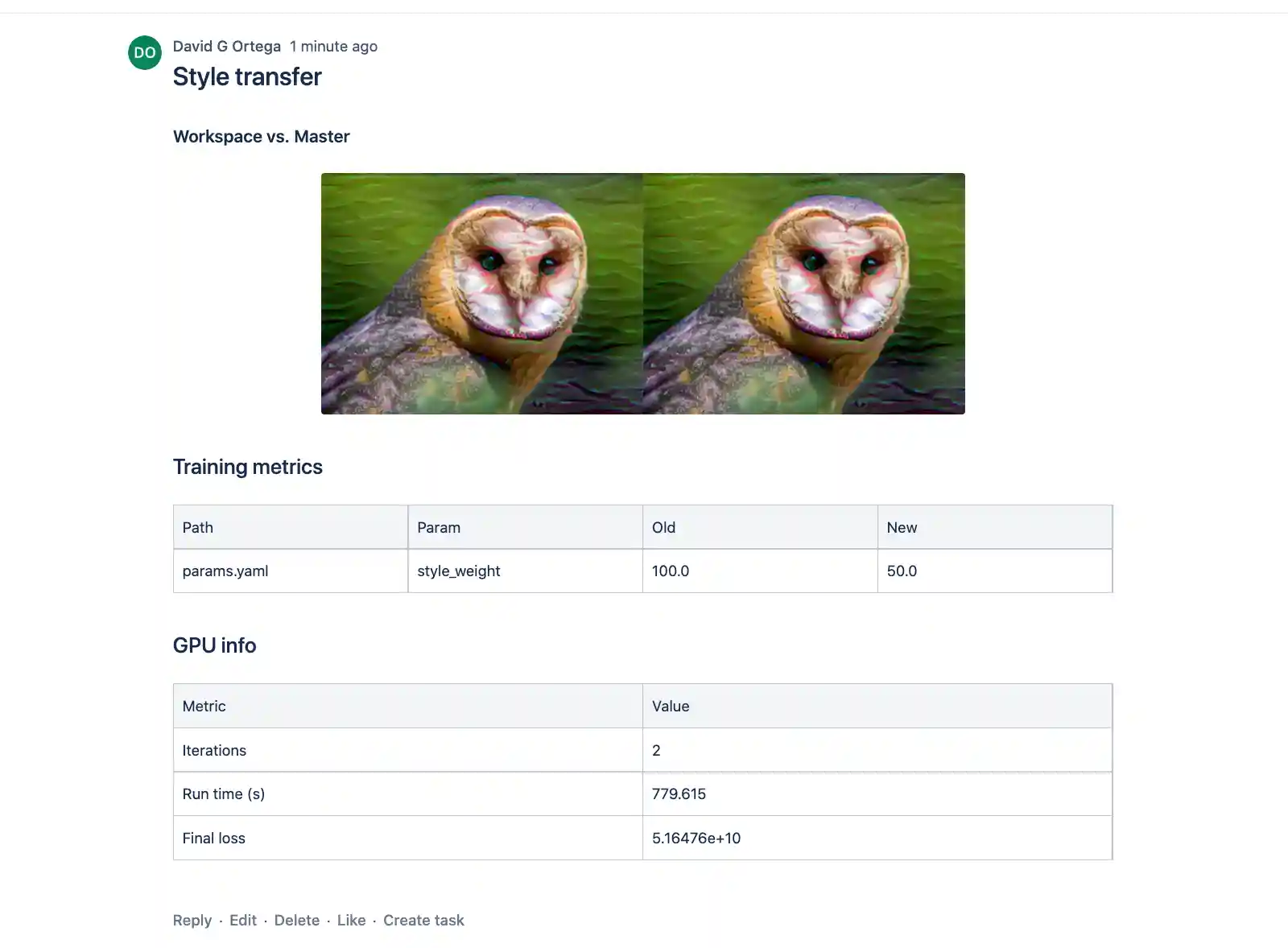
# Style transfer
## Workspace vs. Main
 
## Training metrics
$(dvc params diff main --show-md)
## GPU info
$(cat gpu_info.txt)
EOF
- cml comment create report.md
CML Report

.github/workflows/cml.yaml
name: CML
on: [push]
jobs:
launch-runner:
runs-on: ubuntu-latest
steps:
- uses: actions/checkout@v3
- uses: iterative/setup-cml@v1
- name: Deploy runner on AWS EC2
# Supports AWS, Azure, GCP, K8s
env:
REPO_TOKEN: ${{ secrets.PERSONAL_ACCESS_TOKEN }}
AWS_ACCESS_KEY_ID: ${{ secrets.AWS_ACCESS_KEY_ID }}
AWS_SECRET_ACCESS_KEY: ${{ secrets.AWS_SECRET_ACCESS_KEY }}
run: |
cml runner launch \
--cloud=aws \
--cloud-region=us-west \
--cloud-type=p2.xlarge \
--cloud-hdd-size=64 \
--labels=cml-gpu
train-and-report:
runs-on: [self-hosted, cml-gpu]
needs: launch-runner
timeout-minutes: 50400 # 35 days
container:
image: docker://iterativeai/cml:0-dvc2-base1-gpu
options: --gpus all
steps:
- uses: actions/checkout@v3
- name: Train model
run: |
dvc pull data
pip install -r requirements.txt
dvc repro
- name: Create CML report
run: |
git show origin/main:image.png > image-main.png
cat <<EOF > report.md
# Style transfer
## Workspace vs. Main
 
## Training metrics
$(dvc params diff main --show-md)
## GPU info
$(cat gpu_info.txt)
EOF
cml comment create report.md
env:
REPO_TOKEN: ${{ secrets.PERSONAL_ACCESS_TOKEN }}
CML Report

bitbucket-pipelines.yml
# GPU support coming soon, see https://github.com/iterative/cml/issues/1015
pipelines:
default:
- step:
name: deploy-runner
image: iterativeai/cml:0-dvc2-base1
script:
- |
cml runner \
--cloud=aws \
--cloud-region=us-west \
--cloud-type=m5.2xlarge \
--cloud-spot \
--labels=cml.runner
- step:
name: run
runs-on: [self.hosted, cml.runner]
image: iterativeai/cml:0-dvc2-base1
script:
- apt-get update -y
- apt install imagemagick -y
- pip install -r requirements.txt
- git fetch --prune
- dvc repro
- echo "# Style transfer" >> report.md
- git show origin/master:final_owl.png > master_owl.png
- convert +append final_owl.png master_owl.png out.png
- convert out.png -resize 75% out_shrink.png
- echo "### Workspace vs. Main" >> report.md
- cml publish out_shrink.png --md --title 'compare' >> report.md
- echo "## Training metrics" >> report.md
- dvc params diff master --show-md >> report.md
- echo >> report.md
- cml send-comment report.md
CML Report