C++ Program to Encrypt and Decrypt a File
In this article, you will learn and get code for file encryption and decryption. That is, code for encrypting textual file data (content).and another code to decrypt the same data from a text file.
What do encryption and decryption mean?
Data encryption is the process of converting data from its original form to a coded form. The coded form of the original data cannot be read by an unauthorized person.
Decryption of data means converting data from its coded form to its original form.
Only an authorized person can access encrypted data.
Note: Only an authorized person knows the decryption key. A decryption key is a password or formula that is used to convert ciphertext to plaintext.
Note: Encrypted data is known as "cyphertext," whereas decrypted data (original data) is known as "plaintext."
Therefore, in simple language, converting data from plaintext to ciphertext is known as data encryption. Data decryption is the process of converting data from cyphertext to plaintext.
Things to Do Before the Program
Because the program given below encrypts the data in a text file and then further decrypts the same data with another program, In our current directory, we must create a text file called codescracker.txt.
The current directory is the directory where the C++ source code is saved. Therefore, I'm going to save the program to encrypt and decrypt a file in the cpp programs folder. Then, in the same folder, it creates a file named codescracker.txt with the following content inside it:
username = codescrackerUser
password = codescrackerPassword
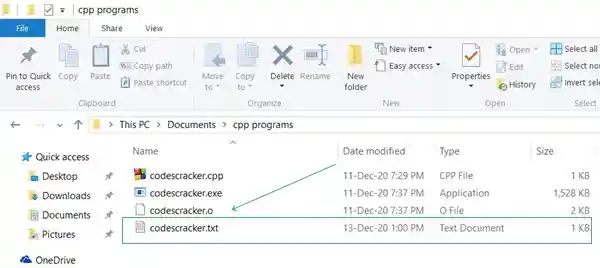
Here is the snapshot of the folder "cpp programs" that contains the file "codescracker.txt":
And here is the snapshot of the opened file, codescracker.txt:
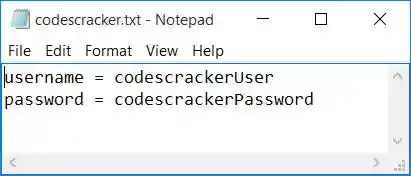
Now let's move on to the program given below, to encrypt the data of this newly created file and then further decrypt the same data.
Encrypt a File in C++
To encrypt a file's content in C++ programming, you have to ask the user to enter the name of the file (with extension). Then, as shown in the program below, encrypt the content contained within the file.
#include<iostream>
#include<fstream>
#include<stdio.h>
using namespace std;
int main()
{
    char fileName[30], ch;
    fstream fps, fpt;
    cout<<"Enter the Name of File: ";
    gets(fileName);
    fps.open(fileName, fstream::in);
    if(!fps)
    {
        cout<<"\nError Occurred, Opening the Source File (to Read)!";
        return 0;
    }
    fpt.open("tmp.txt", fstream::out);
    if(!fpt)
    {
        cout<<"\nError Occurred, Opening/Creating the tmp File!";
        return 0;
    }
    while(fps>>noskipws>>ch)
    {
        ch = ch+100;
        fpt<<ch;
    }
    fps.close();
    fpt.close();
    fps.open(fileName, fstream::out);
    if(!fps)
    {
        cout<<"\nError Occurred, Opening the Source File (to write)!";
        return 0;
    }
    fpt.open("tmp.txt", fstream::in);
    if(!fpt)
    {
        cout<<"\nError Occurred, Opening the tmp File!";
        return 0;
    }
    while(fpt>>noskipws>>ch)
        fps<<ch;
    fps.close();
    fpt.close();
    cout<<"\nFile '"<<fileName<<"' Encrypted Successfully!";
    cout<<endl;
    return 0;
}
This program was built and runs under the Code::Blocks IDE. Here is its sample run:
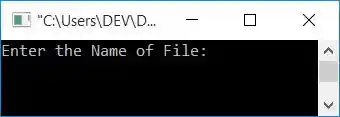
Now enter the name of the file, say, codescracker.txt, and press the ENTER key to encrypt its data. Here is the final snapshot of the sample run:
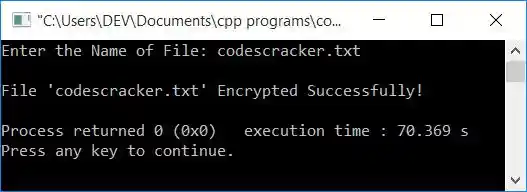
When you open the file codescracker.txt, the data (content) inside it is encrypted. Here is a snapshot of the opened file, codescracker.txt:
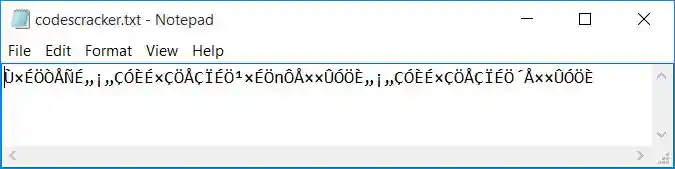
As you can see from the above snapshot, the data in the file codescracker.txt cannot be read by any unknown person, that is, a person who does not know the decryption key.
The decryption key is the formula used while encrypting the file, that is, adding 100 to each and every character. So to decrypt, we have to subtract 100 from each and every character. The file tmp.txt holds encrypted text.
The fstream library allows working with files. It is defined in the fstream header file.
The open() function receives one or two arguments. The first argument is required, and that is the name of the file. The second argument is file opening mode. So the statement given below:
fps.open(fileName, fstream::in);
opens the file in reading mode only. The user enters the name of a file, which is saved in the fileName variable. The file opening mode, fstream::in opens a file in reading mode.
And the file opening mode, fstream::out, opens a file in writing mode. If the file does not already exist, it is created.
The statement,
reads data from a file in a character-by-character manner without skipping white spaces.
The main logic in the above program is:
- The user is prompted to enter the file's name, such as codescracker.txt.
- opens the file (in reading mode) entered by the user.
- creates a file named tmp.txt
- Character-by-character reading of the contents of the file codescracker.txt.
- Adds 100 and writes to the tmp.txt file while reading the character.
- That is, in the tmp.txt file, we have the same content as in codescracker.txt. Instead, each character has an ASCII value, 100 more than the original one.
- Both file streams are closed.
- opens the codecracker.txt file in writing mode.
- opens the file tmp.txt in reading mode.
- Copies the content of tmp.txt (the encrypted content of the codescracker.txt file) to the codescracker.txt file
Decrypt a File in C++
Now let's use the cyphertext available in the tmp.txt file with the decryption formula (subtracting 100 from each character) to decrypt the data of a file, codescracker.txt, with the help of the following program:
#include<iostream>
#include<fstream>
#include<stdio.h>
using namespace std;
int main()
{
    char fileName[30], ch;
    fstream fps, fpt;
    cout<<"Enter the Name of File: ";
    gets(fileName);
    fps.open(fileName, fstream::out);
    if(!fps)
    {
        cout<<"\nError Occurred while Opening the Source File!";
        return 0;
    }
    fpt.open("tmp.txt", fstream::in);
    if(!fpt)
    {
        cout<<"\nError Occurred while Opening/Creating tmp File!";
        return 0;
    }
    while(fpt>>noskipws>>ch)
    {
        ch = ch-100;
        fps<<ch;
    }
    fps.close();
    fpt.close();
    cout<<"\nFile '"<<fileName<<"' Decrypted Successfully!";
    cout<<endl;
    return 0;
}
Here is the initial snapshot of the sample run:
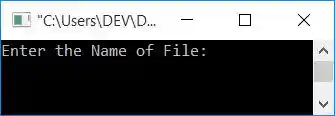
Now, as shown in the screenshot below, enter the name of the file, say codescracker.txt, to decrypt its content:
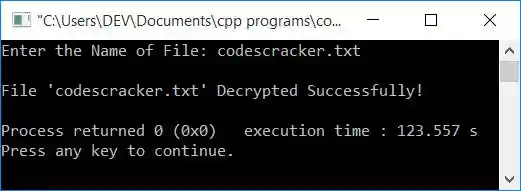
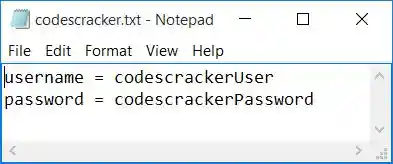
After executing the above program, you should see the same file, which is named codescracker.txt. Then your data will be restored in its original form, or it will be decrypted. Here is a snapshot of the opened file:
Note: You can create and use your own algorithm for encryption and decryption. It is up to you. The program given above provides you with an idea about the topic.
Short Message on Encrypting and Decrypting Files
To encrypt a file entered by the user, first open the file using the function open(). And read the content of the file in a character-by-character manner. At the time of reading, create some algorithm to encrypt the content of the file. While encrypting, place the content (in a character-by-character manner) in a temporary file, say tmp.txt.
After putting all the encrypted content in a tmp.txt file, copy its content to the original file. And later, use the file tmp.txt to decrypt the content of the codescracker.txt file.
Same Program in Other Language
« Previous Program Next Program »
Liked this post? Share it!