C++ program to print a smiling face on the screen
This article was created and published to provide the code and information regarding the printing of a smiling face on the output console using a C++ program. So without further delay, let's start.
To print smiling faces on the screen in C++ programming, first you have to ask the user to enter the number of smiling faces he or she wants to print.
Using the ASCII value of a smiling face, 1, first declare an int variable, say sml, and initialize it with 1. Now declare a variable, say ch, of type char, and initialize sml to ch. ch is now the smiling face character. In this way, the program should be created.
#include<iostream>

using namespace std;

int main()
{
   int smiley, i, limit;
   char ch;

   smiley = 1;
   ch = smiley;

   cout<<"How many smiley face to print?";
   cin>>limit;

   for(i=0; i<limit; i++)
   {
      cout<<ch;
      cout<<"\t";
   }

   cout<<endl;

   return 0;
}
When the above C++ program is put together and run, the following will happen:
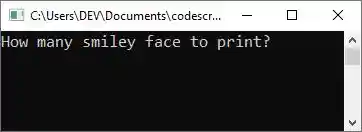
Now supply the input, saying "20" to print twenty smiley faces. In my case, I supplied the value 20 as input and then pressed the "ENTER" key; here is the output I saw on the output console:
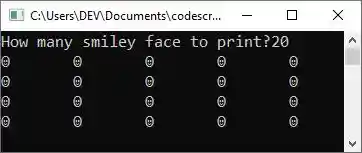
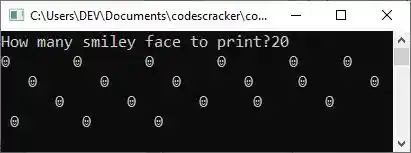
Because I resized the output console's window, each row now displays five smiley faces.However, you can resize the window to change the layout. For your understanding, here is another snapshot after I resized the window, keeping the same sample run.
The above program can also be created in this way:
#include<iostream>
using namespace std;
int main()
{
   int limit;
   char ch = 1;
   cout<<"How many smiley faces should I print? ";
   cout>>limit;
   for(int i = 0; i < limit; i++)
      cout<<ch<<"\t";
   cout<<"\n";
   return 0;
}
You will get similar output as the previous program's output. The following statement:
states that the value "1" is treated as an ASCII value, which is initialized to a char type "ch" variable that initializes the equivalent character of the ASCII value "1" to the "ch".
Note: If there is a single statement inside a loop, then there is no need to include the statement in curly braces.
Note: The endl and the "\n" are both used when we need to insert a newline on the output console.
« Previous Program Next Program »
Liked this post? Share it!