Java Program to Convert Celsius to Fahrenheit
This post covers a program in Java that converts a temperature in Celsius to its equivalent Fahrenheit value.
The formula to use for the Celsius to Fahrenheit conversion is:
where F is the temperature in Fahrenheit, whereas C is the temperature in Celsius.
Note: If you want to know why this formula is used, then refer to The Celsius to Fahrenheit Formula Explained.
Celsius-to-Fahrenheit Conversion in Java
The question is: write a Java program to convert Celsius to Fahrenheit. The Celsius value must be received by the user at runtime. The program given below is its answer:
import java.util.Scanner;

public class CodesCracker
{
   public static void main(String[] args)
   {
      float celsius, fahrenheit;

      Scanner scan = new Scanner(System.in);

      System.out.print("Enter the Temperature (in Celsius): ");
      celsius = scan.nextFloat();

      fahrenheit = (float) ((celsius*1.8)+32);

      System.out.println("\nEquivalent Temperature (in Fahrenheit) = " +fahrenheit);
   }
}
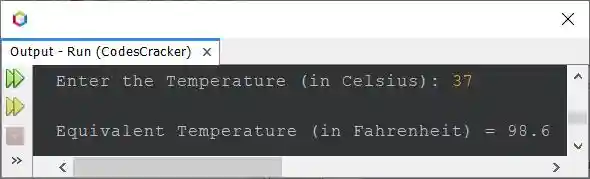
The snapshot given below shows the sample run of the above program with user input 37 as temperature in Celsius to convert and print its equivalent Fahrenheit value:
The program starts by declaring two float variables named "celsius" and "fahrenheit." It also declares a "Scanner" object named "scan."
The program then prompts the user to input a temperature in Celsius using the "Scanner" object's nextFloat() method and assigns this value to the "celsius" variable.
The program then calculates the equivalent temperature in Fahrenheit using the formula (C * 1.8) + 32, where "C" is the temperature in Celsius. The result is then assigned to the fahrenheit variable. The (float) casting is used to ensure that the result is a float.
The program then prints out the equivalent temperature in Fahrenheit using the System.out.println() method.
Same Program in Other Languages
- C Centigrade to Fahrenheit Conversion
- C++ Centigrade to Fahrenheit Conversion
- Python Centigrade to Fahrenheit Conversion
« Previous Program Next Program »
Liked this post? Share it!