Simple Calculator Program in Java
This article covers multiple programs in Java, to create simple calculator. Here are the list of programs covered in this article:
- Calculator program in Java using if else
- Calculator program in Java using switch case - with infinite loop
- Calculator program in Java using functions and switch case
Calculator Program in Java using if else
The question is, write a simple calculator program in Java that performs four basic arithmetic operations. The program given below is its answer:
import java.util.Scanner;

public class CodesCracker
{
   public static void main(String[] args)
   {
      float a, b, res;
      int choice;
      Scanner scan = new Scanner(System.in);

      System.out.println("1. Addition");
      System.out.println("2. Subtraction");
      System.out.println("3. Multiplication");
      System.out.println("4. Division");
      System.out.print("Enter Your Choice (1-4): ");
      choice = scan.nextInt();

      if(choice>=1 && choice<=4)
      {
         System.out.print("\nEnter any Two Number: ");
         a = scan.nextFloat();
         b = scan.nextFloat();

         if(choice==1)
            res = a+b;
         else if(choice==2)
            res = a-b;
         else if(choice==3)
            res = a*b;
         else
            res = a/b;

         System.out.println("\nResult = " +res);
      }
      else
         System.out.println("\nInvalid Choice!");
   }
}
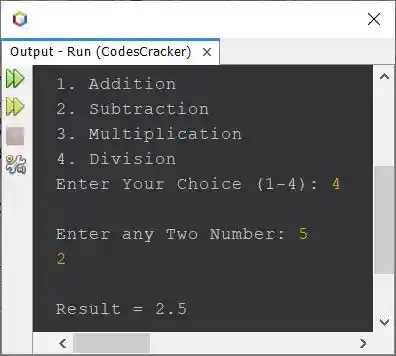
The snapshot given below shows the sample run of above program, with user input 4 as choice, 5 and 2 as two numbers, where 5 as first and 2 as second number:
Calculator Program in Java using switch
Here is another calculator program in Java created using switch case, instead of if...else. This program also continue its execution, until user enters 5 as choice to exit or stop the execution.
import java.util.Scanner;

public class CodesCracker
{
   public static void main(String[] args)
   {
      float a, b, res=0;
      int choice;
      Scanner scan = new Scanner(System.in);

      while(true)
      {
         System.out.println("1. Addition");
         System.out.println("2. Subtraction");
         System.out.println("3. Multiplication");
         System.out.println("4. Division");
         System.out.println("5. Exit");
         System.out.print("Enter Your Choice (1-5): ");
         choice = scan.nextInt();

         switch(choice)
         {
            case 1:
               System.out.print("\nEnter any Two Number: ");
               a = scan.nextFloat();
               b = scan.nextFloat();
               res = a+b;
               break;
            case 2:
               System.out.print("\nEnter any Two Number: ");
               a = scan.nextFloat();
               b = scan.nextFloat();
               res = a-b;
               break;
            case 3:
               System.out.print("\nEnter any Two Number: ");
               a = scan.nextFloat();
               b = scan.nextFloat();
               res = a*b;
               break;
            case 4:
               System.out.print("\nEnter any Two Number: ");
               a = scan.nextFloat();
               b = scan.nextFloat();
               res = a/b;
               break;
            case 5:
               return;
            default:
               System.out.println("\nInvalid choice!");
               break;
         }
         System.out.println("\nResult = " +res+ "\n");
      }
   }
}
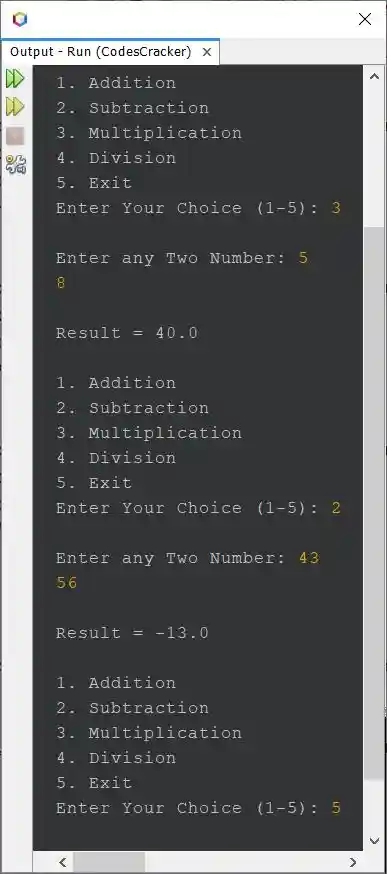
Here is its sample run with some user inputs to perform the calculation:
Calculator Program in Java using Functions and switch
This program is created using user-defined functions. This program works exactly same as of previous program.
import java.util.Scanner;

public class CodesCracker
{
   public static void main(String[] args)
   {
      float a, b, res=0;
      int choice;
      Scanner scan = new Scanner(System.in);

      while(true)
      {
         init();
         choice = scan.nextInt();

         switch(choice)
         {
            case 1:
               msg();
               a = scan.nextFloat();
               b = scan.nextFloat();
               res = add(a, b);
               break;
            case 2:
               msg();
               a = scan.nextFloat();
               b = scan.nextFloat();
               res = sub(a, b);
               break;
            case 3:
               msg();
               a = scan.nextFloat();
               b = scan.nextFloat();
               res = mul(a, b);
               break;
            case 4:
               msg();
               a = scan.nextFloat();
               b = scan.nextFloat();
               res = div(a, b);
               break;
            case 5:
               return;
            default:
               System.out.println("\nInvalid choice!");
               break;
         }
         System.out.println("\nResult = " +res+ "\n");
      }
   }
   public static void init()
   {
      System.out.println("1. Addition");
      System.out.println("2. Subtraction");
      System.out.println("3. Multiplication");
      System.out.println("4. Division");
      System.out.println("5. Exit");
      System.out.print("Enter Your Choice (1-5): ");
   }
   public static void msg()
   {
      System.out.print("\nEnter any Two Number: ");
   }
   public static float add(float x, float y)
   {
      return x+y;
   }
   public static float sub(float x, float y)
   {
      return x-y;
   }
   public static float mul(float x, float y)
   {
      return x*y;
   }
   public static float div(float x, float y)
   {
      return x/y;
   }
}
This program produces same output as of previous program.
Same Program in Other Languages
« Previous Program Next Program »
Liked this post? Share it!