Java One-Dimensional Array Program
This article covers a simple program on a one- or single-dimensional array in Java. The program given below allows the user to define the size of the array along with its elements.
To print a one-dimensional array in Java, you need to use only one for loop, as shown in the following program.
import java.util.Scanner;

public class CodesCracker
{
   public static void main(String[] args)
   {
      int n, i;
      Scanner scan = new Scanner(System.in);

      System.out.print("How many elements to store in array ? ");
      n = scan.nextInt();

      int[] arr = new int[n];

      System.out.print("Enter " +n+ " elements: ");
      for(i=0; i<n; i++)
         arr[i] = scan.nextInt();

      System.out.println("\nThe Array is: ");
      for(i=0; i<n; i++)
         System.out.print(arr[i]+ " ");
   }
}
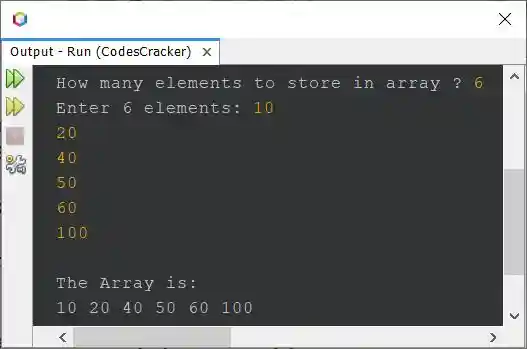
The snapshot given below shows the sample run of the above program, with user input 6 as size and 10, 20, 40, 50, 60, and 100 as six elements for the array:
Following is another example that demonstrates the one-dimensional array in Java. I used a few comments in this program to explain the main codes used in the following program:
Java Code
import java.util.Scanner;

public class ArrayDemo {

    public static void main(String[] args) {

        // Create a Scanner object to read user input
        Scanner scan = new Scanner(System.in);

        // Ask the user to enter the size of the array
        System.out.print("Enter the size of the array: ");
        int size = scan.nextInt();

        // Create an integer array of the specified size
        int[] myArray = new int[size];

        // Ask the user to enter the elements of the array
        System.out.println("Enter " + size + " integers:");
        for (int i = 0; i < size; i++) {
            myArray[i] = scan.nextInt();
        }

        // Print the elements of the array to the console
        System.out.println("The elements of the array are:");
        for (int i = 0; i < size; i++) {
            System.out.print(myArray[i] + " ");
        }
    }
}
Output
Enter the size of the array: 3
Enter 3 integers:
1
2
3
The elements of the array are:
1 2 3
Same Program in Other Languages
« Previous Program Next Program »
Liked this post? Share it!