Python Program to Convert Fahrenheit to Celsius
This article is created to cover some programs in Python, to convert temperature from Fahrenheit (entered by user) to Celsius. Here are the list of programs:
- Fahrenheit to Celsius without Function
- Using Function
- Using Class
Fahrenheit to Celsius Formula
Fahrenheit to Celsius formula is:
Here F indicates to the value of temperature in Fahrenheit, whereas C indicates to temperature value in Celsius
Note - If you're curious to know more about this formula, then refer to Celsius to Fahrenheit Formula Explained.
Fahrenheit to Celsius without Function
To convert temperature from Fahrenheit to Celsius in Python, you have to ask from user to enter temperature in Fahrenheit to convert that temperature into Celsius as shown in the program given below.
print("Enter Temperature in Fahrenheit: ")
fah = float(input())

cel = (fah-32)/1.8
print("\nEquivalent Temperature in Celsius: ", cel)
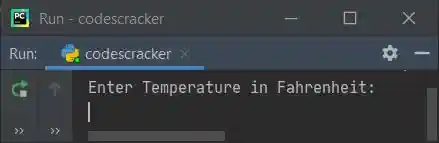
Here is the initial output produced by this Python program:
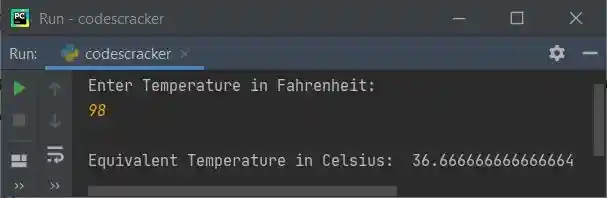
Now supply the input say 98 as temperature in Fahrenheit, press ENTER key to convert and print
its equivalent Celsius value as shown in the snapshot given below:
Note - To format value of Celsius upto only two decimal places, refer to the program given below. That is the modified version of above program.
Modified Version of Previous Program
This program uses end= to skip printing of an automatic newline. And {:.2f} with format() method is used to print the value of variable written as argument of format(), upto only two decimal places.
print("Enter Temperature in Fahrenheit: ", end="")
fah = float(input())

cel = (fah-32)/1.8
print("\nEquivalent Temperature in Celsius = {:.2f}".format(cel))
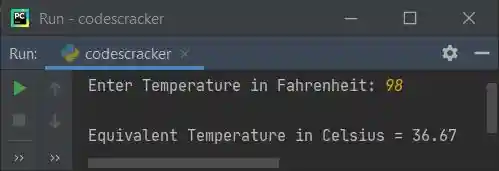
Here is its sample run with same user input as of previous program's sample run:
Fahrenheit to Celsius using Function
This program is created using a user-defined function named FahToCel(). This function takes a value as its argument, and returns its equivalent Celsius value. Therefore equivalent Celsius value of fah's value gets initialized to cel. The value of cel gets printed as Celsius equivalent of given temperature in Fahrenheit by user at run-time:
def FahToCel(f):
    return (f-32)/1.8

print("Enter Temperature in Fahrenheit: ", end="")
fah = float(input())

cel = FahToCel(fah)
print("\nEquivalent Temperature in Celsius = {:.2f}".format(cel))
This program produces same output as of previous program.
Fahrenheit to Celsius using Class
This is the last program, created using class, an object-oriented feature of Python.
class CodesCracker:
    def FahToCel(self, f):
        return (f-32)/1.8

print("Enter Temperature in Fahrenheit: ", end="")
fah = float(input())

ob = CodesCracker()
cel = ob.FahToCel(fah)
print("\nEquivalent Temperature in Celsius = {:.2f}".format(cel))
An object named ob is created of class CodesCracker to access its member function named FahToCel() using dot (.) operator.
Same Program in Other Languages
- Java Convert Fahrenheit to Celsius
- C Convert Fahrenheit to Celsius
- C++ Convert Fahrenheit to Celsius
« Previous Program Next Program »
Liked this post? Share it!