Python Program to Solve Quadratic Equation
This article is created to cover a program in Python that find and prints the solutions or roots of a quadratic equation.
To find the roots of a quadratic equation ax2 + bx + c = 0, we need to first calculate the discriminant of the equation. Here is the formula to find the discriminant:
Where D refers to discriminant. After finding the discriminant, the roots can be calculated as:
R = (-b ± D ** 0.5) / (2*a)
Python Solve Quadratic Equation
The question is, write a Python program to solve a given quadratic equation. The program given below is its answer:
import cmath

print("Enter the Value of a: ", end="")
a = int(input())
print("Enter the Value of b: ", end="")
b = int(input())
print("Enter the Value of c: ", end="")
c = int(input())

discriminant = (b**2) - (4*a*c)
solutionOne = (-b-cmath.sqrt(discriminant))/(2*a)
solutionTwo = (-b+cmath.sqrt(discriminant))/(2*a)

print("\nRoot 1 =", solutionOne)
print("Root 2 =", solutionTwo)
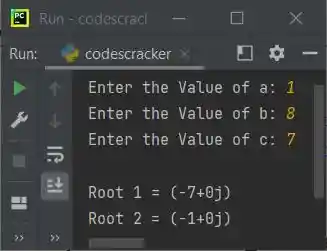
The snapshot given below shows the sample run of above Python program, with user input 1, 8, and 7 as the value of a, b, and c from the quadratic equation ax2 + bx + c
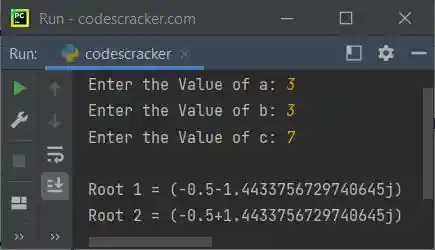
Here is another sample run with user input 3, 3, 7 as value of a, b, and c
Python Find Number of Solutions for a Quadratic Equation
If the value of discriminant is greater than 2, then the quadratic equation has 2 solutions. If the value of discriminant is equal to 0, then the quadratic equation has only 1 solution. And if the value of discriminant is less than 2, means that the quadratic equation has 0 solution.
print("Enter the Value of a: ", end="")
a = int(input())
print("Enter the Value of b: ", end="")
b = int(input())
print("Enter the Value of c: ", end="")
c = int(input())

discriminant = (b**2) - (4*a*c)
if discriminant > 2:
    print("\n2 Solutions")
elif discriminant == 0:
    print("\n1 Solution")
else:
    print("\n0 Solution")
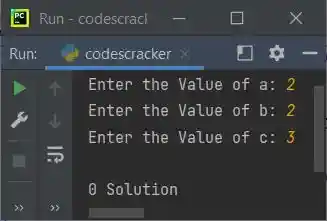
The sample run of above Python program with user input 2, 2, 3 as values of a, b, and c, is shown in the snapshot given below:
« Previous Program Next Program »
Liked this post? Share it!