Python bytes() Function
The bytes() function in Python returns a bytes object, or converts an object into a bytes type object. For example:
x = bytes()
print(type(x))

print(bytes(5))

a = "codescracker"
x = bytes(a, "utf-8")
print(x)

b = "python"
b = bytes(b, "utf-16")
print(b)
The snapshot given below shows the sample run of above program, demonstrating the bytes() function in Python:
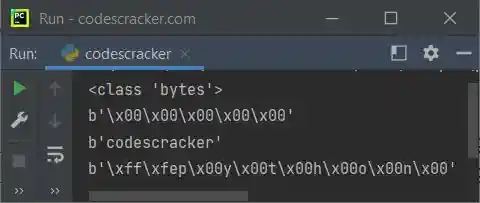
Note: Unlike bytearray(), bytes() returns an object that cannot be modified.
Note: Everything like syntax and example is similar to bytearray() function, except bytes() returns bytes type object, and can be modified.
Python bytes() Function Syntax
The syntax of bytes() function in Python is:
bytes(x, encoding, error)
where x refers to the source. The source may be of string, integer, iterable, or object type. If the source is an integer type, then an empty bytes object with specified size will get created. The encoding is needed when x is of string type. The error is used when the encoding fails or mismatched. All the three parameters are optional.
Python bytes() Function Example
Here is an example of bytes() function in Python:
x = [2, 4, 5, 7]
ba = bytes(x)
print(ba)

x = "Python Programming"
ba = bytes(x, "utf-8")
print(ba)

x = 10
ba = bytes(x)
print(ba)
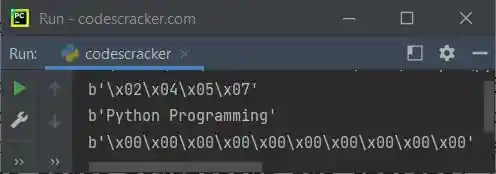
Here is its sample output:
« Previous Function Next Function »
Liked this post? Share it!