Python clear() Function
The clear() function in Python is used to empty the list, dictionary, or set. That is, the clear() function removes all items from the list, dictionary, or set. For example:
mylist = [9, 8, 10, 12]
print("The list is:")
print(mylist)

mylist.clear()
print("\nNow the list is:")
print(mylist)
The output produced by above Python code, demonstrating the clear() function, is:
The list is:
[9, 8, 10, 12]

Now the list is:
[]
The list exists, but becomes empty. Here is another example of clear() function. In this example, I've used this function to remove all items of the dictionary:
mydictionary = {"Name": "Mathew", "City": "California"}
print("The dictionary is:")
print(mydictionary)

mydictionary.clear()
print("\nNow the dictionary is:")
print(mydictionary)
The output produced by this program will exactly be:
The dictionary is:
{'Name': 'Mathew', 'City': 'California'}

Now the dictionary is:
{}
Same things goes with the set. Here is an example, uses clear() function to empty the set, or to remove all elements of a set:
myset = {1, 2, 3}
print(myset)
myset.clear()
print(myset)
The output produced by this Python program, is given below:
Python clear() Function Syntax
Syntax to use clear() function in Python is:
Python clear() Function Example
Here is another example of clear() function in Python, that empty the list if user wants:
mylist = [9, 8, 10, 12]
print("The list is:")
print(mylist)

print("\nDo you want to empty the list (y/n) ? ", end="")
choice = input()
if choice == 'y':
    mylist.clear()
    print("\nNow the list is:")
    print(mylist)
else:
    print("\nOk!")
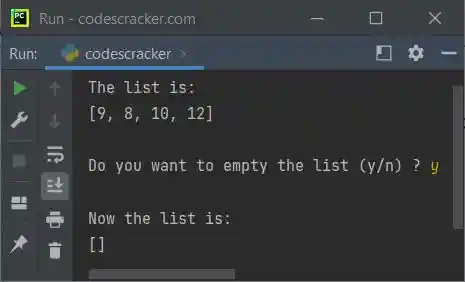
The snapshot given below shows the sample run of above Python code, with user input y as choice to empty the list named mylist:
« Previous Function Next Function »
Liked this post? Share it!