Python float() function
The float() function in Python is used to convert a number or a string into a floating-point number (a number that has a decimal point). For example:
x = float(130)
print(x)

x = float("234")
print(x)

x = float(24.5)
print(x)

x = float()
print(x)
The output produced by this program will be:
Python float() function syntax
The syntax of the float() function in Python is:
Python float() function example
Let's create a simple example of the float() function in Python. This program allows the user to enter anything at runtime to convert the input value to a floating-point type value.
print("Enter Anything: ", end="")
val = input()

try:
    fval = float(val)
    print("\nEquivalent floating-point =", fval)
except ValueError:
    print("\nCan not get converted into floating-point type.")
The snapshot given below shows the sample run with user input codescracker:
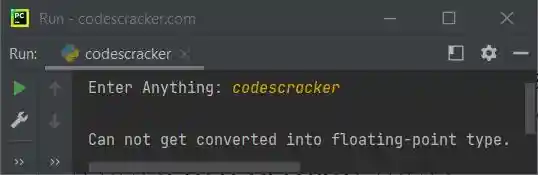
Advantages of the float() function in Python
- Floating-point numbers in Python can represent decimal values accurately, which is useful for performing precise decimal calculations.
- Floating-point numbers can be used for mathematical operations such as addition, subtraction, multiplication, and division.
- Floating-point numbers are used widely in scientific and engineering applications, so learning how to work with them is a valuable skill.
Disadvantages of the float() function in Python
- Because of their limited precision, floating-point numbers can only accurately represent a certain number of decimal values. This may lead to rounded-off values and calculation errors.
- It can be challenging to determine whether two floating-point numbers are equal because of rounding errors. In programs that rely on exact comparisons, this might result in unexpected behavior.
« Previous Function Next Function »
Liked this post? Share it!