Python in Keyword
The "in" keyword in Python is used when we need either:
- to check whether a particular value is available in a sequence such as a list, tuple, etc. or not.
- or to traverse a sequence in for loop
For example:
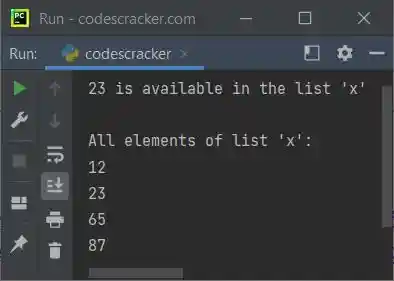
x = [12, 23, 65, 87]
if 23 in x:
    print("23 is available in the list 'x'")
else:
    print("23 is not available in the list 'x'")

print("\nAll elements of list 'x':")
for e in x:
    print(e)
The output of the above program is shown in the screenshot below to show how the "in" keyword works in Python:
Note: Python is a case-sensitive language; therefore, keep both the letters of "in" in small letters.
Python in Keyword Example
Here is an example of the "in" keyword in Python:
x = (134, 54, 65, 67, 0, 23)
print("Enter a Number: ", end="")
num = int(input())
if num in x:
    print("\nThe number is available")
else:
    print("\nThe number is not available")

print("\nEnter a String: ", end="")
str = input()
print("\nCharacters of given string are:")
for c in str:
    print(c)
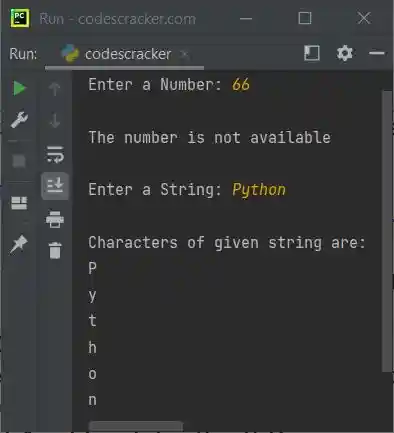
A sample run with user input 66 as a number and Python as a string is shown in the snapshot given below:
The "in" keyword can be thought of as a membership operator that returns True or False depending on whether or not the value is in the container.
Advantages of the "in" keyword in Python
- It's a clear way to check a container's value.
- It works with Python lists, tuples, sets, and dictionaries.
- It makes conditional statements and loops more efficient and readable.
Disadvantages of the "in" keyword in Python
- For large datasets, searching for a value in a container with the "in" keyword can be slow. Binary search or hash tables may be faster.
- It can only check for a value in a container, not its location or frequency.
- It may not work with custom classes or objects, which may require custom "in" implementation.
« Previous Tutorial Next Tutorial »
Liked this post? Share it!