Python keys() function
The keys() function in Python returns the list of all keys in a specified dictionary as a view object. For example:
x = {"Name": "Sophia", "Course": "EECS", "Age": "20"}
print(x.keys())
The output will be a list of keys, that is:
dict_keys(['Name', 'Course', 'Age'])
Note: View objects provide a dynamic view of the entries in the dictionary. Therefore, when the dictionary changes, the view definitely reflects the change.
Python keys() function syntax
The syntax of the keys() function in Python is:
Python keys() function example
Here is an example demonstrating the keys() function in Python. This program allows the user to add new items to the dictionary at run-time.
x = {"Name": "Sophia", "Course": "EECS", "Age": "20"}
print(x.keys())

print("\n----Enter the new item to add in dictionary----")
print("Enter the key: ", end="")
key = input()
print("Enter the value: ", end="")
val = input()

x[key] = val

print("\nNew view object of all keys:")
print(x.keys())
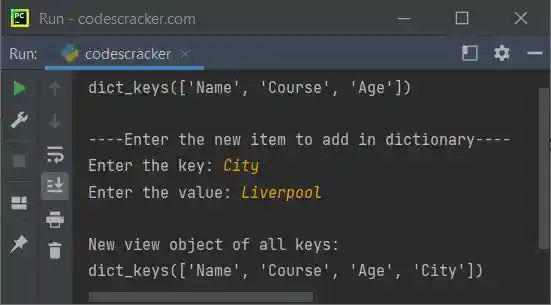
The snapshot given below shows the sample run of the above program, with user input "City" as the new key and "Liverpool" as its value:
Advantages of the keys() function in Python
- Accessing all of the keys in a dictionary is quick and easy thanks to the keys() function.
- Python 2 and Python 3 both have the keys() function, making it simple to write code that is compatible with both of them.
- The built-in methods values() and items() can be combined with the keys() function to perform a variety of operations on a dictionary.
Disadvantages of the keys() function in Python
- The keys() function can be slow if you are working with a large dictionary because it iterates through every key in the dictionary.
- The keys() function generates a fresh list of keys when it is called. If you are using a large dictionary, this may require a lot of memory.
- Although the keys() function has its uses, it doesn't reveal anything about the values connected to the keys. This implies that in addition to using keys(), you will also need to use other built-in methods if you need to work with both keys and values.
« Previous Function Next Function »
Liked this post? Share it!