Python locals() function
The locals() function in Python is used to get the current local symbol table in the form of a dictionary. For example:
The above program produces output that looks like:
{'__name__': '__main__', '__doc__': None, '__package__': None, '__loader__': <_frozen_importlib_external.SourceFileLoader object at 0x000001CFA47A6D00>, '__spec__': None, '__annotations__': {}, '__builtins__': <module 'builtins' (built-in)>, '__file__': 'C:\\Users\\DEV\\codescracker.com\\codescracker.py', '__cached__': None}
Now, if you execute the following code:
v = locals()
print(type(v))
then the output should be:
means that the function locals() returns a dict-type object.
Python locals() function syntax
The syntax of the locals() function in Python is:
Python locals() function example
Here is an example of the locals() function in Python. This program prints the name of the current Python program's source code file along with the complete directory:
x = locals()
print("This program's source code file with directory:")
print(x["__file__"])
The snapshot given below shows the sample output produced by this program, demonstrating the locals() function:
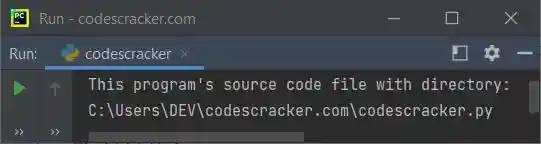
That is, the above Python program file is saved inside the directory C:\Users\DEV\codescracker.com\ with its name as codescracker.txt. But in your case, the output may be different if you have a different file name and/or directory.
Advantages of the locals() function in Python
- To access local variables and their values inside of a function, use the "locals()" function. This can be useful for debugging or checking the program's state at a specific time.
- The "locals()" function enables the generation and manipulation of dynamic code by allowing modifications to the local symbol table at runtime.
Disadvantages of the locals() function in Python
- If used incorrectly, the "locals()" function can be used to access and change local variables, which could be a security risk. The "locals()" function can be abused by malicious code to access private information or change vital variables.
- The current function or block's local symbol table is the only one that the "locals()" function can access. The global or non-local symbol tables are inaccessible to it.
- Performance issues with the "locals()" function can arise, especially when it is used repeatedly or in a loop. It may require more memory and slow down the program's execution.
« Previous Function Next Function »
Liked this post? Share it!