Python not Keyword
In Python, we use the "not" keyword when we want to change the boolean value of an expression that has already been evaluated. That is, the "not" keyword returns "True", if the expression evaluates to be "False", otherwise returns "False", if the expression evaluates to be "True". For example:
print(not True)
print(not False)
The output is:
Python not Keyword Truth Table
The truth table of the "not" keyword in Python is:
| X | not X |
|---|---|
| True | False |
| False | True |
To reverse the truth value of a boolean expression, use the "not" keyword. For example, if x is True, then "not x" is False; conversely, if x is False, then "not x" is True.
Python not Keyword Example
Here is an example of the "not" keyword in Python:
print("Enter the Two Number: ", end="")
numOne = int(input())
numTwo = int(input())

x = numOne>numTwo
if not x:
    print("\nThe value", numOne, "is greater than", numTwo)
else:
    print("\nThe value", numTwo, "is greater than", numOne)

print("\n\n\n@April Fool")
The snapshot given below shows the sample run of the above program, with user input of 10 and 30 as the first and second numbers:
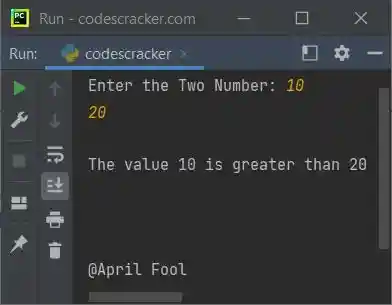
The "not" keyword in the above program reversed the result or output.
Advantages of the not keyword in Python
- Boolean expressions can be easily negated using the "not" keyword, which can make code simpler to read and comprehend.
- When writing conditional statements and loops, it can be helpful when a boolean expression's negation is required.
Disadvantages of the not keyword in Python
- The "not" keyword should not be overused as it can make code more difficult to read and comprehend, especially when there are several negations present.
- Sometimes using the positive form of an expression rather than negating it with "not" can make it clearer.
- It can be simple to inadvertently use the "not" keyword incorrectly, which can result in logical mistakes in the code.
« Previous Tutorial Next Tutorial »
Liked this post? Share it!