Python setattr() Function
The setattr() function in Python is used when we need to set a value of any specified attribute of an object. For example:
class CodesCracker:
    Name = "Olivia Marquess"
    University = "The University of Manchester"
    Course = "Engineering"
    City = "Manchester"

ob = CodesCracker()
print("The name of student is:", ob.Name)

setattr(CodesCracker, "Name", "Amelia Baron")
print("\nNow the name of student is:", ob.Name)
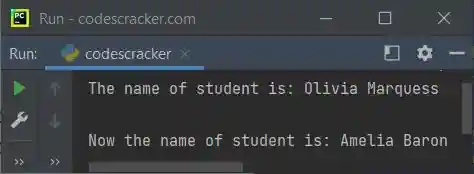
The snapshot given below shows the sample output produced by above program, demonstrating the setattr() function in Python:
Python setattr() Function Syntax
The syntax of setattr() function in Python, is:
setattr(object, attribute, newValue)
All the three parameters are required. The function setattr() basically does not returns any value, or we can say, it returns None. The function only sets a new value of specified attribute to specified object.
Python setattr() Function Example
Here is an example of setattr() function in Python:
class CodesCracker:
    Name = "Olivia Marquess"
    University = "The University of Manchester"
    Course = "Computer Science"
    City = "Manchester"

ob = CodesCracker()
print("----Modify the value of any of the following attributes----")
print("1. Name")
print("2. University")
print("3. Course")
print("4. City")
print("\nEnter Your Choice (1-4): ", end="")
choice = int(input())
if choice == 1:
    print("Enter the new name of student: ", end="")
    n = input()
    setattr(ob, "Name", n)
elif choice == 2:
    print("Enter the new name of university: ", end="")
    u = input()
    setattr(ob, "University", u)
elif choice == 3:
    print("Enter the new name of course: ", end="")
    co = input()
    setattr(ob, "Course", co)
elif choice == 4:
    print("Enter the new name of city: ", end="")
    ci = input()
    setattr(ob, "City", ci)
else:
    print("\nInvalid Choice!")

if 1 <= choice <= 4:
    print("\nName:", ob.Name)
    print("University:", ob.University)
    print("Course:", ob.Course)
    print("City:", ob.City)
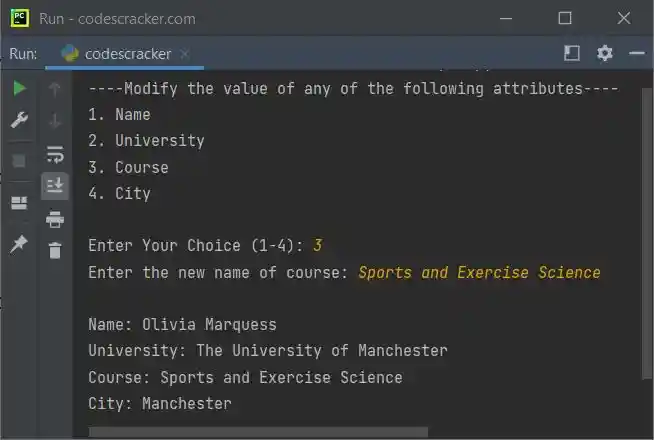
The sample run with user input 3 as choice and Sports and Exercise Science as new course name, is shown in the snapshot given below:
What if Specified Attribute is not Available ?
In case if the specified attribute is not available in specified object, then a new attribute with given value will get created. For example:
class CodesCracker:
    Name = "Olivia Marquess"
    University = "The University of Manchester"
    Course = "Engineering"
    City = "Manchester"

ob = CodesCracker()

setattr(CodesCracker, "Country", "England")
print("\nThe name of country is:", ob.Country)
The output will be:
The name of country is: England
But creating of new attribute using setattr(), in case if the specified attribute is not available, is only possible when specified object implements the __dict__ attribute. The dir() function helps to check all the attributes of any object.
« Previous Function Next Function »
Liked this post? Share it!