Client Credentials Flow | Spotify for Developers
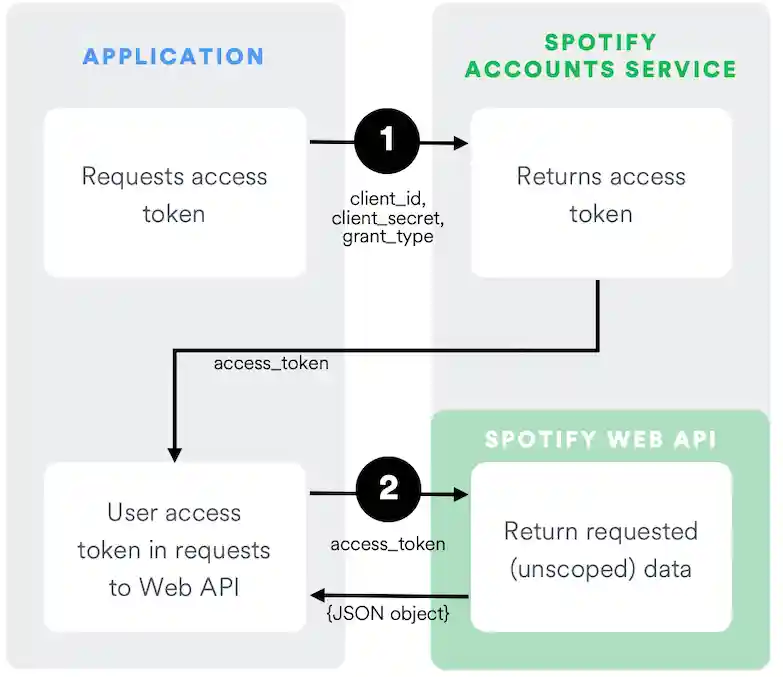
The Client Credentials flow is used in server-to-server authentication. Since this flow does not include authorization, only endpoints that do not access user information can be accessed.
The following diagram shows how the Client Credentials Flow works:
Pre-requisites
This guide assumes that:
- You have read the authorization guide.
- You have created an app following the app guide.
Source Code
You can find an example app implementing Client Credentials flow on GitHub in the web-api-examples repository.
The first step is to send a POST request to the /api/token endpoint of the
Spotify OAuth 2.0 Service with the following parameters encoded in
application/x-www-form-urlencoded:
| Body Parameters | Relevance | Value |
|---|---|---|
| grant_type | Required | Set it to client_credentials. |
The headers of the request must contain the following parameters:
| Header Parameter | Relevance | Value |
|---|---|---|
| Authorization | Required | Base 64 encoded string that contains the client ID and client secret key. The field must have the format: Authorization: Basic <base64 encoded client_id:client_secret> |
| Content-Type | Required | Set to application/x-www-form-urlencoded. |
The following JavaScript creates and sends an authorization request:
_19
var client_id = 'CLIENT_ID';
_19
var client_secret = 'CLIENT_SECRET';
_19
_19
var authOptions = {
_19
url: 'https://accounts.spotify.com/api/token',
_19
headers: {
_19
'Authorization': 'Basic ' + (new Buffer.from(client_id + ':' + client_secret).toString('base64'))
_19
},
_19
form: {
_19
grant_type: 'client_credentials'
_19
},
_19
json: true
_19
};
_19
_19
request.post(authOptions, function(error, response, body) {
_19
if (!error && response.statusCode === 200) {
_19
var token = body.access_token;
_19
}
_19
});
Response
If everything goes well, you'll receive a response with a 200 OK status and
the following JSON data in the response body:
| key | Type | Description |
|---|---|---|
| access_token | string | An access token that can be provided in subsequent calls, for example to Spotify Web API services. |
| token_type | string | How the access token may be used: always "Bearer". |
| expires_in | int | The time period (in seconds) for which the access token is valid. |
For example:
_10
{
_10
"access_token": "NgCXRKc...MzYjw",
_10
"token_type": "bearer",
_10
"expires_in": 3600
_10
}
What's next?
Learn how to use an access token to fetch data from the Spotify Web API by reading the access token guide.