You can delete an instance programmatically when you use one of the Bigtable client libraries or manually using the Google Cloud console, the Google Cloud CLI, or the cbt CLI :
Console
Open the list of Bigtable instances in the Google Cloud console.
Click the instance you want to delete, then click Delete instance. A confirmation dialog appears.
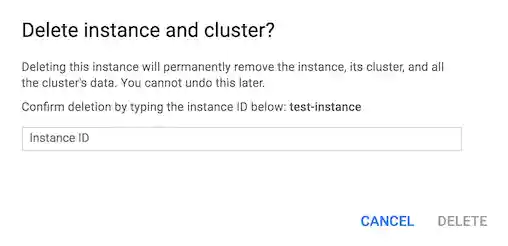
Follow the instructions in the confirmation dialog, then click Delete. The instance is permanently deleted.
gcloud
- Install the Google Cloud CLI if you haven't already.
If you don't know the instance ID, use the
bigtable instances
list
command to view a list of your project's instances:gcloud bigtable instances listUse the
bigtable instances deletecommand to delete an instance:gcloud bigtable instances delete INSTANCE_IDReplace
INSTANCE_IDwith the permanent identifier for your instance.
cbt
- Install the
cbtCLI if you haven't already. If you don't know the instance ID, use the
listinstancescommand to view a list of your project's instances:cbt listinstancesUse the
deleteinstancecommand to delete an instance:cbt deleteinstance INSTANCE_IDReplace
INSTANCE_IDwith the permanent identifier for your instance.
C++
To learn how to install and use the client library for Bigtable, see Bigtable client libraries.
To authenticate to Bigtable, set up Application Default Credentials. For more information, see Set up authentication for a local development environment.
C#
To learn how to install and use the client library for Bigtable, see Bigtable client libraries.
To authenticate to Bigtable, set up Application Default Credentials. For more information, see Set up authentication for a local development environment.
Java
To learn how to install and use the client library for Bigtable, see Bigtable client libraries.
To authenticate to Bigtable, set up Application Default Credentials. For more information, see Set up authentication for a local development environment.
Node.js
To learn how to install and use the client library for Bigtable, see Bigtable client libraries.
To authenticate to Bigtable, set up Application Default Credentials. For more information, see Set up authentication for a local development environment.
PHP
To learn how to install and use the client library for Bigtable, see Bigtable client libraries.
To authenticate to Bigtable, set up Application Default Credentials. For more information, see Set up authentication for a local development environment.
Python
To learn how to install and use the client library for Bigtable, see Bigtable client libraries.
To authenticate to Bigtable, set up Application Default Credentials. For more information, see Set up authentication for a local development environment.
Ruby
To learn how to install and use the client library for Bigtable, see Bigtable client libraries.
To authenticate to Bigtable, set up Application Default Credentials. For more information, see Set up authentication for a local development environment.