m5-docs
Basic
SKU:K001
Description
Basic is a highly cost-effective entry-level product in the M5Stack development-kit series, making it an ideal choice for beginners. Equipped with a wealth of sample resources, it features the ESP32 IoT SoC with integrated Wi-Fi and 16MB SPI flash. Thanks to its dual-core, low-power design, it delivers excellent performance across a wide range of applications. The industrial-grade enclosure offers a refined appearance and stable operation, breaking the traditional limitation of development boards being used only for validation and learning. With rapid prototyping and a very low entry threshold, developers can quickly achieve product-level results and accelerate the process from development to commercialization. A powerful hardware expansion ecosystem composed of stackable modules and extensible units enables fast construction and verification of IoT products.
The Basic adopts a practical and ingenious structural design, stacked in two detachable parts. The upper part integrates the PCB and core components, while the lower part contains a lithium battery, M5-Bus female connector and expansion pins. This layout is convenient for operation and subsequent functional expansion.
Tutorial
This tutorial shows how to control the Basic device via the UiFlow1 graphical programming platform.
This tutorial shows how to control the Basic device via the UiFlow2 graphical programming platform.
This tutorial shows how to program and control the Basic device using the Arduino IDE.
Features
- ESP32 based
- 2.0-inch IPS display panel, speaker, 3 × custom buttons
- Built-in lithium battery with PMU, Type-C interface
- 16MB Flash
- 15 × broken-out IO pins
- Integrated full-color HD IPS display and multiple peripherals
- Development Platform
- UiFlow1
- UiFlow2
- Arduino IDE
- ESP-IDF
- PlatformIO
Includes
- 1 × Basic
- 10 × Dupont Jumper Wires
- 1 × USB Type-C Cable (20 cm)
- 1 × User Manual
- 1 × Sticker
Applications
- IoT controller
- STEM education
- DIY projects
- Smart-home devices
Specifications
| Specification | Parameter |
|---|---|
| SoC | ESP32-D0WDQ6-V3@Dual-core processor, 240MHz |
| DMIPS | 600 |
| SRAM | 520KB |
| Flash | 16MB |
| Wi-Fi | 2.4 GHz Wi-Fi |
| Input Voltage | 5V@500 mA |
| Host Interface | USB Type-C x 1,HY2.0-4P (I2C+I/O+UART) x 1 |
| Core Base Pins | G21, G22, G23, G19, G18, G3, G1, G16, G17, G2, G5, G25, G26, G35, G36 |
| IPS Display | 2-inch, 320 × 240 Color TFT LCD, ILI9342C, max brightness 853 nit |
| Speaker | 1W-0928 |
| Buttons | Custom buttons × 3 |
| Battery | 110 mAh @ 3.7 V |
| Antenna | 2.4 G 3D antenna |
| Operating Temp. | 0 ~ 60 °C |
| Case Material | Plastic (PC) |
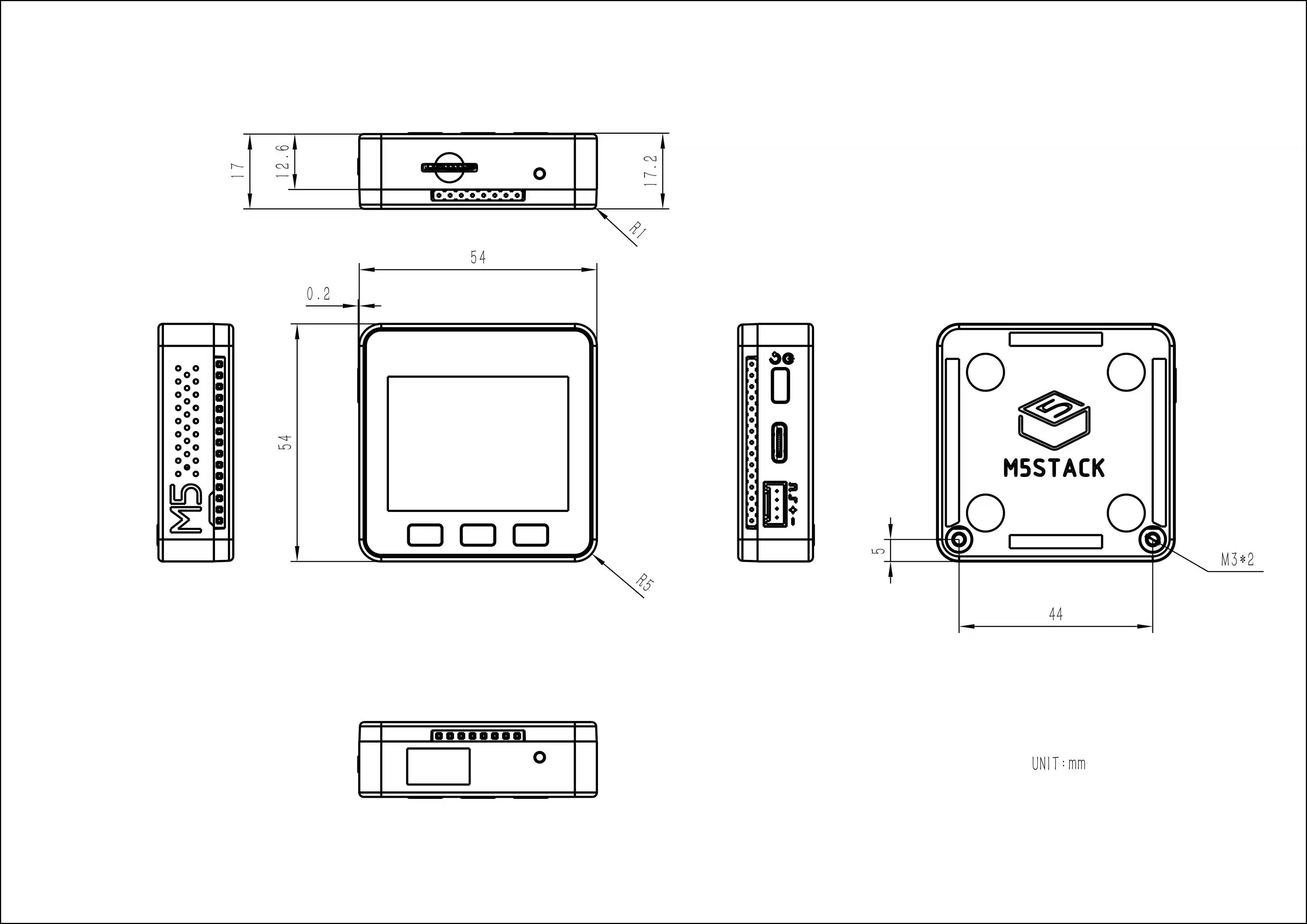
| Product Size | 54.0 × 54.0 × 17.0 mm |
| Product Weight | 49.5 g |
| Package Size | 94.8 × 65.4 × 25.3 mm |
| Gross Weight | 89.5 g |
Learn
Power On/Off
- Power-on: Click the red power button on the left side.
- Power-off: Double-click the red power button on the left side.
Note
By default, the device cannot be powered off while USB power is connected.
Schematics
PinMap
LCD Display & TF Card
LCD pixels: 320 × 240
TF Card: up to 16 GB
| ESP32-D0WDQ6-V3 | G23 | G19 | G18 | G14 | G27 | G33 | G32 | G4 |
|---|---|---|---|---|---|---|---|---|
| ILI9342C | MOSI/MISO | / | CLK | CS | DC | RST | BL | |
| TF Card | MOSI | MISO | CLK | CS |
Buttons & Speaker
| ESP32-D0WDQ6-V3 | G39 | G38 | G37 | G25 |
|---|---|---|---|---|
| Button Pins | BUTTON A | BUTTON B | BUTTON C | / |
| Speaker | DA PIN |
GROVE Port A & IP5306
The power-management IC (IP5306) is a custom I2C version; its I2C address is 0x75. Click here to view the IP5306 register manual.
| ESP32-D0WDQ6-V3 | G22 | G21 | 5 V | GND |
|---|---|---|---|---|
| GROVE A | SCL | SDA | 5 V | GND |
| IP5306 (0x75) | SCL | SDA | 5 V | GND |
IP5306 Charge / Discharge Voltage
| Charge | Discharge |
|---|---|
| 0.00 ~ 3.40 V → 0 % | 4.20 ~ 4.07 V → 100 % |
| 3.40 ~ 3.61 V → 25 % | 4.07 ~ 3.81 V → 75 % |
| 3.61 ~ 3.88 V → 50 % | 3.81 ~ 3.55 V → 50 % |
| 3.88 ~ 4.12 V → 75 % | 3.55 ~ 3.33 V → 25 % |
| 4.12 ~ / → 100 % | 3.33 ~ 0.00 V → 0 % |
HY2.0-4P
| HY2.0-4P | Black | Red | Yellow | White |
|---|---|---|---|---|
| PORT.A | GND | 5 V | G21 | G22 |
| PORT.B | GND | 5 V | G26 | G36 |
| PORT.C | GND | 5 V | G16 | G17 |
ESP32 ADC/DAC
| ADC1 | ADC2 | DAC1 | DAC2 |
|---|---|---|---|
| 8 ch | 10 ch | 2 ch | 2 ch |
| G32-39 | G0/2/4/12-15/25-27 | G25 | G26 |
Charge Current Measurements
| Charge Current | Fully-Charged Current (Power Off) | Fully-Charged Current (Power On) |
|---|---|---|
| 0.55 A | — | 0.066 A |
M5-Bus
| FUNC | PIN | LEFT | RIGHT | PIN | FUNC |
|---|---|---|---|---|---|
| GND | 1 | 2 | G35 | ADC | |
| GND | 3 | 4 | G36 | ADC | |
| GND | 5 | 6 | RST | EN | |
| MOSI | G23 | 7 | 8 | G25 | DAC/SPK |
| MISO | G19 | 9 | 10 | G26 | DAC |
| SCK | G18 | 11 | 12 | 3V3 | |
| RXD0 | G3 | 13 | 14 | G1 | TXD0 |
| RXD2 | G16 | 15 | 16 | G17 | TXD2 |
| Int SDA | G21 | 17 | 18 | G22 | Int SCL |
| GPIO | G2 | 19 | 20 | G5 | GPIO |
| I2S_SK | G12 | 21 | 22 | G13 | I2S_WS |
| I2S_OUT | G15 | 23 | 24 | G0 | I2S_MK |
| HPWR | 25 | 26 | G34 | I2S_IN | |
| HPWR | 27 | 28 | 5 V | ||
| HPWR | 29 | 30 | BAT |
Model Size
Datasheets
Softwares
Arduino
UiFlow1
UiFlow2
PlatformIO
[env:m5stack-core]
platform = espressif32@6.7.0
board = m5stack-core-esp32
framework = arduino
upload_speed = 1500000
monitor_speed = 115200
build_flags =
    -DCORE_DEBUG_LEVEL=5
lib_deps =
    M5Unified=https://github.com/m5stack/M5Unified
USB Driver
Driver Download | Click the links below to download the driver that matches your operating system. Two driver-chip versions are available: CP210X (for CP2104) and CP34X (for CH9102). After extracting the archive, run the installer that matches your OS bitness. (If you are unsure which USB chip your device uses, you may install both drivers. During installation of CH9102_VCP_SER_MacOS v1.7, an error may appear, but the driver is actually installed—just ignore the message.)
| Driver Name | Supported Chip | Download |
|---|---|---|
| CP210x_VCP_Windows | CP2104 | Download |
| CP210x_VCP_MacOS | CP2104 | Download |
| CP210x_VCP_Linux | CP2104 | Download |
| CH9102_VCP_SER_Windows | CH9102 | Download |
| CH9102_VCP_SER_MacOS v1.7 | CH9102 | Download |
Easyloader
| Easyloader | Download | Note |
|---|---|---|
| Basic Factory Test Easyloader | download | / |
Other
Video
Speaker, Wi-Fi, buttons, accelerometer, TF-card (microSD), display and other hardware function test.
Introduction to M5Stack
Product Comparison
To compare information on the controller series products, you can visit the Product Selection Table, check the target products, and get the comparison results. The selection table covers key information such as core parameters and functional features, and supports comparison of multiple products simultaneously.
Version Change
| Release Date | Product Change | Note |
|---|---|---|
| 2017.7 | First release | / |
| 2019.7 | TN display replaced with IPS | Please upgrade the M5Stack library to v0.2.8 or later to fix color-inversion issues. |
| 2020.3 | Battery capacity 150 mAh → 110 mAh | / |
| 2020.6 | Flash size 4 MB → 16 MB | / |
Note
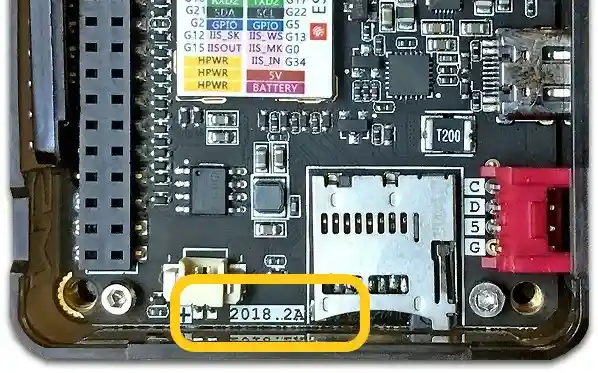
2018.2A PCB version does not support C2C (Type-C to Type-C) connection or PD power supply.