JTextComponent (Java Platform SE 6)
javax.swing.text
Class JTextComponent
java.lang.Object
  java.awt.Component
      java.awt.Container
          javax.swing.JComponent
              javax.swing.text.JTextComponent
- All Implemented Interfaces:
- ImageObserver, MenuContainer, Serializable, Accessible, Scrollable
- Direct Known Subclasses:
- JEditorPane, JTextArea, JTextField
public abstract class JTextComponent
- extends JComponent
- implements Scrollable, Accessible
JTextComponent is the base class for swing text
components. It tries to be compatible with the
java.awt.TextComponent class
where it can reasonably do so. Also provided are other services
for additional flexibility (beyond the pluggable UI and bean
support).
You can find information on how to use the functionality
this class provides in
General Rules for Using Text Components,
a section in The Java Tutorial.
- Caret Changes
-
The caret is a pluggable object in swing text components.
Notification of changes to the caret position and the selection
are sent to implementations of the
CaretListenerinterface that have been registered with the text component. The UI will install a default caret unless a customized caret has been set.
By default the caret tracks all the document changes performed on the Event Dispatching Thread and updates it's position accordingly if an insertion occurs before or at the caret position or a removal occurs before the caret position.DefaultCarettries to make itself visible which may lead to scrolling of a text component withinJScrollPane. The default caret behavior can be changed by theDefaultCaret.setUpdatePolicy(int)method.
Note: Non-editable text components also have a caret though it may not be painted. - Commands
-
Text components provide a number of commands that can be used
to manipulate the component. This is essentially the way that
the component expresses its capabilities. These are expressed
in terms of the swing
Actioninterface, using theTextActionimplementation. The set of commands supported by the text component can be found with thegetActions()method. These actions can be bound to key events, fired from buttons, etc. - Text Input
-
The text components support flexible and internationalized text input, using
keymaps and the input method framework, while maintaining compatibility with
the AWT listener model.
A
Keymaplets an application bind key strokes to actions. In order to allow keymaps to be shared across multiple text components, they can use actions that extendTextAction.TextActioncan determine whichJTextComponentmost recently has or had focus and therefore is the subject of the action (In the case that theActionEventsent to the action doesn't contain the target text component as its source).The input method framework lets text components interact with input methods, separate software components that preprocess events to let users enter thousands of different characters using keyboards with far fewer keys.
JTextComponentis an active client of the framework, so it implements the preferred user interface for interacting with input methods. As a consequence, some key events do not reach the text component because they are handled by an input method, and some text input reaches the text component as committed text within anInputMethodEventinstead of as a key event. The complete text input is the combination of the characters inkeyTypedkey events and committed text in input method events.The AWT listener model lets applications attach event listeners to components in order to bind events to actions. Swing encourages the use of keymaps instead of listeners, but maintains compatibility with listeners by giving the listeners a chance to steal an event by consuming it.
Keyboard event and input method events are handled in the following stages, with each stage capable of consuming the event:
Stage
KeyEvent
InputMethodEvent
1. input methods (generated here) 2. focus manager 3. registered key listeners registered input method listeners 4. input method handling in JTextComponent 5. keymap handling using the current keymap 6. keyboard handling in JComponent (e.g. accelerators, component navigation, etc.) To maintain compatibility with applications that listen to key events but are not aware of input method events, the input method handling in stage 4 provides a compatibility mode for components that do not process input method events. For these components, the committed text is converted to keyTyped key events and processed in the key event pipeline starting at stage 3 instead of in the input method event pipeline.
By default the component will create a keymap (named DEFAULT_KEYMAP) that is shared by all JTextComponent instances as the default keymap. Typically a look-and-feel implementation will install a different keymap that resolves to the default keymap for those bindings not found in the different keymap. The minimal bindings include:
- inserting content into the editor for the printable keys.
- removing content with the backspace and del keys.
- caret movement forward and backward
- Model/View Split
-
The text components have a model-view split. A text component pulls
together the objects used to represent the model, view, and controller.
The text document model may be shared by other views which act as observers
of the model (e.g. a document may be shared by multiple components).
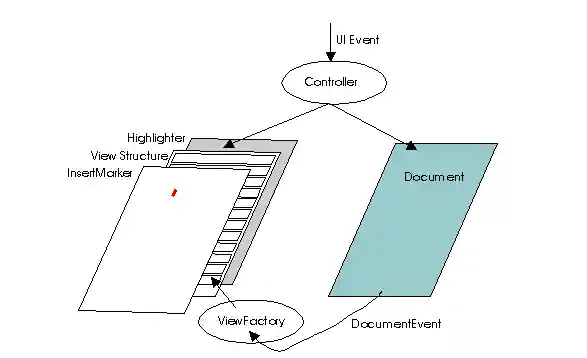
The model is defined by the
Documentinterface. This is intended to provide a flexible text storage mechanism that tracks change during edits and can be extended to more sophisticated models. The model interfaces are meant to capture the capabilities of expression given by SGML, a system used to express a wide variety of content. Each modification to the document causes notification of the details of the change to be sent to all observers in the form of aDocumentEventwhich allows the views to stay up to date with the model. This event is sent to observers that have implemented theDocumentListenerinterface and registered interest with the model being observed. - Location Information
-
The capability of determining the location of text in
the view is provided. There are two methods,
modelToView(int)andviewToModel(java.awt.Point)for determining this information. - Undo/Redo support
-
Support for an edit history mechanism is provided to allow
undo/redo operations. The text component does not itself
provide the history buffer by default, but does provide
the
UndoableEditrecords that can be used in conjunction with a history buffer to provide the undo/redo support. The support is provided by the Document model, which allows one to attach UndoableEditListener implementations. - Thread Safety
-
The swing text components provide some support of thread
safe operations. Because of the high level of configurability
of the text components, it is possible to circumvent the
protection provided. The protection primarily comes from
the model, so the documentation of
AbstractDocumentdescribes the assumptions of the protection provided. The methods that are safe to call asynchronously are marked with comments. - Newlines
-
For a discussion on how newlines are handled, see
DefaultEditorKit.
- Printing support
-
Several
printmethods are provided for basic document printing. If more advanced printing is needed, use thegetPrintable(java.text.MessageFormat, java.text.MessageFormat)method.
Warning:
Serialized objects of this class will not be compatible with
future Swing releases. The current serialization support is
appropriate for short term storage or RMI between applications running
the same version of Swing. As of 1.4, support for long term storage
of all JavaBeansTM
has been added to the java.beans package.
Please see XMLEncoder.
- See Also:
Document,DocumentEvent,DocumentListener,Caret,CaretEvent,CaretListener,TextUI,View,ViewFactory
| Nested Class Summary | |
|---|---|
class |
JTextComponent.AccessibleJTextComponent
This class implements accessibility support for the JTextComponent class. |
static class |
JTextComponent.DropLocation
Represents a drop location for JTextComponents. |
static class |
JTextComponent.KeyBinding
Binding record for creating key bindings. |
| Nested classes/interfaces inherited from class javax.swing.JComponent |
|---|
JComponent.AccessibleJComponent |
| Nested classes/interfaces inherited from class java.awt.Container |
|---|
Container.AccessibleAWTContainer |
| Nested classes/interfaces inherited from class java.awt.Component |
|---|
Component.AccessibleAWTComponent, Component.BaselineResizeBehavior, Component.BltBufferStrategy, Component.FlipBufferStrategy |
| Field Summary | |
|---|---|
static String |
DEFAULT_KEYMAP
The default keymap that will be shared by all JTextComponent instances unless they
have had a different keymap set. |
static String |
FOCUS_ACCELERATOR_KEY
The bound property name for the focus accelerator. |
| Fields inherited from class javax.swing.JComponent |
|---|
accessibleContext, listenerList, TOOL_TIP_TEXT_KEY, ui, UNDEFINED_CONDITION, WHEN_ANCESTOR_OF_FOCUSED_COMPONENT, WHEN_FOCUSED, WHEN_IN_FOCUSED_WINDOW |
| Fields inherited from class java.awt.Component |
|---|
BOTTOM_ALIGNMENT, CENTER_ALIGNMENT, LEFT_ALIGNMENT, RIGHT_ALIGNMENT, TOP_ALIGNMENT |
| Fields inherited from interface java.awt.image.ImageObserver |
|---|
ABORT, ALLBITS, ERROR, FRAMEBITS, HEIGHT, PROPERTIES, SOMEBITS, WIDTH |
| Constructor Summary | |
|---|---|
JTextComponent()
Creates a new JTextComponent. |
|
| Method Summary | |
|---|---|
void |
addCaretListener(CaretListener listener)
Adds a caret listener for notification of any changes to the caret. |
void |
addInputMethodListener(InputMethodListener l)
Adds the specified input method listener to receive input method events from this component. |
static Keymap |
addKeymap(String nm,
          Keymap parent)
Adds a new keymap into the keymap hierarchy. |
void |
copy()
Transfers the currently selected range in the associated text model to the system clipboard, leaving the contents in the text model. |
void |
cut()
Transfers the currently selected range in the associated text model to the system clipboard, removing the contents from the model. |
protected void |
fireCaretUpdate(CaretEvent e)
Notifies all listeners that have registered interest for notification on this event type. |
AccessibleContext |
getAccessibleContext()
Gets the AccessibleContext associated with this
JTextComponent. |
Action[] |
getActions()
Fetches the command list for the editor. |
Caret |
getCaret()
Fetches the caret that allows text-oriented navigation over the view. |
Color |
getCaretColor()
Fetches the current color used to render the caret. |
CaretListener[] |
getCaretListeners()
Returns an array of all the caret listeners registered on this text component. |
int |
getCaretPosition()
Returns the position of the text insertion caret for the text component. |
Color |
getDisabledTextColor()
Fetches the current color used to render the disabled text. |
Document |
getDocument()
Fetches the model associated with the editor. |
boolean |
getDragEnabled()
Returns whether or not automatic drag handling is enabled. |
JTextComponent.DropLocation |
getDropLocation()
Returns the location that this component should visually indicate as the drop location during a DnD operation over the component, or null if no location is to currently be shown. |
DropMode |
getDropMode()
Returns the drop mode for this component. |
char |
getFocusAccelerator()
Returns the key accelerator that will cause the receiving text component to get the focus. |
Highlighter |
getHighlighter()
Fetches the object responsible for making highlights. |
InputMethodRequests |
getInputMethodRequests()
Gets the input method request handler which supports requests from input methods for this component. |
Keymap |
getKeymap()
Fetches the keymap currently active in this text component. |
static Keymap |
getKeymap(String nm)
Fetches a named keymap previously added to the document. |
Insets |
getMargin()
Returns the margin between the text component's border and its text. |
NavigationFilter |
getNavigationFilter()
Returns the NavigationFilter. |
Dimension |
getPreferredScrollableViewportSize()
Returns the preferred size of the viewport for a view component. |
Printable |
getPrintable(MessageFormat headerFormat,
             MessageFormat footerFormat)
Returns a Printable to use for printing the content of this
JTextComponent. |
int |
getScrollableBlockIncrement(Rectangle visibleRect,
                            int orientation,
                            int direction)
Components that display logical rows or columns should compute the scroll increment that will completely expose one block of rows or columns, depending on the value of orientation. |
boolean |
getScrollableTracksViewportHeight()
Returns true if a viewport should always force the height of this Scrollable to match the height of the viewport. |
boolean |
getScrollableTracksViewportWidth()
Returns true if a viewport should always force the width of this Scrollable to match the width of the viewport. |
int |
getScrollableUnitIncrement(Rectangle visibleRect,
                           int orientation,
                           int direction)
Components that display logical rows or columns should compute the scroll increment that will completely expose one new row or column, depending on the value of orientation. |
String |
getSelectedText()
Returns the selected text contained in this TextComponent. |
Color |
getSelectedTextColor()
Fetches the current color used to render the selected text. |
Color |
getSelectionColor()
Fetches the current color used to render the selection. |
int |
getSelectionEnd()
Returns the selected text's end position. |
int |
getSelectionStart()
Returns the selected text's start position. |
String |
getText()
Returns the text contained in this TextComponent. |
String |
getText(int offs,
        int len)
Fetches a portion of the text represented by the component. |
String |
getToolTipText(MouseEvent event)
Returns the string to be used as the tooltip for event. |
TextUI |
getUI()
Fetches the user-interface factory for this text-oriented editor. |
boolean |
isEditable()
Returns the boolean indicating whether this TextComponent is editable or not. |
static void |
loadKeymap(Keymap map,
           JTextComponent.KeyBinding[] bindings,
           Action[] actions)
Loads a keymap with a bunch of bindings. |
Rectangle |
modelToView(int pos)
Converts the given location in the model to a place in the view coordinate system. |
void |
moveCaretPosition(int pos)
Moves the caret to a new position, leaving behind a mark defined by the last time setCaretPosition was
called. |
protected String |
paramString()
Returns a string representation of this JTextComponent. |
void |
paste()
Transfers the contents of the system clipboard into the associated text model. |
boolean |
print()
A convenience print method that displays a print dialog, and then prints this JTextComponent in interactive mode with no
header or footer text. |
boolean |
print(MessageFormat headerFormat,
      MessageFormat footerFormat)
A convenience print method that displays a print dialog, and then prints this JTextComponent in interactive mode with
the specified header and footer text. |
boolean |
print(MessageFormat headerFormat,
      MessageFormat footerFormat,
      boolean showPrintDialog,
      PrintService service,
      PrintRequestAttributeSet attributes,
      boolean interactive)
Prints the content of this JTextComponent. |
protected void |
processInputMethodEvent(InputMethodEvent e)
Processes input method events occurring on this component by dispatching them to any registered InputMethodListener objects. |
void |
read(Reader in,
     Object desc)
Initializes from a stream. |
void |
removeCaretListener(CaretListener listener)
Removes a caret listener. |
static Keymap |
removeKeymap(String nm)
Removes a named keymap previously added to the document. |
void |
removeNotify()
Notifies this component that it no longer has a parent component. |
void |
replaceSelection(String content)
Replaces the currently selected content with new content represented by the given string. |
void |
select(int selectionStart,
       int selectionEnd)
Selects the text between the specified start and end positions. |
void |
selectAll()
Selects all the text in the TextComponent. |
void |
setCaret(Caret c)
Sets the caret to be used. |
void |
setCaretColor(Color c)
Sets the current color used to render the caret. |
void |
setCaretPosition(int position)
Sets the position of the text insertion caret for the TextComponent. |
void |
setComponentOrientation(ComponentOrientation o)
Sets the language-sensitive orientation that is to be used to order the elements or text within this component. |
void |
setDisabledTextColor(Color c)
Sets the current color used to render the disabled text. |
void |
setDocument(Document doc)
Associates the editor with a text document. |
void |
setDragEnabled(boolean b)
Turns on or off automatic drag handling. |
void |
setDropMode(DropMode dropMode)
Sets the drop mode for this component. |
void |
setEditable(boolean b)
Sets the specified boolean to indicate whether or not this TextComponent should be editable. |
void |
setFocusAccelerator(char aKey)
Sets the key accelerator that will cause the receiving text component to get the focus. |
void |
setHighlighter(Highlighter h)
Sets the highlighter to be used. |
void |
setKeymap(Keymap map)
Sets the keymap to use for binding events to actions. |
void |
setMargin(Insets m)
Sets margin space between the text component's border and its text. |
void |
setNavigationFilter(NavigationFilter filter)
Sets the NavigationFilter. |
void |
setSelectedTextColor(Color c)
Sets the current color used to render the selected text. |
void |
setSelectionColor(Color c)
Sets the current color used to render the selection. |
void |
setSelectionEnd(int selectionEnd)
Sets the selection end to the specified position. |
void |
setSelectionStart(int selectionStart)
Sets the selection start to the specified position. |
void |
setText(String t)
Sets the text of this TextComponent
to the specified text. |
void |
setUI(TextUI ui)
Sets the user-interface factory for this text-oriented editor. |
void |
updateUI()
Reloads the pluggable UI. |
int |
viewToModel(Point pt)
Converts the given place in the view coordinate system to the nearest representative location in the model. |
void |
write(Writer out)
Stores the contents of the model into the given stream. |
| Methods inherited from class java.lang.Object |
|---|
clone, equals, finalize, getClass, hashCode, notify, notifyAll, wait, wait, wait |
| Field Detail |
|---|
FOCUS_ACCELERATOR_KEY
public static final String FOCUS_ACCELERATOR_KEY
- The bound property name for the focus accelerator.
- See Also:
- Constant Field Values
DEFAULT_KEYMAP
public static final String DEFAULT_KEYMAP
- The default keymap that will be shared by all
JTextComponentinstances unless they have had a different keymap set.- See Also:
- Constant Field Values
| Constructor Detail |
|---|
JTextComponent
public JTextComponent()
- Creates a new
JTextComponent. Listeners for caret events are established, and the pluggable UI installed. The component is marked as editable. No layout manager is used, because layout is managed by the view subsystem of text. The document model is set tonull.
| Method Detail |
|---|
getUI
public TextUI getUI()
- Fetches the user-interface factory for this text-oriented editor.
- Returns:
- the factory
setUI
public void setUI(TextUI ui)
- Sets the user-interface factory for this text-oriented editor.
- Parameters:
ui- the factory
updateUI
public void updateUI()
- Reloads the pluggable UI. The key used to fetch the
new interface is
getUIClassID(). The type of the UI isTextUI.invalidateis called after setting the UI. - Overrides:
updateUIin classJComponent
addCaretListener
public void addCaretListener(CaretListener listener)
- Adds a caret listener for notification of any changes
to the caret.
- Parameters:
listener- the listener to be added- See Also:
CaretEvent
removeCaretListener
public void removeCaretListener(CaretListener listener)
- Removes a caret listener.
- Parameters:
listener- the listener to be removed- See Also:
CaretEvent
getCaretListeners
public CaretListener[] getCaretListeners()
- Returns an array of all the caret listeners
registered on this text component.
- Returns:
- all of this component's
CaretListeners or an empty array if no caret listeners are currently registered - Since:
- 1.4
- See Also:
addCaretListener(javax.swing.event.CaretListener),removeCaretListener(javax.swing.event.CaretListener)
fireCaretUpdate
protected void fireCaretUpdate(CaretEvent e)
- Notifies all listeners that have registered interest for
notification on this event type. The event instance
is lazily created using the parameters passed into
the fire method. The listener list is processed in a
last-to-first manner.
- Parameters:
e- the event- See Also:
EventListenerList
setDocument
public void setDocument(Document doc)
- Associates the editor with a text document.
The currently registered factory is used to build a view for
the document, which gets displayed by the editor after revalidation.
A PropertyChange event ("document") is propagated to each listener.
- Parameters:
doc- the document to display/edit- See Also:
getDocument()
getDocument
public Document getDocument()
- Fetches the model associated with the editor. This is
primarily for the UI to get at the minimal amount of
state required to be a text editor. Subclasses will
return the actual type of the model which will typically
be something that extends Document.
- Returns:
- the model
setComponentOrientation
public void setComponentOrientation(ComponentOrientation o)
- Description copied from class:
Component - Sets the language-sensitive orientation that is to be used to order
the elements or text within this component. Language-sensitive
LayoutManagerandComponentsubclasses will use this property to determine how to lay out and draw components.At construction time, a component's orientation is set to
ComponentOrientation.UNKNOWN, indicating that it has not been specified explicitly. The UNKNOWN orientation behaves the same asComponentOrientation.LEFT_TO_RIGHT.To set the orientation of a single component, use this method. To set the orientation of an entire component hierarchy, use
applyComponentOrientation. - Overrides:
setComponentOrientationin classComponent
- See Also:
ComponentOrientation
getActions
public Action[] getActions()
- Fetches the command list for the editor. This is
the list of commands supported by the plugged-in UI
augmented by the collection of commands that the
editor itself supports. These are useful for binding
to events, such as in a keymap.
- Returns:
- the command list
setMargin
public void setMargin(Insets m)
- Sets margin space between the text component's border
and its text. The text component's default
Borderobject will use this value to create the proper margin. However, if a non-default border is set on the text component, it is thatBorderobject's responsibility to create the appropriate margin space (else this property will effectively be ignored). This causes a redraw of the component. A PropertyChange event ("margin") is sent to all listeners. - Parameters:
m- the space between the border and the text
getMargin
public Insets getMargin()
- Returns the margin between the text component's border and
its text.
- Returns:
- the margin
setNavigationFilter
public void setNavigationFilter(NavigationFilter filter)
- Sets the
NavigationFilter.NavigationFilteris used byDefaultCaretand the default cursor movement actions as a way to restrict the cursor movement. - Since:
- 1.4
getNavigationFilter
public NavigationFilter getNavigationFilter()
- Returns the
NavigationFilter.NavigationFilteris used byDefaultCaretand the default cursor movement actions as a way to restrict the cursor movement. A null return value implies the cursor movement and selection should not be restricted. - Returns:
- the NavigationFilter
- Since:
- 1.4
getCaret
public Caret getCaret()
- Fetches the caret that allows text-oriented navigation over
the view.
- Returns:
- the caret
setCaret
public void setCaret(Caret c)
- Sets the caret to be used. By default this will be set
by the UI that gets installed. This can be changed to
a custom caret if desired. Setting the caret results in a
PropertyChange event ("caret") being fired.
- Parameters:
c- the caret- See Also:
getCaret()
getHighlighter
public Highlighter getHighlighter()
- Fetches the object responsible for making highlights.
- Returns:
- the highlighter
setHighlighter
public void setHighlighter(Highlighter h)
- Sets the highlighter to be used. By default this will be set
by the UI that gets installed. This can be changed to
a custom highlighter if desired. The highlighter can be set to
nullto disable it. A PropertyChange event ("highlighter") is fired when a new highlighter is installed. - Parameters:
h- the highlighter- See Also:
getHighlighter()
setKeymap
public void setKeymap(Keymap map)
- Sets the keymap to use for binding events to
actions. Setting to
nulleffectively disables keyboard input. A PropertyChange event ("keymap") is fired when a new keymap is installed. - Parameters:
map- the keymap- See Also:
getKeymap()
setDragEnabled
public void setDragEnabled(boolean b)
- Turns on or off automatic drag handling. In order to enable automatic
drag handling, this property should be set to
true, and the component'sTransferHandlerneeds to benon-null. The default value of thedragEnabledproperty isfalse.The job of honoring this property, and recognizing a user drag gesture, lies with the look and feel implementation, and in particular, the component's
TextUI. When automatic drag handling is enabled, most look and feels (including those that subclassBasicLookAndFeel) begin a drag and drop operation whenever the user presses the mouse button over a selection and then moves the mouse a few pixels. Setting this property totruecan therefore have a subtle effect on how selections behave.If a look and feel is used that ignores this property, you can still begin a drag and drop operation by calling
exportAsDragon the component'sTransferHandler. - Parameters:
b- whether or not to enable automatic drag handling- Throws:
HeadlessException- ifbistrueandGraphicsEnvironment.isHeadless()returnstrue- Since:
- 1.4
- See Also:
GraphicsEnvironment.isHeadless(),getDragEnabled(),JComponent.setTransferHandler(javax.swing.TransferHandler),TransferHandler
getDragEnabled
public boolean getDragEnabled()
- Returns whether or not automatic drag handling is enabled.
- Returns:
- the value of the
dragEnabledproperty - Since:
- 1.4
- See Also:
setDragEnabled(boolean)
setDropMode
public final void setDropMode(DropMode dropMode)
- Sets the drop mode for this component. For backward compatibility,
the default for this property is
DropMode.USE_SELECTION. Usage ofDropMode.INSERTis recommended, however, for an improved user experience. It offers similar behavior of dropping between text locations, but does so without affecting the actual text selection and caret location.JTextComponentssupport the following drop modes:DropMode.USE_SELECTIONDropMode.INSERT
The drop mode is only meaningful if this component has a
TransferHandlerthat accepts drops. - Parameters:
dropMode- the drop mode to use- Throws:
IllegalArgumentException- if the drop mode is unsupported ornull- Since:
- 1.6
- See Also:
getDropMode(),getDropLocation(),JComponent.setTransferHandler(javax.swing.TransferHandler),TransferHandler
getDropMode
public final DropMode getDropMode()
- Returns the drop mode for this component.
- Returns:
- the drop mode for this component
- Since:
- 1.6
- See Also:
setDropMode(javax.swing.DropMode)
getDropLocation
public final JTextComponent.DropLocation getDropLocation()
- Returns the location that this component should visually indicate
as the drop location during a DnD operation over the component,
or
nullif no location is to currently be shown.This method is not meant for querying the drop location from a
TransferHandler, as the drop location is only set after theTransferHandler'scanImporthas returned and has allowed for the location to be shown.When this property changes, a property change event with name "dropLocation" is fired by the component.
- Returns:
- the drop location
- Since:
- 1.6
- See Also:
setDropMode(javax.swing.DropMode),TransferHandler.canImport(TransferHandler.TransferSupport)
getKeymap
public Keymap getKeymap()
- Fetches the keymap currently active in this text
component.
- Returns:
- the keymap
addKeymap
public static Keymap addKeymap(String nm,
                               Keymap parent)
- Adds a new keymap into the keymap hierarchy. Keymap bindings
resolve from bottom up so an attribute specified in a child
will override an attribute specified in the parent.
- Parameters:
nm- the name of the keymap (must be unique within the collection of named keymaps in the document); the name may benullif the keymap is unnamed, but the caller is responsible for managing the reference returned as an unnamed keymap can't be fetched by nameparent- the parent keymap; this may benullif unspecified bindings need not be resolved in some other keymap- Returns:
- the keymap
removeKeymap
public static Keymap removeKeymap(String nm)
- Removes a named keymap previously added to the document. Keymaps
with
nullnames may not be removed in this way. - Parameters:
nm- the name of the keymap to remove- Returns:
- the keymap that was removed
getKeymap
public static Keymap getKeymap(String nm)
- Fetches a named keymap previously added to the document.
This does not work with
null-named keymaps. - Parameters:
nm- the name of the keymap- Returns:
- the keymap
loadKeymap
public static void loadKeymap(Keymap map,
                              JTextComponent.KeyBinding[] bindings,
                              Action[] actions)
Loads a keymap with a bunch of bindings. This can be used to take a static table of definitions and load them into some keymap. The following example illustrates an example of binding some keys to the cut, copy, and paste actions associated with a JTextComponent. A code fragment to accomplish this might look as follows:
The sets of bindings and actions may be empty but must be non-static final JTextComponent.KeyBinding[] defaultBindings = { new JTextComponent.KeyBinding( KeyStroke.getKeyStroke(KeyEvent.VK_C, InputEvent.CTRL_MASK), DefaultEditorKit.copyAction), new JTextComponent.KeyBinding( KeyStroke.getKeyStroke(KeyEvent.VK_V, InputEvent.CTRL_MASK), DefaultEditorKit.pasteAction), new JTextComponent.KeyBinding( KeyStroke.getKeyStroke(KeyEvent.VK_X, InputEvent.CTRL_MASK), DefaultEditorKit.cutAction), }; JTextComponent c = new JTextPane(); Keymap k = c.getKeymap(); JTextComponent.loadKeymap(k, defaultBindings, c.getActions());null.- Parameters:
map- the keymapbindings- the bindingsactions- the set of actions
getCaretColor
public Color getCaretColor()
- Fetches the current color used to render the
caret.
- Returns:
- the color
setCaretColor
public void setCaretColor(Color c)
- Sets the current color used to render the caret.
Setting to
nulleffectively restores the default color. Setting the color results in a PropertyChange event ("caretColor") being fired. - Parameters:
c- the color- See Also:
getCaretColor()
getSelectionColor
public Color getSelectionColor()
- Fetches the current color used to render the
selection.
- Returns:
- the color
setSelectionColor
public void setSelectionColor(Color c)
- Sets the current color used to render the selection.
Setting the color to
nullis the same as settingColor.white. Setting the color results in a PropertyChange event ("selectionColor"). - Parameters:
c- the color- See Also:
getSelectionColor()
getSelectedTextColor
public Color getSelectedTextColor()
- Fetches the current color used to render the
selected text.
- Returns:
- the color
setSelectedTextColor
public void setSelectedTextColor(Color c)
- Sets the current color used to render the selected text.
Setting the color to
nullis the same asColor.black. Setting the color results in a PropertyChange event ("selectedTextColor") being fired. - Parameters:
c- the color- See Also:
getSelectedTextColor()
getDisabledTextColor
public Color getDisabledTextColor()
- Fetches the current color used to render the
disabled text.
- Returns:
- the color
setDisabledTextColor
public void setDisabledTextColor(Color c)
- Sets the current color used to render the
disabled text. Setting the color fires off a
PropertyChange event ("disabledTextColor").
- Parameters:
c- the color- See Also:
getDisabledTextColor()
replaceSelection
public void replaceSelection(String content)
- Replaces the currently selected content with new content
represented by the given string. If there is no selection
this amounts to an insert of the given text. If there
is no replacement text this amounts to a removal of the
current selection.
This is the method that is used by the default implementation of the action for inserting content that gets bound to the keymap actions.
This method is thread safe, although most Swing methods are not. Please see How to Use Threads for more information.
- Parameters:
content- the content to replace the selection with
getText
public String getText(int offs,
                      int len)
               throws BadLocationException
- Fetches a portion of the text represented by the
component. Returns an empty string if length is 0.
- Parameters:
offs- the offset >= 0len- the length >= 0- Returns:
- the text
- Throws:
BadLocationException- if the offset or length are invalid
modelToView
public Rectangle modelToView(int pos)
                      throws BadLocationException
- Converts the given location in the model to a place in
the view coordinate system.
The component must have a positive size for
this translation to be computed (i.e. layout cannot
be computed until the component has been sized). The
component does not have to be visible or painted.
- Parameters:
pos- the position >= 0- Returns:
- the coordinates as a rectangle, with (r.x, r.y) as the location in the coordinate system, or null if the component does not yet have a positive size.
- Throws:
BadLocationException- if the given position does not represent a valid location in the associated document- See Also:
TextUI.modelToView(javax.swing.text.JTextComponent, int)
viewToModel
public int viewToModel(Point pt)
- Converts the given place in the view coordinate system
to the nearest representative location in the model.
The component must have a positive size for
this translation to be computed (i.e. layout cannot
be computed until the component has been sized). The
component does not have to be visible or painted.
- Parameters:
pt- the location in the view to translate- Returns:
- the offset >= 0 from the start of the document, or -1 if the component does not yet have a positive size.
- See Also:
TextUI.viewToModel(javax.swing.text.JTextComponent, java.awt.Point)
cut
public void cut()
- Transfers the currently selected range in the associated
text model to the system clipboard, removing the contents
from the model. The current selection is reset. Does nothing
for
nullselections. - See Also:
Toolkit.getSystemClipboard(),Clipboard
copy
public void copy()
- Transfers the currently selected range in the associated
text model to the system clipboard, leaving the contents
in the text model. The current selection remains intact.
Does nothing for
nullselections. - See Also:
Toolkit.getSystemClipboard(),Clipboard
paste
public void paste()
- Transfers the contents of the system clipboard into the
associated text model. If there is a selection in the
associated view, it is replaced with the contents of the
clipboard. If there is no selection, the clipboard contents
are inserted in front of the current insert position in
the associated view. If the clipboard is empty, does nothing.
moveCaretPosition
public void moveCaretPosition(int pos)
- Moves the caret to a new position, leaving behind a mark
defined by the last time
setCaretPositionwas called. This forms a selection. If the document isnull, does nothing. The position must be between 0 and the length of the component's text or else an exception is thrown. - Parameters:
pos- the position- Throws:
IllegalArgumentException- if the value supplied forpositionis less than zero or greater than the component's text length- See Also:
setCaretPosition(int)
setFocusAccelerator
public void setFocusAccelerator(char aKey)
- Sets the key accelerator that will cause the receiving text
component to get the focus. The accelerator will be the
key combination of the alt key and the character
given (converted to upper case). By default, there is no focus
accelerator key. Any previous key accelerator setting will be
superseded. A '\0' key setting will be registered, and has the
effect of turning off the focus accelerator. When the new key
is set, a PropertyChange event (FOCUS_ACCELERATOR_KEY) will be fired.
- Parameters:
aKey- the key- See Also:
getFocusAccelerator()
getFocusAccelerator
public char getFocusAccelerator()
- Returns the key accelerator that will cause the receiving
text component to get the focus. Return '\0' if no focus
accelerator has been set.
- Returns:
- the key
read
public void read(Reader in,
                 Object desc)
          throws IOException
- Initializes from a stream. This creates a
model of the type appropriate for the component
and initializes the model from the stream.
By default this will load the model as plain
text. Previous contents of the model are discarded.
- Parameters:
in- the stream to read fromdesc- an object describing the stream; this might be a string, a File, a URL, etc. Some kinds of documents (such as html for example) might be able to make use of this information; if non-null, it is added as a property of the document- Throws:
IOException- as thrown by the stream being used to initialize- See Also:
EditorKit.createDefaultDocument(),setDocument(javax.swing.text.Document),PlainDocument
write
public void write(Writer out)
           throws IOException
- Stores the contents of the model into the given
stream. By default this will store the model as plain
text.
- Parameters:
out- the output stream- Throws:
IOException- on any I/O error
removeNotify
public void removeNotify()
- Description copied from class:
JComponent - Notifies this component that it no longer has a parent component.
When this method is invoked, any
KeyboardActions set up in the the chain of parent components are removed. - Overrides:
removeNotifyin classJComponent
setCaretPosition
public void setCaretPosition(int position)
- Sets the position of the text insertion caret for the
TextComponent. Note that the caret tracks change, so this may move if the underlying text of the component is changed. If the document isnull, does nothing. The position must be between 0 and the length of the component's text or else an exception is thrown. - Parameters:
position- the position- Throws:
IllegalArgumentException- if the value supplied forpositionis less than zero or greater than the component's text length
getCaretPosition
public int getCaretPosition()
- Returns the position of the text insertion caret for the
text component.
- Returns:
- the position of the text insertion caret for the text component >= 0
setText
public void setText(String t)
- Sets the text of this
TextComponentto the specified text. If the text isnullor empty, has the effect of simply deleting the old text. When text has been inserted, the resulting caret location is determined by the implementation of the caret class.This method is thread safe, although most Swing methods are not. Please see How to Use Threads for more information. Note that text is not a bound property, so no
PropertyChangeEventis fired when it changes. To listen for changes to the text, useDocumentListener. - Parameters:
t- the new text to be set- See Also:
getText(int, int),DefaultCaret
getText
public String getText()
- Returns the text contained in this
TextComponent. If the underlying document isnull, will give aNullPointerException. Note that text is not a bound property, so noPropertyChangeEventis fired when it changes. To listen for changes to the text, useDocumentListener. - Returns:
- the text
- Throws:
NullPointerException- if the document isnull- See Also:
setText(java.lang.String)
getSelectedText
public String getSelectedText()
- Returns the selected text contained in this
TextComponent. If the selection isnullor the document empty, returnsnull. - Returns:
- the text
- Throws:
IllegalArgumentException- if the selection doesn't have a valid mapping into the document for some reason- See Also:
setText(java.lang.String)
isEditable
public boolean isEditable()
- Returns the boolean indicating whether this
TextComponentis editable or not. - Returns:
- the boolean value
- See Also:
setEditable(boolean)
setEditable
public void setEditable(boolean b)
- Sets the specified boolean to indicate whether or not this
TextComponentshould be editable. A PropertyChange event ("editable") is fired when the state is changed. - Parameters:
b- the boolean to be set- See Also:
isEditable()
getSelectionStart
public int getSelectionStart()
- Returns the selected text's start position. Return 0 for an
empty document, or the value of dot if no selection.
- Returns:
- the start position >= 0
setSelectionStart
public void setSelectionStart(int selectionStart)
- Sets the selection start to the specified position. The new
starting point is constrained to be before or at the current
selection end.
This is available for backward compatibility to code that called this method on
java.awt.TextComponent. This is implemented to forward to theCaretimplementation which is where the actual selection is maintained. - Parameters:
selectionStart- the start position of the text >= 0
getSelectionEnd
public int getSelectionEnd()
- Returns the selected text's end position. Return 0 if the document
is empty, or the value of dot if there is no selection.
- Returns:
- the end position >= 0
setSelectionEnd
public void setSelectionEnd(int selectionEnd)
- Sets the selection end to the specified position. The new
end point is constrained to be at or after the current
selection start.
This is available for backward compatibility to code that called this method on
java.awt.TextComponent. This is implemented to forward to theCaretimplementation which is where the actual selection is maintained. - Parameters:
selectionEnd- the end position of the text >= 0
select
public void select(int selectionStart,
                   int selectionEnd)
- Selects the text between the specified start and end positions.
This method sets the start and end positions of the selected text, enforcing the restriction that the start position must be greater than or equal to zero. The end position must be greater than or equal to the start position, and less than or equal to the length of the text component's text.
If the caller supplies values that are inconsistent or out of bounds, the method enforces these constraints silently, and without failure. Specifically, if the start position or end position is greater than the length of the text, it is reset to equal the text length. If the start position is less than zero, it is reset to zero, and if the end position is less than the start position, it is reset to the start position.
This call is provided for backward compatibility. It is routed to a call to
setCaretPositionfollowed by a call tomoveCaretPosition. The preferred way to manage selection is by calling those methods directly. - Parameters:
selectionStart- the start position of the textselectionEnd- the end position of the text- See Also:
setCaretPosition(int),moveCaretPosition(int)
selectAll
public void selectAll()
- Selects all the text in the
TextComponent. Does nothing on anullor empty document.
getToolTipText
public String getToolTipText(MouseEvent event)
- Returns the string to be used as the tooltip for
event. This will return one of:- If
setToolTipTexthas been invoked with a non-nullvalue, it will be returned, otherwise - The value from invoking
getToolTipTexton the UI will be returned.
JTextComponentdoes not register itself with theToolTipManager. This means that tooltips will NOT be shown from theTextUIunlessregisterComponenthas been invoked on theToolTipManager. - If
- Overrides:
getToolTipTextin classJComponent
- Parameters:
event- the event in question- Returns:
- the string to be used as the tooltip for
event - See Also:
JComponent.setToolTipText(java.lang.String),TextUI.getToolTipText(javax.swing.text.JTextComponent, java.awt.Point),ToolTipManager.registerComponent(javax.swing.JComponent)
getPreferredScrollableViewportSize
public Dimension getPreferredScrollableViewportSize()
- Returns the preferred size of the viewport for a view component.
This is implemented to do the default behavior of returning
the preferred size of the component.
- Specified by:
getPreferredScrollableViewportSizein interfaceScrollable
- Returns:
- the
preferredSizeof aJViewportwhose view is thisScrollable - See Also:
JComponent.getPreferredSize()
getScrollableUnitIncrement
public int getScrollableUnitIncrement(Rectangle visibleRect,
                                      int orientation,
                                      int direction)
- Components that display logical rows or columns should compute
the scroll increment that will completely expose one new row
or column, depending on the value of orientation. Ideally,
components should handle a partially exposed row or column by
returning the distance required to completely expose the item.
The default implementation of this is to simply return 10% of the visible area. Subclasses are likely to be able to provide a much more reasonable value.
- Specified by:
getScrollableUnitIncrementin interfaceScrollable
- Parameters:
visibleRect- the view area visible within the viewportorientation- eitherSwingConstants.VERTICALorSwingConstants.HORIZONTALdirection- less than zero to scroll up/left, greater than zero for down/right- Returns:
- the "unit" increment for scrolling in the specified direction
- Throws:
IllegalArgumentException- for an invalid orientation- See Also:
JScrollBar.setUnitIncrement(int)
getScrollableBlockIncrement
public int getScrollableBlockIncrement(Rectangle visibleRect,
                                       int orientation,
                                       int direction)
- Components that display logical rows or columns should compute
the scroll increment that will completely expose one block
of rows or columns, depending on the value of orientation.
The default implementation of this is to simply return the visible area. Subclasses will likely be able to provide a much more reasonable value.
- Specified by:
getScrollableBlockIncrementin interfaceScrollable
- Parameters:
visibleRect- the view area visible within the viewportorientation- eitherSwingConstants.VERTICALorSwingConstants.HORIZONTALdirection- less than zero to scroll up/left, greater than zero for down/right- Returns:
- the "block" increment for scrolling in the specified direction
- Throws:
IllegalArgumentException- for an invalid orientation- See Also:
JScrollBar.setBlockIncrement(int)
getScrollableTracksViewportWidth
public boolean getScrollableTracksViewportWidth()
- Returns true if a viewport should always force the width of this
Scrollableto match the width of the viewport. For example a normal text view that supported line wrapping would return true here, since it would be undesirable for wrapped lines to disappear beyond the right edge of the viewport. Note that returning true for aScrollablewhose ancestor is aJScrollPaneeffectively disables horizontal scrolling.Scrolling containers, like
JViewport, will use this method each time they are validated. - Specified by:
getScrollableTracksViewportWidthin interfaceScrollable
- Returns:
- true if a viewport should force the
Scrollables width to match its own
getScrollableTracksViewportHeight
public boolean getScrollableTracksViewportHeight()
- Returns true if a viewport should always force the height of this
Scrollableto match the height of the viewport. For example a columnar text view that flowed text in left to right columns could effectively disable vertical scrolling by returning true here.Scrolling containers, like
JViewport, will use this method each time they are validated. - Specified by:
getScrollableTracksViewportHeightin interfaceScrollable
- Returns:
- true if a viewport should force the Scrollables height to match its own
public boolean print()
              throws PrinterException
- A convenience print method that displays a print dialog, and then
prints this
JTextComponentin interactive mode with no header or footer text. Note: this method blocks until printing is done.Note: In headless mode, no dialogs will be shown.
This method calls the full featured
printmethod to perform printing. - Returns:
true, unless printing is canceled by the user- Throws:
PrinterException- if an error in the print system causes the job to be abortedSecurityException- if this thread is not allowed to initiate a print job request- Since:
- 1.6
- See Also:
print(MessageFormat, MessageFormat, boolean, PrintService, PrintRequestAttributeSet, boolean)
public boolean print(MessageFormat headerFormat,
                     MessageFormat footerFormat)
              throws PrinterException
- A convenience print method that displays a print dialog, and then
prints this
JTextComponentin interactive mode with the specified header and footer text. Note: this method blocks until printing is done.Note: In headless mode, no dialogs will be shown.
This method calls the full featured
printmethod to perform printing. - Parameters:
headerFormat- the text, inMessageFormat, to be used as the header, ornullfor no headerfooterFormat- the text, inMessageFormat, to be used as the footer, ornullfor no footer- Returns:
true, unless printing is canceled by the user- Throws:
PrinterException- if an error in the print system causes the job to be abortedSecurityException- if this thread is not allowed to initiate a print job request- Since:
- 1.6
- See Also:
print(MessageFormat, MessageFormat, boolean, PrintService, PrintRequestAttributeSet, boolean),MessageFormat
public boolean print(MessageFormat headerFormat,
                     MessageFormat footerFormat,
                     boolean showPrintDialog,
                     PrintService service,
                     PrintRequestAttributeSet attributes,
                     boolean interactive)
              throws PrinterException
- Prints the content of this
JTextComponent. Note: this method blocks until printing is done.Page header and footer text can be added to the output by providing
MessageFormatarguments. The printing code requestsStringsfrom the formats, providing a single item which may be included in the formatted string: anIntegerrepresenting the current page number.showPrintDialog booleanparameter allows you to specify whether a print dialog is displayed to the user. When it is, the user may use the dialog to change printing attributes or even cancel the print.serviceallows you to provide the initialPrintServicefor the print dialog, or to specifyPrintServiceto print to when the dialog is not shown.attributescan be used to provide the initial values for the print dialog, or to supply any needed attributes when the dialog is not shown.attributescan be used to control how the job will print, for example duplex or single-sided.interactive booleanparameter allows you to specify whether to perform printing in interactive mode. Iftrue, a progress dialog, with an abort option, is displayed for the duration of printing. This dialog is modal whenprintis invoked on the Event Dispatch Thread and non-modal otherwise. Warning: calling this method on the Event Dispatch Thread withinteractive falseblocks all events, including repaints, from being processed until printing is complete. It is only recommended when printing from an application with no visible GUI.Note: In headless mode,
showPrintDialogandinteractiveparameters are ignored and no dialogs are shown.This method ensures the
documentis not mutated during printing. To indicate it visually,setEnabled(false)is set for the duration of printing.This method uses
getPrintable(java.text.MessageFormat, java.text.MessageFormat)to render document content.This method is thread-safe, although most Swing methods are not. Please see How to Use Threads for more information.
Sample Usage. This code snippet shows a cross-platform print dialog and then prints the
JTextComponentin interactive mode unless the user cancels the dialog:textComponent.print(new MessageFormat("My text component header"), new MessageFormat("Footer. Page - {0}"), true, null, null, true);Executing this code off the Event Dispatch Thread performs printing on the background. The following pattern might be used for background printing:
FutureTask<Boolean> future = new FutureTask<Boolean>( new Callable<Boolean>() { public Boolean call() { return textComponent.print(.....); } }); executor.execute(future); - Parameters:
headerFormat- the text, inMessageFormat, to be used as the header, ornullfor no headerfooterFormat- the text, inMessageFormat, to be used as the footer, ornullfor no footershowPrintDialog-trueto display a print dialog,falseotherwiseservice- initialPrintService, ornullfor the defaultattributes- the job attributes to be applied to the print job, ornullfor noneinteractive- whether to print in an interactive mode- Returns:
true, unless printing is canceled by the user- Throws:
PrinterException- if an error in the print system causes the job to be abortedSecurityException- if this thread is not allowed to initiate a print job request- Since:
- 1.6
- See Also:
getPrintable(java.text.MessageFormat, java.text.MessageFormat),MessageFormat,GraphicsEnvironment.isHeadless(),FutureTask
getPrintable
public Printable getPrintable(MessageFormat headerFormat,
                              MessageFormat footerFormat)
- Returns a
Printableto use for printing the content of thisJTextComponent. The returnedPrintableprints the document as it looks on the screen except being reformatted to fit the paper. The returnedPrintablecan be wrapped inside anotherPrintablein order to create complex reports and documents.The returned
Printableshares thedocumentwith thisJTextComponent. It is the responsibility of the developer to ensure that thedocumentis not mutated while thisPrintableis used. Printing behavior is undefined when thedocumentis mutated during printing.Page header and footer text can be added to the output by providing
MessageFormatarguments. The printing code requestsStringsfrom the formats, providing a single item which may be included in the formatted string: anIntegerrepresenting the current page number.The returned
Printablewhen printed, formats the document content appropriately for the page size. For correct line wrapping theimageable widthof all pages must be the same. SeePageFormat.getImageableWidth().This method is thread-safe, although most Swing methods are not. Please see How to Use Threads for more information.
The returned
Printablecan be printed on any thread.This implementation returned
Printableperforms all painting on the Event Dispatch Thread, regardless of what thread it is used on. - Parameters:
headerFormat- the text, inMessageFormat, to be used as the header, ornullfor no headerfooterFormat- the text, inMessageFormat, to be used as the footer, ornullfor no footer- Returns:
- a
Printablefor use in printing content of thisJTextComponent - Since:
- 1.6
- See Also:
Printable,PageFormat,Document.render(java.lang.Runnable)
getAccessibleContext
public AccessibleContext getAccessibleContext()
- Gets the
AccessibleContextassociated with thisJTextComponent. For text components, theAccessibleContexttakes the form of anAccessibleJTextComponent. A newAccessibleJTextComponentinstance is created if necessary. - Specified by:
getAccessibleContextin interfaceAccessible- Overrides:
getAccessibleContextin classJComponent
- Returns:
- an
AccessibleJTextComponentthat serves as theAccessibleContextof thisJTextComponent
paramString
protected String paramString()
- Returns a string representation of this
JTextComponent. This method is intended to be used only for debugging purposes, and the content and format of the returned string may vary between implementations. The returned string may be empty but may not benull.Overriding
paramStringto provide information about the specific new aspects of the JFC components. - Overrides:
paramStringin classJComponent
- Returns:
- a string representation of this
JTextComponent
processInputMethodEvent
protected void processInputMethodEvent(InputMethodEvent e)
- Description copied from class:
Component - Processes input method events occurring on this component by
dispatching them to any registered
InputMethodListenerobjects.This method is not called unless input method events are enabled for this component. Input method events are enabled when one of the following occurs:
- An
InputMethodListenerobject is registered viaaddInputMethodListener. - Input method events are enabled via
enableEvents.
Note that if the event parameter is
nullthe behavior is unspecified and may result in an exception. - An
- Overrides:
processInputMethodEventin classComponent
- Parameters:
e- the input method event- See Also:
InputMethodEvent,InputMethodListener,Component.addInputMethodListener(java.awt.event.InputMethodListener),Component.enableEvents(long)
getInputMethodRequests
public InputMethodRequests getInputMethodRequests()
- Description copied from class:
Component - Gets the input method request handler which supports
requests from input methods for this component. A component
that supports on-the-spot text input must override this
method to return an
InputMethodRequestsinstance. At the same time, it also has to handle input method events. - Overrides:
getInputMethodRequestsin classComponent
- Returns:
- the input method request handler for this component,
nullby default - See Also:
Component.addInputMethodListener(java.awt.event.InputMethodListener)
addInputMethodListener
public void addInputMethodListener(InputMethodListener l)
- Description copied from class:
Component - Adds the specified input method listener to receive
input method events from this component. A component will
only receive input method events from input methods
if it also overrides
getInputMethodRequeststo return anInputMethodRequestsinstance. If listenerlisnull, no exception is thrown and no action is performed.Refer to AWT Threading Issues for details on AWT's threading model.
- Overrides:
addInputMethodListenerin classComponent
- Parameters:
l- the input method listener- See Also:
InputMethodEvent,InputMethodListener,Component.removeInputMethodListener(java.awt.event.InputMethodListener),Component.getInputMethodListeners(),Component.getInputMethodRequests()
Submit a bug or feature
For further API reference and developer documentation, see Java SE Developer Documentation. That documentation contains more detailed, developer-targeted descriptions, with conceptual overviews, definitions of terms, workarounds, and working code examples.
Copyright © 1993, 2015, Oracle and/or its affiliates. All rights reserved. Use is subject to license terms. Also see the documentation redistribution policy.