Formatting (The Java™ Tutorials Essential Java Classes
Stream objects that implement formatting are instances of either
PrintWriter, a character stream class, or
PrintStream, a byte stream class.
Note: The only PrintStream objects you are likely to need are
System.out and
System.err. (See I/O from the Command Line for more on these objects.) When you need to create a formatted output stream, instantiate PrintWriter, not PrintStream.
Like all byte and character stream objects, instances of PrintStream and PrintWriter implement a standard set of write methods for simple byte and character output. In addition, both PrintStream and PrintWriter implement the same set of methods for converting internal data into formatted output. Two levels of formatting are provided:
printandprintlnformat individual values in a standard way.formatformats almost any number of values based on a format string, with many options for precise formatting.
The print and println Methods
Invoking print or println outputs a single value after converting the value using the appropriate toString method. We can see this in the
Root example:
public class Root {
    public static void main(String[] args) {
        int i = 2;
        double r = Math.sqrt(i);

        System.out.print("The square root of ");
        System.out.print(i);
        System.out.print(" is ");
        System.out.print(r);
        System.out.println(".");

        i = 5;
        r = Math.sqrt(i);
        System.out.println("The square root of " + i + " is " + r + ".");
    }
}
Here is the output of Root:
The square root of 2 is 1.4142135623730951.
The square root of 5 is 2.23606797749979.
The i and r variables are formatted twice: the first time using code in an overload of print, the second time by conversion code automatically generated by the Java compiler, which also utilizes toString. You can format any value this way, but you don't have much control over the results.
The format Method
The format method formats multiple arguments based on a format string. The format string consists of static text embedded with format specifiers; except for the format specifiers, the format string is output unchanged.
Format strings support many features. In this tutorial, we'll just cover some basics. For a complete description, see
format string syntax in the API specification.
The
Root2 example formats two values with a single format invocation:
public class Root2 {
    public static void main(String[] args) {
        int i = 2;
        double r = Math.sqrt(i);

        System.out.format("The square root of %d is %f.%n", i, r);
    }
}
Here is the output:
The square root of 2 is 1.414214.
Like the three used in this example, all format specifiers begin with a % and end with a 1- or 2-character conversion that specifies the kind of formatted output being generated. The three conversions used here are:
dformats an integer value as a decimal value.fformats a floating point value as a decimal value.noutputs a platform-specific line terminator.
Here are some other conversions:
xformats an integer as a hexadecimal value.sformats any value as a string.tBformats an integer as a locale-specific month name.
There are many other conversions.
Note:
Except for %% and %n, all format specifiers must match an argument. If they don't, an exception is thrown.
In the Java programming language, the \n escape always generates the linefeed character (\u000A). Don't use \n unless you specifically want a linefeed character. To get the correct line separator for the local platform, use %n.
In addition to the conversion, a format specifier can contain several additional elements that further customize the formatted output. Here's an example,
Format, that uses every possible kind of element.
public class Format {
    public static void main(String[] args) {
        System.out.format("%f, %1$+020.10f %n", Math.PI);
    }
}
Here's the output:
3.141593, +00000003.1415926536
The additional elements are all optional. The following figure shows how the longer specifier breaks down into elements.
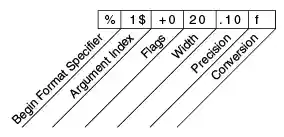
Elements of a Format Specifier.
The elements must appear in the order shown. Working from the right, the optional elements are:
- Precision. For floating point values, this is the mathematical precision of the formatted value. For
sand other general conversions, this is the maximum width of the formatted value; the value is right-truncated if necessary. - Width. The minimum width of the formatted value; the value is padded if necessary. By default the value is left-padded with blanks.
- Flags specify additional formatting options. In the
Formatexample, the+flag specifies that the number should always be formatted with a sign, and the0flag specifies that0is the padding character. Other flags include-(pad on the right) and,(format number with locale-specific thousands separators). Note that some flags cannot be used with certain other flags or with certain conversions. - The Argument Index allows you to explicitly match a designated argument. You can also specify
<to match the same argument as the previous specifier. Thus the example could have said:System.out.format("%f, %<+020.10f %n", Math.PI);