Unity - Scripting API: Handles.DrawWireDisc
Success!
Thank you for helping us improve the quality of Unity Documentation. Although we cannot accept all submissions, we do read each suggested change from our users and will make updates where applicable.
Submission failed
For some reason your suggested change could not be submitted. Please <a>try again</a> in a few minutes. And thank you for taking the time to help us improve the quality of Unity Documentation.
Declaration
public static void DrawWireDisc(Vector3 center, Vector3 normal, float radius, float thickness = 0.0f);
Parameters
| Parameter | Description |
|---|---|
| center | The center of the disc in world space. |
| normal | The normal of the disc in world space. |
| radius | The radius of the disc in world space units. |
| thickness | Line thickness in UI points (zero thickness draws single-pixel line). |
Description
Draws the outline of a flat disc in 3D space.
The Handles.color and Handles.matrix properties colorize and additionally transform the disc position. Unity ignores DrawWireDisc (that is, nothing happens) when the current GUI event type is not Repaint.
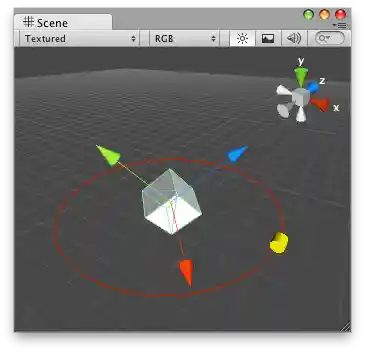
Wire Disc in the Scene View.
The cube:
using UnityEngine;public class CubeExample : MonoBehaviour
{
    public float circleSize = 3.0f;
}
You can use HandleUtility.GetHandleSize to calculate a suitable size for a manipulator handle.
Disc line thickness can be optionally set. Zero thickness draws a one-pixel line. Larger thickness values express line thickness in UI points. For example, a thickness of 1.0 could be two pixels wide on screen if the display zoom is 200% (see EditorGUIUtility.pixelsPerPoint).

Discs of varying thickness.