Unity - Scripting API: Handles.ScaleValueHandle
Success!
Thank you for helping us improve the quality of Unity Documentation. Although we cannot accept all submissions, we do read each suggested change from our users and will make updates where applicable.
Submission failed
For some reason your suggested change could not be submitted. Please <a>try again</a> in a few minutes. And thank you for taking the time to help us improve the quality of Unity Documentation.
Parameters
| Parameter | Description |
|---|---|
| value | The value the user can modify. |
| position | The position of the handle in the space of Handles.matrix. |
| rotation | The rotation of the handle in the space of Handles.matrix. |
| size | The size of the handle in the space of Handles.matrix. Use HandleUtility.GetHandleSize if you want a constant screen-space size. |
| snap | The snap increment. See Handles.SnapValue. |
| capFunction | The function to call for doing the actual drawing. |
Returns
float The new value modified by the user's interaction with the handle. If the user has not moved the handle, it will return the same value as you passed into the function.
Description
Make a 3D handle that scales a single float.
This method will draw a 3D-draggable handle on the screen. The handle does not move and will scale a single float up and down.
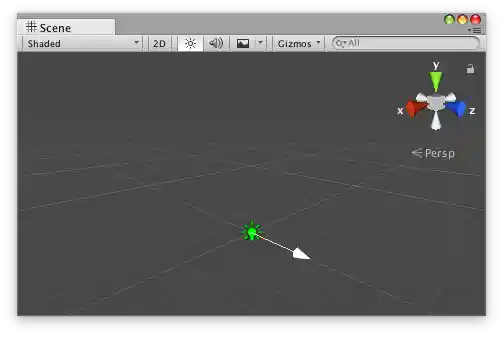
Scale Value handle in the Scene view with an arrow cap as the handle.
Add the following script to your Assets folder as LightColorLerp.cs and add the LightColorLerp component to an object in a Scene.
Add the following script to Assets/Editor as LightColorLerpEditor.cs and select the object with the LightColorLerp component.