Unity - Scripting API: MenuCommand.context
Success!
Thank you for helping us improve the quality of Unity Documentation. Although we cannot accept all submissions, we do read each suggested change from our users and will make updates where applicable.
Submission failed
For some reason your suggested change could not be submitted. Please <a>try again</a> in a few minutes. And thank you for taking the time to help us improve the quality of Unity Documentation.
Description
Context is the object that is the target of a menu command.
Usually the context is the current selection or the item under the mouse when invoking a context menu. The new menu item is added to the list supplied by the selected component. The component in the Inspector has a clickable circular item at the top right. The image below shows how the Rigidbody has a MenuItem that is accessible with a click. The Context name is "Do Something". See the script below.
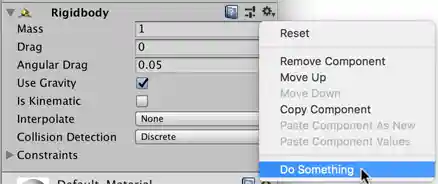
Context menu location.