Unity - Manual: Input
Disable and strip the physics integration from your project
Input in Unity refers to users sending signals from the outside world to your game or app using a physical device.
Unity supports input from many types of device, such as gamepads, mouse, keyboard, touchscreen, joystick, movement-sensors like accelerometers or gyroscopes, and VRVirtual Reality More info
See in Glossary and ARAugmented Reality More info
See in Glossary controllers. Almost every project requires input of some kind, whether it is to allow users to navigate a UI, control a character in a game, or move around and interact with objects in virtual realityVirtual Reality (VR) immerses users in an artificial 3D world of realistic images and sounds, using a headset and motion tracking. More info
See in Glossary.
Unity has two methods of implementing Input:
- The Input System Package, which is newer, more flexible, and better supported.
- The legacy Input ManagerSettings where you can define all the different input axes, buttons and controls for your project. More info
See in Glossary (which includes the built-inInputclass).
The Input System Package
By default, the Input System Package provides input support in Unity. If needed, you can also install it through the Package Manager.
This is the recommended solution for most projects. It provides an intuitive interface in the Editor to configure input, and provides a variety of workflows to suit your project and coding style.
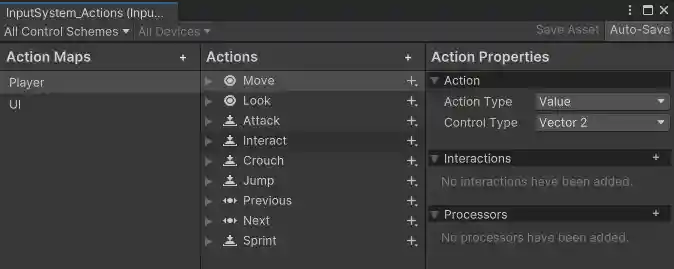
Get started with the Input System Package.
Legacy projects
If you are supporting a project that needs to use the older Input Manager, refer to the legacy Input Manager documentation.
Additional resources and examples
- Community: Join the conversation on Unity Discussions
- Video: Unity Input System in Unity 6 (1/7): Input Action Editor
- Video: Unity Input System in Unity 6 (2/7): Input System Scripting
- Video: Unity Input System in Unity 6 (3/7): Input System Mobile controls
- Video: Unity Input System in Unity 6 (4/7): Input System and UI toolkit
- Video: Unity Input System in Unity 6 (5/7): Rebinding Input System controls
- Video: Unity Input System in Unity 6 (6/7): Player Input Component
- Video: Unity Input System in Unity 6 (7/7): Player Input Manager and local multiplayer
Disable and strip the physics integration from your project