Unity - Scripting API: GUILayout.BeginArea
Success!
Thank you for helping us improve the quality of Unity Documentation. Although we cannot accept all submissions, we do read each suggested change from our users and will make updates where applicable.
Submission failed
For some reason your suggested change could not be submitted. Please <a>try again</a> in a few minutes. And thank you for taking the time to help us improve the quality of Unity Documentation.
Declaration
public static void BeginArea(Rect screenRect);
Declaration
public static void BeginArea(Rect screenRect, string text);
Declaration
public static void BeginArea(Rect screenRect, GUIContent content);
Parameters
| Parameter | Description |
|---|---|
| text | Optional text to display in the area. |
| image | Optional texture to display in the area. |
| content | Optional text, image and tooltip top display for this area. |
| style | The style to use. If left out, the empty GUIStyle (GUIStyle.none) is used, giving a transparent background. |
Description
Begin a GUILayout block of GUI controls in a fixed screen area.
By default, any GUI controls made using GUILayout are placed in the top-left corner of the screen. If you want to place a series of automatically laid out controls in an arbitrary area, use GUILayout.BeginArea to define a new area for the automatic layouting system to use.
Additional resources: EndArea
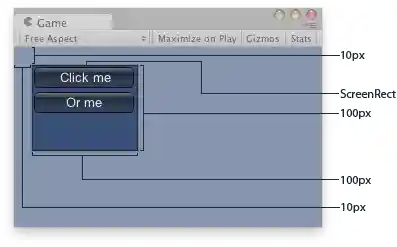
Explained Area of the example.
This function is very useful when mixing GUILayout code. It must be matched with a call to EndArea. BeginArea / EndArea cannot be nested.