Unity - Scripting API: GUILayout.BeginHorizontal
Success!
Thank you for helping us improve the quality of Unity Documentation. Although we cannot accept all submissions, we do read each suggested change from our users and will make updates where applicable.
Submission failed
For some reason your suggested change could not be submitted. Please <a>try again</a> in a few minutes. And thank you for taking the time to help us improve the quality of Unity Documentation.
Declaration
public static void BeginHorizontal(params GUILayoutOption[] options);
Declaration
public static void BeginHorizontal(GUIStyle style, params GUILayoutOption[] options);
Declaration
public static void BeginHorizontal(string text, GUIStyle style, params GUILayoutOption[] options);
Declaration
public static void BeginHorizontal(Texture image, GUIStyle style, params GUILayoutOption[] options);
Declaration
public static void BeginHorizontal(GUIContent content, GUIStyle style, params GUILayoutOption[] options);
Parameters
| Parameter | Description |
|---|---|
| text | Text to display on group. |
| image | Texture to display on group. |
| content | Text, image, and tooltip for this group. |
| style | The style to use for background image and padding values. If left out, the background is transparent. |
| options | An optional list of layout options that specify extra layouting properties. Any values passed in here will override settings defined by the style.Additional resources: GUILayout.Width, GUILayout.Height, GUILayout.MinWidth, GUILayout.MaxWidth, GUILayout.MinHeight, GUILayout.MaxHeight, GUILayout.ExpandWidth, GUILayout.ExpandHeight. |
Description
Begin a Horizontal control group.
All controls rendered inside this element will be placed horizontally next to each other. The group must be closed with a call to EndHorizontal.
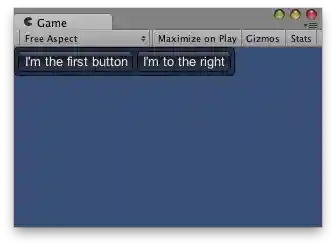
Horizontal Layout.