
Interaction
NodeBox is designed to output PDF documents or images, when you want to do all sorts of moving and interactive things you're probably better off with a tool like Processing.
However, if you do want to experiment with interactivity in NodeBox, there's some built-in support that might be of help to you. This assumes you already know how to make an animation in NodeBox.
Interacting with the mouse
In a NodeBox animation, there are three predefined variables that store the current position of the mouse cursor and the state of the mouse button:
- MOUSEX: the horizontal location of the mouse cursor
- MOUSEY: the vertical location of the mouse cursor
- mousedown: is True when the mouse button is pressed, False otherwise
You would typically use the mousedown variable in an if-statement:
if mousedown:
     # do stuff when the mouse is pressed
else:
     # do stuff when the mouse isn't pressed
Interacting with the keyboard
Three predefined variables store the keys a user is pressing during a NodeBox animation:
- key: the last key pressed
- keycode: the integer keycode of the last key pressed
- keydown: is True when a key is being pressed, False otherwise
The key and keycode variables are updated as long as any key is being pressed.
KEY_UP, KEY_DOWN_ KEY_LEFT, KEY_RIGHT, KEY_BACKSPACE contain the keycodes for the arrow keys and the backspace key.
Example
A fun example is this little sketch application. Simply run the code and draw some stuff on the canvas! 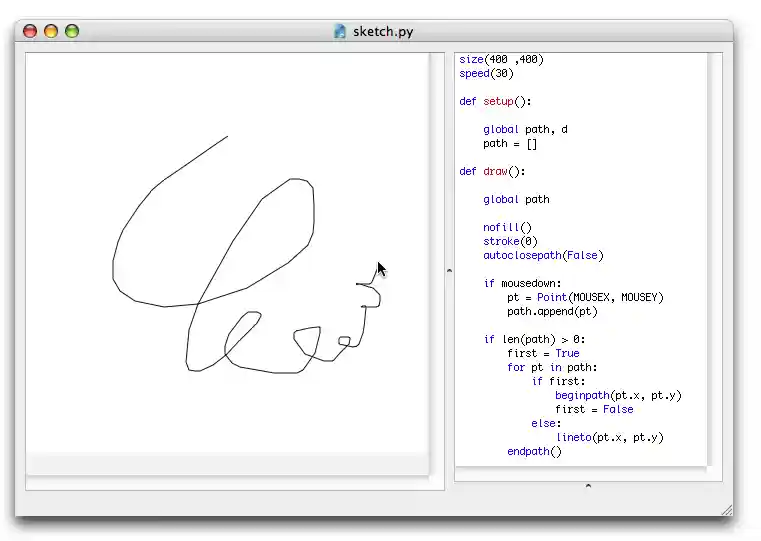
Play movie
size(400 ,400)
speed(30)

def setup():

    global path, d
    path = []

def draw():

    global path

    nofill()
    stroke(0)
    autoclosepath(False)

    if mousedown:
        pt = Point(MOUSEX, MOUSEY)
        path.append(pt)

    if len(path) > 0:
        first = True
        for pt in path:
            if first:
                beginpath(pt.x, pt.y)
                first = False
            else:
                lineto(pt.x, pt.y)
        endpath()