Java 9 Modules - The Root Modules
|
Compiling using javac
D:\unnamed-and-jee-module-example>javac -d out src/com/logicbig/MsgObj.java src/com/logicbig/MsgUnMarshaller.java
src\com\logicbig\MsgObj.java:3: error: package javax.xml.bind.annotation is not visible
import javax.xml.bind.annotation.XmlRootElement;
                     ^
  (package javax.xml.bind.annotation is declared in module java.xml.bind, which is not in the module graph)
src\com\logicbig\MsgUnMarshaller.java:3: error: package javax.xml.bind is not visible
import javax.xml.bind.JAXBContext;
                ^
  (package javax.xml.bind is declared in module java.xml.bind, which is not in the module graph)
src\com\logicbig\MsgUnMarshaller.java:4: error: package javax.xml.bind is not visible
import javax.xml.bind.JAXBException;
                ^
  (package javax.xml.bind is declared in module java.xml.bind, which is not in the module graph)
src\com\logicbig\MsgUnMarshaller.java:5: error: package javax.xml.bind is not visible
import javax.xml.bind.Unmarshaller;
                ^
  (package javax.xml.bind is declared in module java.xml.bind, which is not in the module graph)
4 errors
The above exception messages are clear, the JAXB related classes are not visible to our unnamed module. The reason is, the default set of root modules in java.se does not have 'requires transitive java.xml.bind'.
To fix the exception we have to add the module by using '--add-modules java.xml.bind':
D:\unnamed-and-jee-module-example>javac --add-modules java.xml.bind -d out src/com/logicbig/MsgObj.java src/com/logicbig/MsgUnMarshaller.java
It's compiled this time.
Running using java
Now let's run the main class by using 'java' command:
D:\unnamed-and-jee-module-example>java -cp out com.logicbig.MsgUnMarshaller
Error: Unable to initialize main class com.logicbig.MsgUnMarshaller
Caused by: java.lang.NoClassDefFoundError: javax/xml/bind/JAXBException
This exception is also because of the same reason; the module 'java.xml.bind' has not been imported during runtime. In this case, however, the exception is less intuitive than it was during the compilation.
To fix the exception, we have to use '--add-modules' option with java command also:
D:\unnamed-and-jee-module-example>java --add-modules java.xml.bind -cp out com.logicbig.MsgUnMarshaller
MsgObj{msg='test msg'}
How it was working before Java 9?
JAXB API was working with JDK 8 and older versions without any extra configuration. This API and other Java EE APIs have been bundled with Java SE since version 6. In Java 9, it is decided to separate these Java EE APIs from Java SE via new module system (benefit is, it will reduce the size of JRE so that it can run in smaller devices as well). Currently these APIs have been disabled by default as we saw in above example. Also, the modules which are exporting Java EE API (e.g. java.xml.bind) have been individually deprecated for removal in a future release. The separate and standalone platforms of such modules will be released in future, so the applications and libraries using these APIs can eventually migrate to those platforms.
The java.se.ee module
If your current application uses a lot of Java EE API, it will probably fail if you run it in Java 9. For example, if you are using JPA/Hibernate in your application, it will likely to fail during compiling and running. Rather than figuring out individual required modules, one option could be to use the mixed set of Java SE and Java EE modules declared in java.se.ee module. We can enable this set of root modules via '--add-modules' option. Currently java.se.ee is also included in standard JDK 9 but is not enabled by default. Let's see how this module is declared
@SuppressWarnings({"deprecation", "removal"})
@Deprecated(since="9", forRemoval=true)
module java.se.ee {

    requires transitive java.se;

    // Upgradeable modules for Java EE technologies
    requires transitive java.activation;
    requires transitive java.corba;
    requires transitive java.transaction;
    requires transitive java.xml.bind;
    requires transitive java.xml.ws;
    requires transitive java.xml.ws.annotation;

}
As seen above, this module is deprecated and is subject to removal in a future version of the standard JDK.
Setting --add-modules option in IDE
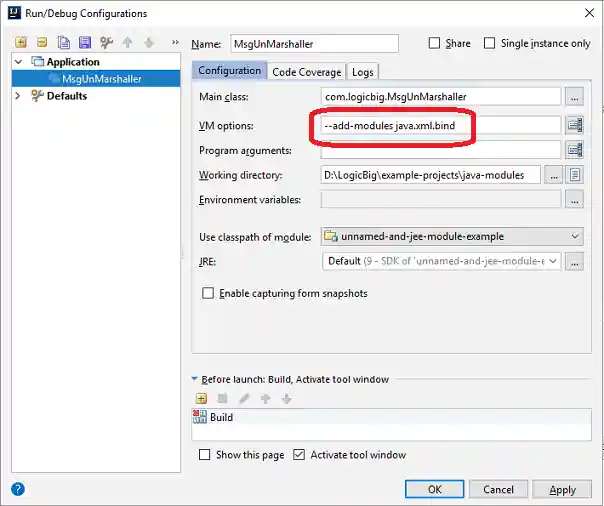
All IDEs have option to set compiler and JVM runtime options. For example in IntelliJ, we can set them as shown:
For compilation:

For running:
Example Project
Dependencies and Technologies Used:
- JDK 9
- unnamed-and-jee-module-example
- src
- com
- logicbig
-
MsgObj.java
-
MsgUnMarshaller.java
-
- logicbig
- com
- src