Java Arrays
Last Updated : 10 Feb 2026
Java arrays are objects that store multiple elements of the same data type in a single, contiguous memory block. In this chapter, we will learn about Java arrays, their types, features, and how to use them in programs.
What is an Array?
An array is a collection of elements of the same type stored in a single, contiguous block of memory. Arrays allow us to group similar data together and access them using an index.
Array in Java
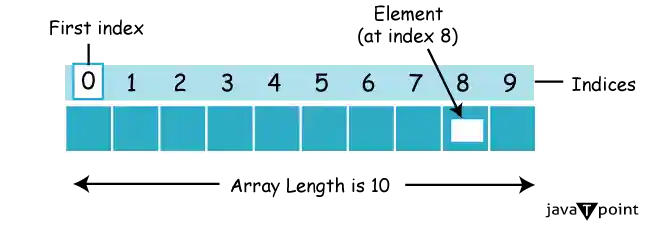
In Java, an array is an object that stores elements of a similar data type in contiguous memory locations. It is a data structure used to store a fixed number of elements.
Arrays in Java are index-based, meaning the first element is at index 0, the second at index 1, and so on.
In Java, an array is considered an object of a dynamically created class. All arrays in Java:
- Implement the Serializable and Cloneable interfaces
- Derive from the Object class
Arrays can store primitive values or objects, and Java supports both single-dimensional and multi-dimensional arrays.
Java also supports anonymous arrays, which are not available in C/C++. This feature allows us to create and pass arrays without explicitly declaring a variable.
Arrays are of two types, single dimensional and multi-dimensional.
Single-Dimensional Array in Java
A single-dimensional array in Java is a linear collection of elements of the same data type. It can be declared and instantiated using the following syntax.
Syntax of Declaring an Array
Below is the syntax to declare a single dimensional array in Java:
Syntax of Instantiation of an Array
Below is the syntax to Instantiate a single dimensional array in Java:
Example of Single Dimensional Array
Let's see the simple example of java array, where we are going to declare, instantiate, initialize and traverse an array.
Output:
Multidimensional Array (Two-Dimensional Array)
A multidimensional array (two-dimensional array) in Java is an array of arrays, where each element of the main array is itself an array. It is used to store data in a table-like structure with rows and columns.
Syntax of Declaring a Two-Dimensional Array
Below is the syntax to declare a two-dimensional array in Java:
Syntax of Instantiation of a Two-Dimensional Array
Below is the syntax to instantiate a two-dimensional array in Java:
or you can combine declaration and instantiation:
Example of Two-Dimensional Array
Let's see a simple example of a two-dimensional array in Java, where we declare, instantiate, initialize, and traverse the array:
Output:
Accessing Array Elements Using For Each Loop
We can access the array elements using for-each loop. The Java for-each loop accesses the array elements one by one. It holds an array element in a variable, then executes the body of the loop.
Syntax
The syntax of the for-each loop is given below:
Let's see the example of printing the elements of the Java array using the for-each loop.
Output:
Passing Array to a Method
We can pass the Java array to the method so that we can reuse the same logic on any array. When we pass an array to a method in Java, we are essentially passing a reference to the array. It means that the method will have access to the same array data as the calling code, and any modifications made to the array within the method will affect the original array.
Let's see the simple example to get the minimum number of an array using a method.
Output:
Explanation
This Java program demonstrates the concept of passing an array to a method. The min method takes an integer array arr as a parameter and finds the minimum element in the array using a simple iterative loop. In the main method, an integer array a is declared and initialized with values {33, 3, 4, 5}, and then the min method is called with this array as an argument. The min method iterates through the array to find the minimum element and prints it to the console.
Anonymous Array
Java's anonymous arrays eliminate the requirement for separate declarations of array variables by enabling developers to build and initialize arrays directly within method calls or other expressions. When working with temporary arrays that are just needed for a single job and don't need a persistent reference within the program, this is quite helpful.
Java supports the feature of an anonymous array, so we do not need to declare the array while passing an array to the method.
Output:
Explanation
In this example, the printArray method takes an integer array as a parameter and prints each element of the array. In the main method, an anonymous array {10, 20, 30} is directly passed as an argument to the printArray method. This concise syntax demonstrates the usage of anonymous arrays in Java, allowing for more streamlined code without the need for intermediate variable declarations.
Returning Array from the Method
In Java, methods are not limited to returning simple data types or objects; they can also return arrays. This feature allows for more flexibility in method design and enables developers to encapsulate complex logic for generating arrays within methods.
Output:
Explanation
The example demonstrates how to return an array from a method in Java and subsequently use the returned array in the calling code. By encapsulating array creation and initialization logic within the get method, the code becomes more modular and reusable.
ArrayIndexOutOfBoundsException
In Java, the ArrayIndexOutOfBoundsException is a runtime exception thrown by the Java Virtual Machine (JVM) when attempting to access an invalid index of an array. This exception occurs if the index is negative, equal to the size of the array, or greater than the size of the array while traversing the array.
Example
The following example demonstrates ArrayIndexOutOfBoundsException in Java array:
Output:
Exception in thread "main" java.lang.ArrayIndexOutOfBoundsException: 4
	at TestArrayException.main(TestArrayException.java:5)
50
60
70
80
Jagged Arrays
In Java, a jagged array is an array of arrays where each row of the array can have a different number of columns. This contrasts with a regular two-dimensional array, where each row has the same number of columns.
Declaring and Initializing a Jagged Array
To declare a jagged array in Java, you first declare the array of arrays, and then you initialize each row separately with its own array of columns.
Example
The following example demonstrates the use of jagged array in Java:
Output:
Explanation
This Java program demonstrates the concept of a jagged array, where an array of arrays is created, with each inner array having a different number of columns. Initially, a 2D array named arr is declared with 3 rows, but with each row having a different number of columns: the first row has 3 columns, the second row has 4 columns, and the third row has 2 columns. The program then initializes the jagged array by filling it with sequential values starting from 0. Finally, it iterates through the array and prints out each element, row by row, separated by a space, with a newline character indicating the end of each row.
Arrays as Objects
In Java, an array is an object. However, arrays have a special feature in Java where the JVM generates a proxy class for each array object. This proxy class represents the runtime type of the array. To obtain the class name of a Java array, you can use the getClass().getName() method, which is available on all Java objects. This method returns a String representing the fully qualified name of the class of the object, including any package information.
Example
The following example shows how to get the runtime class name of an array in Java using the getClass().getName() method.
Output:
Explanation
This Java program demonstrates how to retrieve the class name of an array in Java using the getClass().getName() method. It initializes an array arr with integer values, obtains the runtime class of the array using getClass(), and retrieves the class name using getName(). The obtained class name, typically represented by a single character followed by square brackets, reflects the dimensionality and type of elements in the array.
Copying Arrays
Copying an array in Java can be achieved using the arraycopy() method of the System class. This method allows you to copy elements from a source array to a destination array with a specified starting position and length.
Syntax of arraycopy() method
Below is the syntax of arraycopy() method:
Here, src is the source array, srcPos is the starting position in the source array, dest is the destination array, destPos is the starting position in the destination array, and length is the number of elements to be copied.
Example
The following example demonstrates how to copy elements from one array to another in Java using the System.arraycopy() method.
Output:
Explanation
The Java program initializes two character arrays, copyFrom and copyTo, with predefined values. It then utilizes the System.arraycopy() method to copy a portion of the copyFrom array into the copyTo array, starting from index 2 and copying 7 elements. Finally, it prints the contents of the copyTo array, resulting in the output "caffein".
Cloning an Array
In Java, arrays implement the Cloneable interface, allowing us to create clones of arrays. If we create a clone of a single-dimensional array, it creates a deep copy of the Java array. It means it will copy the actual value. But, if we create the clone of a multidimensional array, it creates a shallow copy of the Java array, which means it copies the references.
This distinction is important because modifying elements in a shallow copied multidimensional array will affect both the original and cloned arrays, while in a deep copied single-dimensional array, modifications will not impact the original.
Example
The following example demonstrates the closing of an array in Java:
Output:
Printing original array:
33
3
4
5
Printing clone of the array:
33
3
4
5
Are both equal?
False
Explanation
An integer array called arr is initialised with the numbers {33, 3, 4, 5} in this Java programme, and its elements are printed. Then, it uses the clone() method to duplicate arr, assigns the result to carr, and prints the items of the duplicated array. The last line of the programme compares arr and carr using the == operator; the result evaluates to false, meaning that arr and carr are distinct array objects. The elements in both arrays, though, are the same.
Addition Two Multidimensional Arrays (Two Matrices)
A fundamental operation in linear algebra and computer science, matrix addition is frequently utilised in a variety of applications, including scientific computing, computer graphics, and image processing. To create a new matrix with the same dimensions as the original, matching elements from each matrix must be added when adding two matrices in Java. This Java program shows how to add matrices effectively by using stacked loops to do a basic example of the process.
Example
Let's see a simple example that adds two matrices.
Output:
Explanation
This Java program demonstrates matrix addition by adding two predefined matrices, a and b, element-wise and storing the result in matrix c. The matrices a and b are initialized with values, and matrix c is created to store the sum. It iterates through each element of the matrices using nested loops, adding corresponding elements from a and b and storing the result in the corresponding position in c. Finally, it prints the resulting matrix c. The output displays the element-wise addition of the two matrices, with each element in the resulting matrix c being the sum of the corresponding elements in a and b.
Multiplication Two Multidimensional Arrays (Two Matrices)
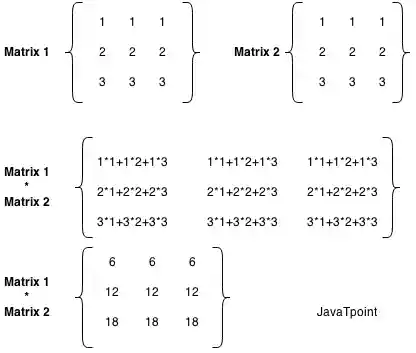
Matrix multiplication is a crucial operation in mathematics and computer science, often utilized in various applications such as graphics rendering, optimization algorithms, and scientific computing. In Java, multiplying two matrices involves a systematic process where each element in the resulting matrix is computed by taking the dot product of a row from the first matrix and a column from the second matrix.
Example
The following example demonstrates multiplication of two matrices:
Output:
Explanation
This Java program computes the multiplication of two 3x3 matrices, 'a' and 'b', storing the result in matrix 'c'. It initializes matrices 'a' and 'b' with predefined values and creates matrix 'c' to store the result. Using nested loops, it iterates through each element of the resulting matrix 'c', calculating the dot product of corresponding row and column elements from matrices 'a' and 'b'. The computed result for each element is accumulated in the corresponding position of 'c'.
Arrays Programs
The following are the important arrays programs in Java:
- Java Program to copy all elements of one array into another array
- Java Program to find the frequency of each element in the array
- Java Program to left rotate the elements of an array
- Java Program to print the duplicate elements of an array
- Java Program to print the elements of an array
- Java Program to print the elements of an array in reverse order
- Java Program to print the elements of an array present on even position
- 8) Java Program to print the elements of an array present on odd position
- Java Program to print the largest element in an array
- Java Program to print the smallest element in an array
- Java Program to print the number of elements present in an array
- Java Program to print the sum of all the items of the array
- Java Program to right rotate the elements of an array
- Java Program to sort the elements of an array in ascending order
- Java Program to sort the elements of an array in descending order
- Find 3rd Largest Number in an Array
- Find 2nd Largest Number in an Array
- Find Largest Number in an Array
- Find 2nd Smallest Number in an Array
- Find Smallest Number in an Array
- Remove Duplicate Element in an Array
- Add Two Matrices
- Multiply Two Matrices
- Print Odd and Even Number from an Array
- Transpose matrix
- Java Program to subtract the two matrices
- Java Program to determine whether a given matrix is an identity matrix
- Java Program to determine whether a given matrix is a sparse matrix
- Java Program to determine whether two matrices are equal
- Java Program to display the lower triangular matrix
- Java Program to display the upper triangular matrix
- Java Program to find the frequency of odd & even numbers in the given matrix
- Java Program to find the product of two matrices
- Java Program to find the sum of each row and each column of a matrix
- Java Program to find the transpose of a given matrix