C++ Break Statement
Last Updated : 10 Jan 2026
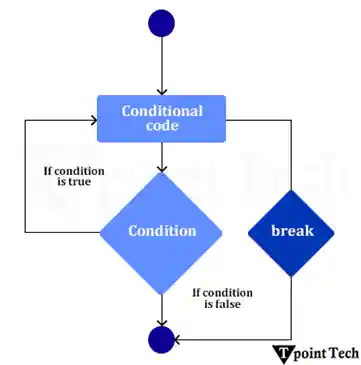
In C++, a break statement is used to break loop or switch statements. It breaks the current flow of the program at the given condition. In the case of the inner loop, it breaks only the inner loop.
In other words, the break statement works as a jump statement throughout C++ code specifically for early termination of loops and switch statements. The break statement ends the nearest loop or switch statement before it can continue control at the next following statement. The break statement functions best for exiting loops, and switch cases to achieve better efficiency as well as improved understanding ability of the code.
Syntax
It has the following syntax:
Flow Diagram of Break Statement:
Basic Example of C++ Break Statement
Let us take a basic example to illustrate the break statement in C++.
Output:
Working of Break Statement in C++
Here, we will discuss the usage of break statements with different types of loops. Some of them are as follows:
1. Simple Loops (for, while, do-while)
Loops should end when a particular condition matches (for, while, and do-while) to terminate execution.
- Break Statement with for Loop
In C++, a break statement within a for loop is very useful when the number of iterations is known.
Syntax:
It has the following syntax:
Example:
Let us take an example to illustrate the break statement using for loop in C++.
Output:
i = 1
i = 2
i = 3
i = 4
i = 5
Loop breaks at i = 6
Loop ended!
Explanation:
In this example, we have taken a for loop that starts from i=1 and executes up to 10. When (i=6), the break statements jump the loops at that time. After that, the program does not print value from 6 to 10 because the loop is terminated.
- Break Statement with While Loop
In C++, a break statement within a while loop is very useful when the number of iterations is unknown but depends on a condition.
Syntax:
It has the following syntax:
Example:
Let us take an example to illustrate the break statement using while loop in C++.
Output:
Enter a positive number: 6
The Factorial of 6 is: 720
Explanation:
In this example, the program asks the user to input a number. If the number is negative, it exits the loop because factorial is undefined for the negative numbers. After that, a while (true) infinite loop is utilized in the program.
The break statement stops the loop when 1 reaches 1. In the end, the factorial is calculated by multiplying numbers from num down to 1.
- Break Statement with do-while Loop
In C++, a break statement within a do-while loop executes at least once before checking the condition. The break statement can be used to exit the loop prematurely, regardless of the condition.
Syntax:
It has the following syntax:
Example:
Let us take an example to illustrate the break statement within a do-while loop in C++.
Output:
Iteration: 3
Iteration: 4
Iteration: 5
Break the loop at i = 5
Loop exited.
Explanation:
In this example, the do-while loop executes at least once before checking the condition, even if the condition is initially false. If the break_condition is matched, the break statement terminates the loops quickly.
2. Break Statement with Nested Loops
In C++, we may utilize the break statement while working with the nested loops. When it is utilized inside the nested loop, it only terminates the innermost loops. The control will come out only from the innermost loop.
Syntax:
It has the following syntax:
Example:
Let us take an example to illustrate the Break statement in the nested loop in C++.
Output:
1 1
1 2
1 3
2 1
3 1
3 2
3 3
3. C++ Break Statement with Inner Loop:
The C++ break statement breaks the inner loop only if we use the break statement inside the inner loop.
Output:
1 1
1 2
1 3
2 1
3 1
3 2
3 3
4. Break statement with Infinity Loop
In C++, the break statement may be used in an infinite loop with a condition to terminate the execution of the infinite loop.
Output:
Iteration: 4
Breaking the loop...
Loop exited successfully.
Explanation:
In this example, we have taken an infinite loop using a while(true) condition. After that, the counter starts from 1 and increments in every iteration. When the condition count == 4, the if condition is matched, and the break statement exits the loop. After that, it prints the output in the console.
5. Break Statement in Switch Case:
In C++, the break statement in a switch case is utilized to exit the switch block after executing a matching case. Without a break statement, the execution will continue to the next case (called fall-through behavior), which is usually not desired.
Syntax:
It has the following syntax:
Output:
Advantages of Break Statement:
Several advantages of Break statement in C++ are as follows:
- Efficient code operation becomes possible because unnecessary iterations are stopped, which results in shorter execution time.
- The statement indicates how to terminate execution to improve readability.
- It enables loop termination at any time when the specified condition becomes true.
Conclusion
In conclusion, program execution in C++ can be controlled by the break statement, which provides a mechanism to exit loops and switch cases under certain programmed conditions. The ability to predict how break statements operate in various coding situations directly affects code optimization and operational efficiency. Break statements require attentive usage to preserve code readability and prevent confusion in programming.