Java ArrayList
Last Updated : 26 Mar 2026
Java ArrayList is used to store and manage a collection of data that can grow or shrink dynamically.
In Java, traditional arrays have a fixed size, which makes them less flexible. To solve this problem, ArrayList provides a dynamic way to store elements that allow you to add or remove items easily without worrying about size.
What is Java ArrayList?
ArrayList is a resizable (dynamic) array that is part of the Java Collections Framework. It allows you to store elements dynamically without worrying about the initial size.
Unlike standard arrays, an ArrayList automatically adjusts its capacity as elements are added or removed.
- It belongs to the java.util package
- It provides flexibility and ease of use
- It behaves similarly to dynamic arrays in other programming languages
The ArrayList in Java can also have duplicate elements. It implements the List interface so that we can use all the methods of the List interface here. The ArrayList maintains the insertion order internally.
It inherits the AbstractList class and implements List interface.
Key Features of Java ArrayList
The ArrayList provides several useful features that make it flexible and easy to use for storing and managing data dynamically.
- Maintains Insertion Order: Java ArrayList guarantees the order in which elements are fed into it. When going through the ArrayList with the iterating process, elements are accessed in the same sequence they were added.
- Non-Synchronized: Unlike some other Java collection classes (for instance, Vector), ArrayList is not synchronized. This fact implies that ArrayList is not thread-safe; therefore, concurrent modification issues might arise if multiple threads access ArrayList concurrently.
- Supports Random Access: ArrayList allows the implementation of fast random access operations using the elements' index positions. This is because an array structure is used for internal implementation, which ensures constant-time access to elements via index.
- Slower Manipulation compared to LinkedList: Manipulation operations, such as insertion and deletion, can be slower in ArrayList than in LinkedList. Thus, ArrayList has to perform the shifting of the elements when items are inserted or removed from anywhere except the end of the list. However, it is effortless to add or delete an element in a LinkedList, and no shifting will be needed.
- Requires Wrapper Classes for Primitive Types: ArrayList does not have a direct support for primitive data types such as `int`, `float`, and `char`. Instead, it requires the wrapper classes like `Integer`, `Float`, `Character`, etc., to hold for these primitive types. For example:
- Dynamic Resizing: ArrayList expands or contracts when adding or removing elements to meet the required new size. Due to adaptive resizing, online collections can be managed without physical resizing.
- Capacity: ArrayList has an initial capacity, which is the number of elements it can keep without reallocation. If the number of elements cannot fit into this capacity, the List automatically enlarges the size to accommodate the rest of the elements. Copying all the elements to the new, larger array may be involved.
- Iterable: ArrayList implements the `Iterable` interface. Therefore, we can easily iterate the elements using enhanced for loops or iterators.
- Dynamic Initialization: Java ArrayList is initialized without specifying its size. Unlike traditional arrays, where you must declare a fixed size, ArrayList dynamically adjusts its size based on the number of elements added or removed. This dynamic sizing eliminates the need to preallocate memory or worry about exceeding array bounds, providing more flexibility in managing collections.
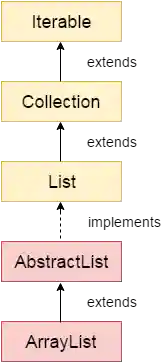
Hierarchy of ArrayList Class
The Java ArrayList class is part of the Java Collections Framework and follows a hierarchical structure.
- ArrayList extends the AbstractList class
- AbstractList implements the List interface
- The List interface extends the Collection interface
- The Collection interface further extends the Iterable interface
This hierarchy allows ArrayList to inherit useful methods and support features like iteration, dynamic storage, and collection operations.
The below image shows the hierarchy of the ArrayList class:
ArrayList Class Declaration
Let's see the declaration of the java.util.ArrayList class:
Explanation:
- public class ArrayList<E>:
This declares the ArrayList class as a generic class. The type parameter <E> represents the type of elements stored in the ArrayList, allowing it to store any object type. - extends AbstractList<E>:
This means ArrayList is a subclass of AbstractList. The AbstractList class provides a basic implementation of the List interface. - implements List<E>:
This indicates that ArrayList implements the List interface, which defines methods for ordered collections. - implements RandomAccess:
This is a marker interface that indicates ArrayList supports fast (constant-time) random access using an index. - implements Cloneable:
This means ArrayList objects can be cloned using the clone() method. - implements Serializable:
This allows ArrayList objects to be converted into a byte stream, so they can be saved to a file or transferred over a network.
Constructors of the ArrayList Class
ArrayList provides multiple constructors that allow you to create a list with a default size, a specified initial capacity, or by copying elements from another collection.
| Constructor | Description |
|---|---|
| ArrayList() | It is used to build an empty array list. |
| ArrayList(Collection<? extends E> c) | It is used to build an array list that is initialized with the elements of the collection c. |
| ArrayList(int capacity) | It is used to build an array list that has the specified initial capacity. |
Methods of the ArrayList Class
ArrayList provides various methods to add, remove, access, and manipulate elements within the list.
| Method | Description |
|---|---|
| void add(int index, E element) | It is used to insert the specified element at the specified position in a list. |
| boolean add(E e) | It is used to append the specified element at the end of a list. |
| boolean addAll(Collection<? extends E> c) | It is used to append all of the elements in the specified collection to the end of this list, in the order that they are returned by the specified collection's iterator. |
| boolean addAll(int index, Collection<? extends E> c) | It is used to append all the elements in the specified collection, starting at the specified position of the list. |
| void clear() | It is used to remove all of the elements from this list. |
| void ensureCapacity(int requiredCapacity) | It is used to enhance the capacity of an ArrayList instance. |
| E get(int index) | It is used to fetch the element from the particular position of the list. |
| boolean isEmpty() | It returns true if the list is empty, otherwise false. |
| Iterator() | Returns an iterator over the elements in the ArrayList in proper sequence. Allows sequential access to the elements in the ArrayList. |
| listIterator() | Returns a list iterator over the elements in the ArrayList in proper sequence. Allows bidirectional access to the elements in the ArrayList, including adding, removing, and modifying elements during iteration. |
| int lastIndexOf(Object o) | It is used to return the index in this list of the last occurrence of the specified element, or -1 if the list does not contain this element. |
| Object[] toArray() | It is used to return an array containing all of the elements in this list in the correct order. |
| <T> T[] toArray(T[] a) | It is used to return an array containing all of the elements in this list in the correct order. |
| Object clone() | It is used to return a shallow copy of an ArrayList. |
| boolean contains(Object o) | It returns true if the list contains the specified element. |
| int indexOf(Object o) | It is used to return the index in this list of the first occurrence of the specified element, or -1 if the List does not contain this element. |
| E remove(int index) | It is used to remove the element present at the specified position in the list. |
| boolean remove(Object o) | It is used to remove the first occurrence of the specified element. |
| boolean removeAll(Collection<?> c) | It is used to remove all the elements from the list. |
| boolean removeIf(Predicate<? super E> filter) | It is used to remove all the elements from the list that satisfies the given predicate. |
| protected void removeRange(int fromIndex, int toIndex) | It is used to remove all the elements lies within the given range. |
| void replaceAll(UnaryOperator<E> operator) | It is used to replace all the elements from the list with the specified element. |
| void retainAll(Collection<?> c) | It is used to retain all the elements in the list that are present in the specified collection. |
| E set(int index, E element) | It is used to replace the specified element in the list, present at the specified position. |
| void sort(Comparator<? super E> c) | It is used to sort the elements of the list on the basis of the specified comparator. |
| Spliterator<E> spliterator() | It is used to create a spliterator over the elements in a list. |
| List<E> subList(int fromIndex, int toIndex) | It is used to fetch all the elements that lies within the given range. |
| int size() | It is used to return the number of elements present in the list. |
| void trimToSize() | It is used to trim the capacity of this ArrayList instance to be the list's current size. |
Iterating ArrayList using Iterator
You can traverse an ArrayList using an Iterator. It provides a safe way to loop through elements, especially when modifying the list during iteration.
Example
This example demonstrates how to iterate through an ArrayList using the Iterator interface in Java.
Output:
Mango
Apple
Banana
Grapes
Iterating ArrayList using For-each loop
The for-each loop (enhanced for loop) provides a simple and readable way to iterate through elements of an ArrayList.
Example
This example shows how to traverse an ArrayList using the for-each loop in a simple and readable way.
Output:
Mango
Apple
Banana
Grapes
Get and Set Elements in ArrayList
You can access and modify elements in an ArrayList using the get() and set() methods.
- get(index): This method retrieves element at a specific index
- set(index, value): This method replaces element at a specific index
Example
This example explains how to access and modify elements in an ArrayList using the get() and set() methods.
Output:
Returning element: Apple
Mango
Dates
Banana
Grapes
How to Sort ArrayList
You can sort an ArrayList using the Collections.sort() method from the java.util package.
Example
This example demonstrates how to sort elements of an ArrayList using the Collections.sort() method.
Output:
Apple
Banana
Grapes
Mango
Sorting numbers...
1
11
21
51
Iterating Collection through Other Ways
You can traverse an ArrayList using multiple methods like ListIterator, for loop, forEach(), and forEachRemaining().
Example
This example demonstrates different ways to iterate through an ArrayList.
Output:
ListIterator (reverse):
Ajay
Ravi
Vijay
Ravi
For loop:
Ravi
Vijay
Ravi
Ajay
forEach():
Ravi
Vijay
Ravi
Ajay
forEachRemaining():
Ravi
Vijay
Ravi
Ajay
User-defined Class Objects in ArrayList
ArrayList can store objects of user-defined classes, making it useful for managing custom data.
Example
This example demonstrates how to store and access user-defined class objects in an ArrayList.
Output:
101 Sonoo 23
102 Ravi 21
103 Hanumat 25
ArrayList Serialization and Deserialization
Serialization converts an object into a byte stream, while deserialization restores it back.
Example
This example demonstrates how to serialize and deserialize an ArrayList.
Output:
Adding Elements in ArrayList
You can add elements using methods like add() and addAll().
Example
This example demonstrates different ways to add elements to an ArrayList.
Output:
[Ravi, Gaurav, Vijay, Ajay, Sonoo, Hanumat]
Removing Elements from ArrayList
ArrayList provides multiple methods to remove elements.
Example
This example demonstrates different ways to remove elements from an ArrayList.
Output:
ArrayList - retainAll() Method
The retainAll() method keeps only common elements between two collections.
Example
This example demonstrates how to retain common elements in an ArrayList.
Output:
ArrayList isEmpty() Method
The isEmpty() method checks whether the ArrayList is empty.
Example
This example demonstrates how to check if an ArrayList is empty.
Output:
ArrayList Example with Book Class
ArrayList can store complex objects like books.
Example
This example demonstrates how to store and display objects in an ArrayList.
Output:
Size and Capacity of ArrayList
Size is the number of elements in the list, while capacity is the internal storage size.
Example
This example demonstrates the difference between size and capacity of an ArrayList.
Output:
Explanation: The output makes sense as we have not done anything with the array list. Now observe the following program.