Java HashSet
Last Updated : 27 Mar 2026
In Java, a HashSet is a part of the Collections Framework that uses a hashing mechanism to store elements uniquely, whereas it does not maintain insertion order and focuses on fast search and retrieval operations.
In this chapter, we will learn about the Java HashSet class, its features, internal working using hashing, and how it differs from other collection types like List.
What is Java HashSet?
The HashSet class is used to create a collection that stores elements using a hash table. It extends the AbstractSet class and implements the Set interface.
HashSet stores elements based on their hash codes, which allows fast operations such as insertion, deletion, and searching. It only allows unique elements that means duplicate values are not permitted. It also allows one null value.
Additionally, HashSet is not synchronized and does not maintain insertion order. The elements are stored based on their hash codes, so the order may appear random.
Some important points about HashSet:
- Uses hashing mechanism for storage
- Stores unique elements only
- Allows one null value
- Not synchronized
- Does not maintain insertion order
- Default initial capacity is 16
- Default load factor is 0.75
- Provides better performance for search operations
Difference Between List and Set
The main difference between a List and a Set lies in how they store elements and handle duplicates.
A List allows duplicate elements and maintains insertion order, whereas a Set does not allow duplicate elements and may not maintain any order (in case of HashSet).
List is suitable when we need ordered data and duplicates, whereas Set is preferred when we need unique elements and faster search operations.
In terms of performance, HashSet generally provides better performance for search operations compared to List because it uses hashing internally, while List relies on index-based or sequential access.
Hierarchy of HashSet class
The HashSet class is a part of the Java Collections Framework. It extends the AbstractSet class and implements the Set interface, which further inherits from the Collection and Iterable interfaces. In simple terms, the hierarchy follows this order: Iterable → Collection → Set → AbstractSet → HashSet.
A HashSet is used to store a collection of unique elements, meaning it does not allow duplicates. Internally, it uses a HashMap where each element is stored as a key. It uses the hash code of elements to store and retrieve data efficiently, which makes operations like add, remove, and search very fast. HashSet allows only one null value and is not synchronized.
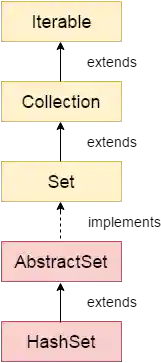
Another important point is that HashSet does not maintain insertion order, so elements may appear in random order. If we need to maintain order, we can use LinkedHashSet. Also, if a duplicate element is added, it is ignored, and the add() method returns false.
HashSet Class Declaration
Constructors of Java HashSet Class
Constructors of HashSet Class
The HashSet class provides different constructors to create a HashSet with default or specified capacity and load factor.
1. HashSet()
This constructor creates a default HashSet with initial capacity 16 and load factor 0.75.
Here is the syntax:
2. HashSet(int capacity)
This constructor creates a HashSet with the specified initial capacity. The capacity increases automatically as elements are added.
Here is the syntax:
3. HashSet(int capacity, float loadFactor)
This constructor creates a HashSet with the specified initial capacity and load factor.
Here is the syntax:
4. HashSet(Collection c)
This constructor creates a HashSet containing the elements of the specified collection.
Here is the syntax:
Methods of Java HashSet Class
The following table contains the commonly used methods of the HashSet class along with their descriptions.
| SN | Modifier & Type | Method | Description |
|---|---|---|---|
| 1) | boolean | add(E e) | It is used to add the specified element to this set if it is not already present. |
| 2) | void | clear() | It is used to remove all of the elements from the set. |
| 3) | object | clone() | It is used to return a shallow copy of this HashSet instance: the elements themselves are not cloned. |
| 4) | boolean | contains(Object o) | It is used to return true if this set contains the specified element. |
| 5) | boolean | isEmpty() | It is used to return true if this set contains no elements. |
| 6) | Iterator<E> | iterator() | It is used to return an iterator over the elements in this set. |
| 7) | boolean | remove(Object o) | It is used to remove the specified element from this set if it is present. |
| 8) | int | size() | It is used to return the number of elements in the set. |
| 9) | Spliterator<E> | spliterator() | It is used to create a late-binding and fail-fast Spliterator over the elements in the set. |
HashSet Example
A HashSet stores elements in an unordered manner and uses hashing for fast operations like add and search.
The following example demonstrates how to create a HashSet and iterate its elements.
Output:
Ignoring Duplicate Elements
HashSet does not allow duplicate elements. If a duplicate value is added, it is ignored.
Example
The following example demonstrates that duplicate elements are not stored in a HashSet.
Output:
Removing Elements from HashSet
We can remove elements from a HashSet using methods like remove(), removeAll(), removeIf(), and clear().
Example
The following example demonstrates different ways to remove elements from a HashSet.
Output:
An initial list of elements: [Vijay, Ravi, Arun, Sumit]
After invoking remove(object) method: [Vijay, Arun, Sumit]
Updated List: [Vijay, Arun, Gaurav, Sumit, Ajay]
After invoking removeAll() method: [Vijay, Arun, Sumit]
After invoking removeIf() method: [Arun, Sumit]
After invoking clear() method: []
Creating HashSet from Another Collection
We can create a HashSet using another collection like ArrayList.
Example
The following example demonstrates how to create a HashSet from an existing collection.
Output:
Complete Example of HashSet with Custom Objects
We can store custom objects in a HashSet and traverse them like normal elements.
Example
The following example demonstrates how to store and display custom objects in a HashSet.
Output:
101 Let us C Yashwant Kanetkar BPB 8
102 Data Communications & Networking Forouzan Mc Graw Hill 4
103 Operating System Galvin Wiley 6
Complete Example of HashSet Features
This example demonstrates multiple features like iteration, conversion, and storing custom objects.
Example
The following example demonstrates various functionalities of HashSet in Java.
Output:
HashSet: [Rahul, Amit, Priya]
Rahul Amit Priya
Array: [Rahul, Amit, Priya]
Custom Objects: [Rahul 30, Priya 25]