String format()
Java String.format() Method
Last Updated : 17 Mar 2025
In Java, string formatting enables programmers to produce dynamic, readable, and organized strings. There are multiple methods in Java for formatting strings, but the most popular and effective one is String.format() method.
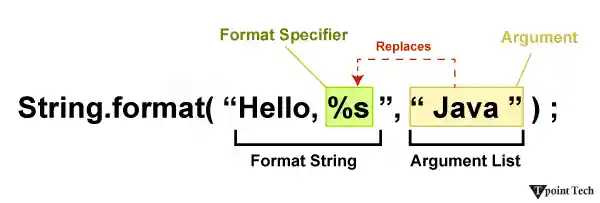
String.format() Method
The static String.format() method uses the specified format for string and arguments to return a formatted string. It is comparable to C programming's printf() function. It returns a formatted string.
Java String class provides the following two variants of the format() method:
and,
Parameters
- locale: It is applied during formatting. If l is null then no localization is applied. It is optional.
- format: Text and format specifiers are contained in a format string.
- args: A variable quantity of arguments that will be formatted in accordance with the format specifiers. The number of arguments is variable and may be zero.
Exception: The method throws IllegalFormatException if a format string contains an illegal syntax, a format specifier that is incompatible with the given arguments, insufficient arguments given the format string, or other illegal conditions.
Internal Implementation
Example: String Format
Java String class format() method provides following two variants:
The Locale.US parameter specifies that the formatting should follow the convention of the United States locale.
The format number is "Hello, %s! You have %d new messages. Two formats are specified: %s for string and %d for integer."
The arguments "John" and 5 correspond to the %s and %d format specification, respectively.
The method returns a formatted string, which is then printed to the console.
Understanding these parameters and exceptions is important to properly use the String.format() method in Java, ensuring proper formatting and handling possible errors.
Java String Format Specifiers
The following table provides the format specifiers supported by the Java String.
| Format Specifier | Data Type | Output |
|---|---|---|
| %a | float (except BigDecimal) | Returns Hex output of floating point number. |
| %b | Any type | "true" if non-null, "false" if null |
| %c | char | Unicode character |
| %d | int (including byte, short, int, long, bigint) | Decimal Integer |
| %e | float | decimal number in scientific notation |
| %f | float | decimal number |
| %g | float | decimal number, possibly in scientific notation depending on the precision and value. |
| %h | any type | Hex String of value from hashCode() method. |
| %n | None | Platform-specific line separator. |
| %o | int (including byte, short, int, long, bigint) | Octal number |
| %s | any type | String value |
| %t | Date/Time (including long, Calendar, Date and TemporalAccessor) | %t is the prefix for Date/Time conversions. More formatting flags are needed after this. See Date/Time conversion below. |
| %x | int (including byte, short, int, long, bigint) | Hex string. |
Example-1: String.format() Method
Example
Output:
name is Andrew
value is 32.334340
value is                  32.334340000000
Explanation:
sf1 formats a string with the placeholder %s, resulting in "name is Andrew".
sf2 formats a float with %f, resulting in "value is 32.334340".
sf3 formats a float with a minimum width of 32 characters and 12 decimal places using %32.12f, resulting in "value is 32.334340000000
These examples illustrate how `String.format()` allows us to format strings with placeholders and control the appearance of numeric values, including specifying minimum widths and precision for floating-point numbers.
Example-2: String.format() Method
The method supports various data types and formats them into a string type.
Example
Output:
101
Alice
101.000000
65
c
Explanation:
str1 formats an integer using %d, resulting in the string "101".
str2 formats a string using %s, resulting in "Alice".
str3 formats a float using %f, resulting in "101.000000".
str4 formats an integer as hexadecimal using %x, resulting in "65" (101 in hexadecimal).
str5 formats a character using %c, resulting in "c".
These examples demonstrate how different data types can be formatted using the String.format() method, providing versatility in formatting output according to your needs.
Example-2: String.format() Method
Apart from formatting, we can set width, padding etc. of any value. Let's see an example where we are setting width and padding for an integer value.
Example
Output:
101
|       101|
|101       |
| 101|
|0000000101|
Explanation:
str1 formats an integer using %d, resulting in the string "101".
str2 formats an integer with a minimum width of 10 characters, right-aligned, resulting in "| 101|".
str3 formats an integer with a minimum width of 10 characters, left-aligned, resulting in "|101 |".
str4 formats an integer with a space before positive numbers, resulting in "| 101|".
str5 formats an integer with a minimum width of 10 characters, filled with leading zeroes, resulting in "|0000000101|".
These examples demonstrate various formatting options available in Java's String.format() method, allowing you to control the appearance of integers within strings.
Java String Format Specifiers
Format specifiers in Java's String.format() method allows us to control how data is displayed within a formatted string. Here are some common use cases for format specifiers:
Formatting Numbers
| Format Specifiers | Description |
|---|---|
| %d | Formats an integer number. |
| %f | Formats a floating-point number. |
| %e, %E | Formats a floating-point number in scientific notation. |
| %x, %X | Formats an integer number in hexadecimal. |
| %o | Formats an integer number in octal. |
Example:
Output: Integer: 42, Float: 3.14
Formatting Strings
%s: Formats a string.
Example:
Output: Hello, Alice!
Formatting Booleans
%b: Formats a boolean value.
Example:
Output: Is Admin: true
Formatting Characters
%c: Formats a character.
Example:
Output: Grade: A
Specifying Width and Precision
We can specify the minimum width and precision of the formatted output.
Example:
Output: Value: 123
Date and Time Formatting (Using %t)
%t followed by a conversion character formats date and time values.
Conversion characters include:
| Format Specifiers | Description |
|---|---|
| %tA | Full name of the day of the week |
| %tB | Full name of the month |
| %td | Day of the month (2-digit) |
| %tm | Month (2-digit) |
| %tY | Year (4-digit) |
| %tH | Hour of the day (24-hour format) |
| %tM | Minute |
| %tS | Second |
Example: Date and Time Speccifier
Output: Today's date is Sunday, 06 February 2024
These are just a few examples of how format specifiers can be used in Java's String.format() method. They provide a powerful mechanism for formatting data dynamically within strings.
Locale-Specific Formatting
The String.format() method has an overloaded version that accepts a Locale object, which is crucial for internationalization.
Syntax:
Example: Locale Specific Formatting
Example
Output:
Salary: $123,456.78
Gehalt: 123.456,78€
Salaire : 123 456,78 €
Performance Considerations
Despite its strength, String.format()'s overhead of parsing the format string and generating a new Formatter object makes it less efficient than other approaches for basic string building. Simple options for basic concatenations are the + operator or StringBuilder. String.format() provides the best readability, maintainability, and functionality for complex formatting.
Template Literals (Text Blocks)
They are essentially a type of string formatting for multi-line strings, which were introduced in Java 15. They enhance the readability of intricate, multi-line string templates, but they are not a direct substitute for String.format(). Text blocks can be used with String.format().
Example
Output:
Hello Alice! Welcome to London. We hope you enjoy your stay.
Explanation
The new feature makes it easier to create and manage multi-line strings, especially when dealing with JSON, XML, or SQL queries. The String.formatted() method on the string itself is a convenient way to apply String.format() to a text block.
Features of the String.format() Method
To specify width and precision: We can specify a minimum width and precision in the formatted output.
Specifying the Argument Index: We can specify the index of the arguments that we want to sort.
Local support: We can specify a location to apply local policy-specific rules.
Why String.format() method in Java?
Readability: Improves the readability of your code by separating the format from the data.
Localization: Facilitates localization by allowing the user to easily convert formats based on locality.
Dynamic Formatting: Enables dynamic formatting of a string based on runtime data.
Conclusion
The String.format() method in Java provides a simple way to create a sorted string with placeholders. By using format specifiers and arguments, we can easily create complex textual output. Whether we are creating simple messages or formatting complex data, String.format() gives you the flexibility and readability we need.
Java String Format MCQs
1. The format specifiers _______ are used to format a string with a floating-point number and a decimal integer, respectively.
- %f and %d
- %d and %f
- %s and %f
- %c and %d
Answer: a)
Explanation: %f is used for floating-point numbers, and %d is used for decimal integers.
2. To left-justify the output within a given width, use the _______ flag in String.format().
- +
- 0
- -
- (
Answer: c)
Explanation: A format specifier flag that left-justifies the output is the - flag.
3. Which method is most suitable for building a string from a list of elements with a delimiter, such as creating a CSV string from a List<String>?
- append()
- format()
- join()
- concat()
Answer: c)
Explanation: String.join() was created for this use case, offering a neat and effective method of concatenating a group of strings with a given delimiter.
4. The _____ class is a better choice for managing intricate, locale-specific messages, especially for internationalization (i18n).
- util.Formatter
- text.MessageFormat
- lang.StringBuilder
- util.Locale
Answer: b)
Explanation: MessageFormat is designed to produce localizable formatted messages that handle variations such as pluralization and gender-specific wording.
5. To reuse an argument from the previous format specifier, use the _____ flag in String.format().
- <
- >
- ^
- &
Answer: a)
Explanation: To format different portions of a date or time from the same Date object without repeating the argument, the < flag is a special flag that re-uses the argument from the previous specifier.
Next TopicJava String getBytes()