String REPEAT() function
Last Updated : 17 Mar 2025
REPEAT(str,count) is a MySQL string function. It is used to repeat the input string a specified number of times.
In this article, we will elaborate on the concept of the MySQL REPEAT function in detail with its working examples.
Syntax
In the above syntax,
- The select statement is used to retrieve data from a table.
- str represents the original string.
- count represents how many times to repeat the string.
Example 1
Explanation: On execution of the above statement, the REPEAT function repeats the 'tpoinetech' string 4 times.
Output: The output of this example is given below.
| repeat('tpointtech', 4) |
| tpointtech tpointtech tpointtech tpointtech |
Example 2
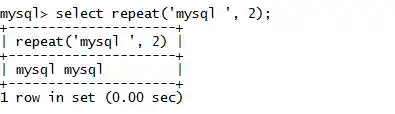
Explanation: On execution of the above statement, the REPEAT function repeats the 'mysql' string 2 times.
Output: The output of this example is given below.
Using REPEAT() function with a column in a table
We can also use REPEAT() function with MySQL tables to repeat the table data. Consider the Teacher table, which contains the following information.
Sample: Teacher Table
| TID | T_Name | Qualification | Salary | Subject | Email_ID |
|---|---|---|---|---|---|
| 1 | Aryan | BCA | 10000 | English | anshu@gmail.com |
| 2 | Harshita | BCA | 25000 | MySQL | harshita@gmail.com |
| 3 | Raman | MCA | 30000 | SQL | raman@gmail.com |
| 4 | Ruby | BCA | 15000 | MATH | ruby@gmail.com |
| 5 | Suman | MCA | 20000 | DBMS | suman@gmail.com |
Example:
Explanation: On execution of the above SELECT statement, the REPEAT function repeats the information of the T_Name column 2 times.
Output: The output of this example is given below.
| TID | T_Name | Qualification | Salary | Subject | Result |
|---|---|---|---|---|---|
| 1 | Aryan | BCA | 10000 | English | Aryan Aryan |
| 2 | Harshita | BCA | 25000 | MySQL | Harshita Harshita |
| 3 | Raman | MCA | 30000 | SQL | Raman Raman |
| 4 | Ruby | BCA | 15000 | MATH | Ruby Ruby |
| 5 | Suman | MCA | 20000 | DBMS | Suman Suman |
Using REPEAT() function with a numeric values in a table
We can also use REPEAT() function to repeat the numeric data. Take an example of the Teacher table, which has some numeric values to perform REPEAT() function on.
Sample: Teacher Table
| TID | T_Name | Qualification | Salary | Subject | Email_ID |
|---|---|---|---|---|---|
| 1 | Aryan | BCA | 10000 | English | anshu@gmail.com |
| 2 | Harshita | BCA | 25000 | MySQL | harshita@gmail.com |
| 3 | Raman | MCA | 30000 | SQL | raman@gmail.com |
| 4 | Ruby | BCA | 15000 | MATH | ruby@gmail.com |
| 5 | Suman | MCA | 20000 | DBMS | suman@gmail.com |
Example:
Explanation: On execution of the above SELECT statement, the REPEAT function repeats the information of the TID column 4 times.
Output: The output of this example is given below.
| TID | T_Name | Qualification | Salary | Subject | Result |
|---|---|---|---|---|---|
| 1 | Aryan | BCA | 10000 | English | 1111 |
| 2 | Harshita | BCA | 25000 | MySQL | 2222 |
| 3 | Raman | MCA | 30000 | SQL | 3333 |
| 4 | Ruby | BCA | 15000 | MATH | 4444 |
| 5 | Suman | MCA | 20000 | DBMS | 5555 |
Using CONCAT() function with REPEAT() function in a table
We can also use the REPEAT() function with the CONCAT() function to join repeated strings. Take an example of the Teacher table, which has the following information to perform the function.
Sample: Teacher Table
| TID | T_Name | Qualification | Salary | Subject | Email_ID |
|---|---|---|---|---|---|
| 1 | Aryan | BCA | 10000 | English | anshu@gmail.com |
| 2 | Harshita | BCA | 25000 | MySQL | harshita@gmail.com |
| 3 | Raman | MCA | 30000 | SQL | raman@gmail.com |
| 4 | Ruby | BCA | 15000 | MATH | ruby@gmail.com |
| 5 | Suman | MCA | 20000 | DBMS | suman@gmail.com |
Example:
Explanation: On execution of the above SELECT statement, we combine the functioning of the REPEAT function with the CONCAT() function. In this, CONCAT(), combine the 'T' character at the beginning of TID.
Output: The output of this example is given below.
| New_TID | T_Name | Qualification | Salary | Subject |
|---|---|---|---|---|
| T1 | Aryan | BCA | 10000 | English |
| T2 | Harshita | BCA | 25000 | MySQL |
| T3 | Raman | MCA | 30000 | SQL |
| T4 | Ruby | BCA | 15000 | MATH |
| T5 | Suman | MCA | 20000 | DBMS |
Frequently asked questions on MySQL Repeat Function
1. How does the MySQL REPEAT() function work?
Answer: It concatenates copies of the specified string the number of times specified by the count parameter. If the count is less than 1, the function returns an empty string.
2. What are the advantage of using MySQL REPEAT() function?
Answer: The REPEAT function is one of the string functions in MySQL, which is helpful to repeat a given string for a user-specified number of times. This repetition method accepts both characters and integers and returns the repeated string.
Next TopicMySQL String