Tkinter Spinbox
Python Tkinter Spinbox
Last Updated : 17 Mar 2025
The Spinbox widget is an alternative to the Entry widget. It provides the range of values to the user, out of which, the user can select the one. It is used in the case where a user is given some fixed number of values to choose from. We can use various options with the Spinbox to decorate the widget.
Python Tkinter Spinbox Syntax
The syntax to use the Spinbox is given below.
Tkinter Spinbox Options
There is a list of several possible tkinter Spinbox options. Some of them are as follows:
| SN | Option | Description |
|---|---|---|
| 1 | activebackground | The background color of the widget when it has the focus. |
| 2 | bg | The background color of the widget. |
| 3 | bd | The border width of the widget. |
| 4 | command | The associated callback with the widget which is called each time the state of the widget is called. |
| 5 | cursor | The mouse pointer is changed to the cursor type assigned to this option. |
| 6 | disabledbackground | The background color of the widget when it is disabled. |
| 7 | disabledforeground | The foreground color of the widget when it is disabled. |
| 8 | fg | The normal foreground color of the widget. |
| 9 | font | The font type of the widget content. |
| 10 | format | This option is used for the format string. It has no default value. |
| 11 | from_ | It is used to show the starting range of the widget. |
| 12 | justify | It is used to specify the justification of the multi-line widget content. The default is LEFT. |
| 13 | relief | It is used to specify the type of the border. The default is SUNKEN. |
| 14 | repeatdelay | This option is used to control the button auto repeat. The value is given in milliseconds. |
| 15 | repeatinterval | It is similar to repeatdelay. The value is given in milliseconds. |
| 16 | state | It represents the state of the widget. The default is NORMAL. The possible values are NORMAL, DISABLED, or "readonly". |
| 17 | textvariable | It is like a control variable which is used to control the behaviour of the widget text. |
| 18 | to | It specify the maximum limit of the widget value. The other is specified by the from_ option. |
| 19 | validate | This option controls how the widget value is validated. |
| 20 | validatecommand | It is associated to the function callback which is used for the validation of the widget content. |
| 21 | values | It represents the tuple containing the values for this widget. |
| 22 | vcmd | It is same as validation command. |
| 23 | width | It represents the width of the widget. |
| 24 | wrap | This option wraps up the up and down button the Spinbox. |
| 25 | xscrollcommand | This options is set to the set() method of scrollbar to make this widget horizontally scrollable. |
Tkinter Spinbox Methods
There are the following methods associated with the Spinbox widget.
| SN | Option | Description |
|---|---|---|
| 1 | delete(startindex, endindex) | This method is used to delete the characters present at the specified range. |
| 2 | get(startindex, endindex) | It is used to get the characters present in the specified range. |
| 3 | identify(x, y) | It is used to identify the widget's element within the specified range. |
| 4 | index(index) | It is used to get the absolute value of the given index. |
| 5 | insert(index, string) | This method is used to insert the string at the specified index. |
| 6 | invoke(element) | It is used to invoke the callback associated with the widget. |
Python Tkinter Spinbox Example
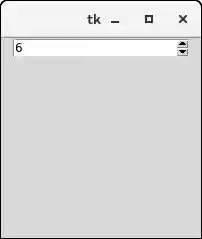
Let us take an example to demonstrate the tkinter spinbox in Python.
Output:
Next TopicPython Tkinter PanedWindow