Unity - Scripting API: EditorGUIUtility.GetFlowLayoutedRects
Success!
Thank you for helping us improve the quality of Unity Documentation. Although we cannot accept all submissions, we do read each suggested change from our users and will make updates where applicable.
Submission failed
For some reason your suggested change could not be submitted. Please <a>try again</a> in a few minutes. And thank you for taking the time to help us improve the quality of Unity Documentation.
Declaration
public static List<Rect> GetFlowLayoutedRects(Rect rect, GUIStyle style, float horizontalSpacing, float verticalSpacing, List<string> items);
Parameters
| Parameter | Description |
|---|---|
| rect | Area where to layout the items. |
| style | Style for the items. |
| horizontalSpacing | Extra horizontal spacing between successive items. |
| verticalSpacing | Extra vertical spacing between item rows. |
| items | Strings to layout. |
Returns
List<Rect> List of rectangles for the passed items.
Description
Layout list of string items left to right, top to bottom in the given area.
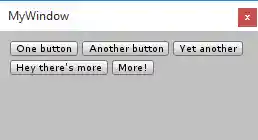
Example of buttons positioned with GetFlowLayoutedRects.
using UnityEngine;
using UnityEditor;
using System.Collections.Generic;public class MyWindow : EditorWindow
{
    [MenuItem("Window/My Window")]
    static void OpenMyWindow()
    {
        EditorWindow.GetWindow<MyWindow>(true);
    }    void OnGUI()
    {
        // area to layout our items in
        var rect = new Rect(10, 10, position.width - 20, position.height - 20);
        // items to layout
        var items = new List<string>
        {
            "One button", "Another button", "Yet another", "Hey there's more", "More!"
        };
        // get resulting rectangles of items
        var style = EditorStyles.miniButton;
        var boxes = EditorGUIUtility.GetFlowLayoutedRects(rect, style, 4, 4, items);
        // do actual UI for them
        for (var i = 0; i < boxes.Count; ++i)
        {
            GUI.Button(boxes[i], items[i], style);
        }
    }
}