Post-Processing — amrex 26.04-dev documentation
The following is a list of tools you may find useful for processing plotfile data generated by AMReX codes.
WritePlotfileToASCII
This basic routine reads in a single-level plotfile and writes the entire contents
to the standard output, one line at a time for each data value.
After reading in the plotfile to a MultiFab, the program copies the data
into a separate MultiFab with one large grid to make writing the data out
sequentially an easier task.
In amrex/Tools/Postprocessing/C_Src, edit GNUMakefile to read
EBASE = WritePlotfileToASCII and NEEDS_f90_SRC = FALSE and then make
to generate an executable. To run the executable, <executable> infile=<plotfilename>.
You can modify the C++ file to write out certain components, coordinates,
row/column formatting, etc.
fcompare
Compares two plotfiles, zone by zone, to machine precision and reports the maximum absolute and relative errors for each variable.
How to build and run
In amrex/Tools/Plotfile, type make and then ./fcompare.gnu.ex to run.
Typing ./fcompare.gnu.ex without inputs will bring up usage and options.
Example
user@machine:~/AMReX/amrex/Tools/Plotfile$   ./fcompare.gnu.ex \
> ~/AMReX/FHDeX/exec/multispec/Reg_DetBubble_2d_Bench/plt0000000 \
> ~/AMReX/FHDeX/exec/multispec/Reg_DetBubble_2d_Bench/plt0000003

            variable name            absolute error            relative error
                                        (||A - B||)         (||A - B||/||A||)
 ----------------------------------------------------------------------------
 level = 0
 rho                                    0.020039805             0.00845645443
 rho1                                 0.01703166127             0.01450634203
 rho2                                 0.01737072831             0.01479513491
 rho3                                 0.01436258458             0.01436258458
 c1                                  0.003022939351             0.00610148453
 c2                                  0.003167240107            0.006392740399
 c3                                  0.006190179458            0.006190179458
 averaged_velx                      0.0001120979347             0.02141254606
 averaged_vely                      0.0001120979347             0.02141254606
 shifted_velx                       0.0001151524563             0.02145887678
 shifted_vely                       0.0001151524563             0.02145887678
 pres                                 0.05687549245          1.797693135e+308
fboxinfo
Displays information about AMR levels and boxes. Works with 1-, 2- or 3-dimensional datasets.
How to build and run
In amrex/Tools/Plotfile, type make and then ./fboxinfo.gnu.ex to run.
Typing ./fboxinfo.gnu.ex without inputs will bring up usage and options.
Example
user@machine:~/AMReX/amrex/Tools/Plotfile$ ./fboxinfo.gnu.ex \
> ~/AMReX/FHDeX/exec/multispec/Reg_DetBubble_2d_Bench/plt0000000

 plotfile: /home/user/AMReX/FHDeX/exec/multispec/Reg_DetBubble_2d_Bench/plt0000000
 level   0: number of boxes =      4, volume = 100.00%
            maximum zones =        64 x      64
fvarnames
Takes a single plotfile and displays a list of the variables present.
How to build and run
In amrex/Tools/Plotfile, type make and then ./fvarnames.gnu.ex to run.
Typing ./fvarnames.gnu.ex without inputs will bring up usage and description.
Example
user@machine:~/AMReX/amrex/Tools/Plotfile$ ./fvarnames.gnu.ex \
> ~/AMReX/FHDeX/exec/multispec/Reg_DetBubble_2d_Bench/plt0000000
    0   rho
    1   rho1
    2   rho2
    3   rho3
    4   c1
    5   c2
    6   c3
    7   averaged_velx
    8   averaged_vely
    9   shifted_velx
   10   shifted_vely
   11   pres
ftime
Takes a whitespace-separated list of plotfiles and returns the time for each plotfile.
How to build and run
In amrex/Tools/Plotfile, type make and then ./ftime.gnu.ex to run.
Typing ./ftime.gnu.ex without inputs will bring up usage and description.
Example
user@machine :~/AMReX/amrex/Tools/Plotfile$ ./ftime.gnu.ex \
> ~/AMReX/FHDeX/exec/multispec/Spinodal_Charges_2d_Bench/plt0000000 \
> ~/AMReX/FHDeX/exec/multispec/Spinodal_Charges_2d_Bench/plt0000002 \
> ~/AMReX/FHDeX/exec/multispec/Spinodal_Charges_2d_Bench/plt0000004 \
> ~/AMReX/FHDeX/exec/multispec/Spinodal_Charges_2d_Bench/plt0000006

 /home/user/AMReX/FHDeX/exec/multispec/Spinodal_Charges_2d_Bench/plt0000000    0
 /home/user/AMReX/FHDeX/exec/multispec/Spinodal_Charges_2d_Bench/plt0000002    4.0000000000000001e-13
 /home/user/AMReX/FHDeX/exec/multispec/Spinodal_Charges_2d_Bench/plt0000004    8.0000000000000002e-13
 /home/user/AMReX/FHDeX/exec/multispec/Spinodal_Charges_2d_Bench/plt0000006    1.1999999999999999e-12
fsnapshot
Produces an image of a 2-D plotfile, or a slice of a 3-D plotfile.
How to build and run
In amrex/Tools/Plotfile, type make and then ./fsnapshot.gnu.ex to run.
Typing ./fsnapshot.gnu.ex without inputs will bring up usage and options.
Example
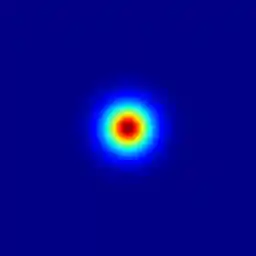
In this example, an image of the data from the 2-D plotfile plt0000003 is created.
user@silentm:~/AMReX/amrex/Tools/Plotfile$ ./fsnapshot.gnu.ex \
> -v rho -p Palette ~/AMReX/FHDeX/exec/multispec/Reg_DetBubble_2d_Bench/plt0000003
 plotfile variable maximum = 2.349724636
 plotfile variable minimum = 1
This command tells fsnapshot to plot the variable rho using the palette
Palette which is available in the current directory, amrex/Tools/Plotfile.
The image is created in the same directory as the plotfile folder.
user@machine:~/AMReX/amrex/Tools/Plotfile$ ls ~/AMReX/FHDeX/exec/multispec/Reg_DetBubble_2d_Bench/
 plt0000000  plt0000003  plt0000003.rho.ppm
The image is produced in the portable pixmap format (.ppm). It can be displayed using
the command display from ImageMagick as seen below.
user@machine:~/AMReX/amrex/Tools/Plotfile$ display \
> ~/AMReX/FHDeX/exec/multispec/Reg_DetBubble_2d_Bench/plt0000003.rho.ppm
This should produce a window to view the image. (The example here is enlarged for clarity.):
fnan
Takes a single plot file and reports whether each variable contains NaN values.
How to build and run
In amrex/Tools/Plotfile, type make and then ./fnan.gnu.ex to run.
Typing ./fnan.gnu.ex without inputs will bring up usage and description.
Example
user@machine:~/AMReX/amrex/Tools/Plotfile$ ./fnan.gnu.ex \
> ~/AMReX/FHDeX/exec/multispec/Reg_DetBubble_2d_Bench/plt0000003
 rho           : clean
 rho1          : clean
 rho2          : clean
 rho3          : clean
 c1            : clean
 c2            : clean
 c3            : clean
 averaged_velx : clean
 averaged_vely : clean
 shifted_velx  : clean
 shifted_vely  : clean
 pres          : clean
In this example, there were no NaN values found in the variable data.
fextrema
Reports the extrema (min/max) for each variable in a plotfile.
How to build and run
In amrex/Tools/Plotfile, type make and then ./fextrema.gnu.ex to run.
Typing ./fextrema.gnu.ex without inputs will bring up usage and options.
Example
user@:~/AMReX/amrex/Tools/Plotfile(postproc_docs)$ ./fextrema.gnu.ex \
> ~/AMReX/FHDeX/exec/multispec/Reg_DetBubble_2d_Bench/plt0000000 \
> ~/AMReX/FHDeX/exec/multispec/Reg_DetBubble_2d_Bench/plt0000003
#                   time |rho                                         |rho1                                        |rho2                                        |rho3                                        |c1                                          |c2                                          |c3                                          |averaged_velx                               |averaged_vely                               |shifted_velx                                |shifted_vely                                |pres                                        |
#                        |         min                   max          |         min                   max          |         min                   max          |         min                   max          |         min                   max          |         min                   max          |         min                   max          |         min                   max          |         min                   max          |         min                   max          |         min                   max          |         min                   max          |
                      0                       1          2.369764441         8.277319027e-17          1.174083806         8.277319027e-17          1.174083806           0.02159682815                    1         8.277319027e-17         0.4954432542         8.277319027e-17         0.4954432542          0.009113491527                    1         -0.005235152063       0.005235152063         -0.005235152063       0.005235152063         -0.005366192156       0.005366192156         -0.005366192156       0.005366192156                       0                    0
                   0.03                       1          2.349724636         8.277319027e-17          1.157052145         8.277319027e-17          1.156713078           0.03595941273                    1         8.277319027e-17         0.4924203149         8.277319027e-17         0.4922760141           0.01530367099                    1         -0.005172583789       0.005172583789         -0.005172583789       0.005172583789         -0.005287367803       0.005287367803         -0.005287367803       0.005287367803         -0.004924487345        0.05687549245
faverage
Compute the lateral average of a variable in a plotfile, with optional density weighting. For 2-D, a profile \(f(y)\) is returned where the average was done over \(x\). For 3-D, a profile \(f(z)\) is returned where the average was done over \(x\) and \(y\).
How to build and run
In amrex/Tools/Plotfile, type make programs=faverage and then ./faverage.gnu.ex to run.
Typing ./faverage.gnu.ex without inputs will bring up usage and options.
Example
user@:~/AMReX/amrex/Tools/Plotfile$ ./faverage.gnu.ex -v density plt0000000
will compute the average density as a function of height, outputting a data file
plt0000000.slice.
fgradient
Compute the gradient of variables in a plotfile.
How to build and run
In amrex/Tools/Plotfile, type make programs=fgradient and then ./fgradient.gnu.ex to run.
Typing ./fgradient.gnu.ex without inputs will bring up usage and options.
Example
user@:~/AMReX/amrex/Tools/Plotfile$ ./fgradient.gnu.ex -v density plt0000000
will compute the gradient of density as a function of height, outputting a
new plotfile grad.plt0000000.