Tutorial style guide
The following guidelines will help you present your content in tutorial form so that your users can effectively familiarize themselves with your project.
Cloud Shell features
- Unique layout: Tutorials are presented in a side panel on the right hand side of Google Cloud console.
- Navigation: Users can move through the tutorial using the Next and Previous buttons in each step. They can also close the tutorial and resume from where they left off.
- Code to go: Code snippets can be copied directly into Cloud Shell.
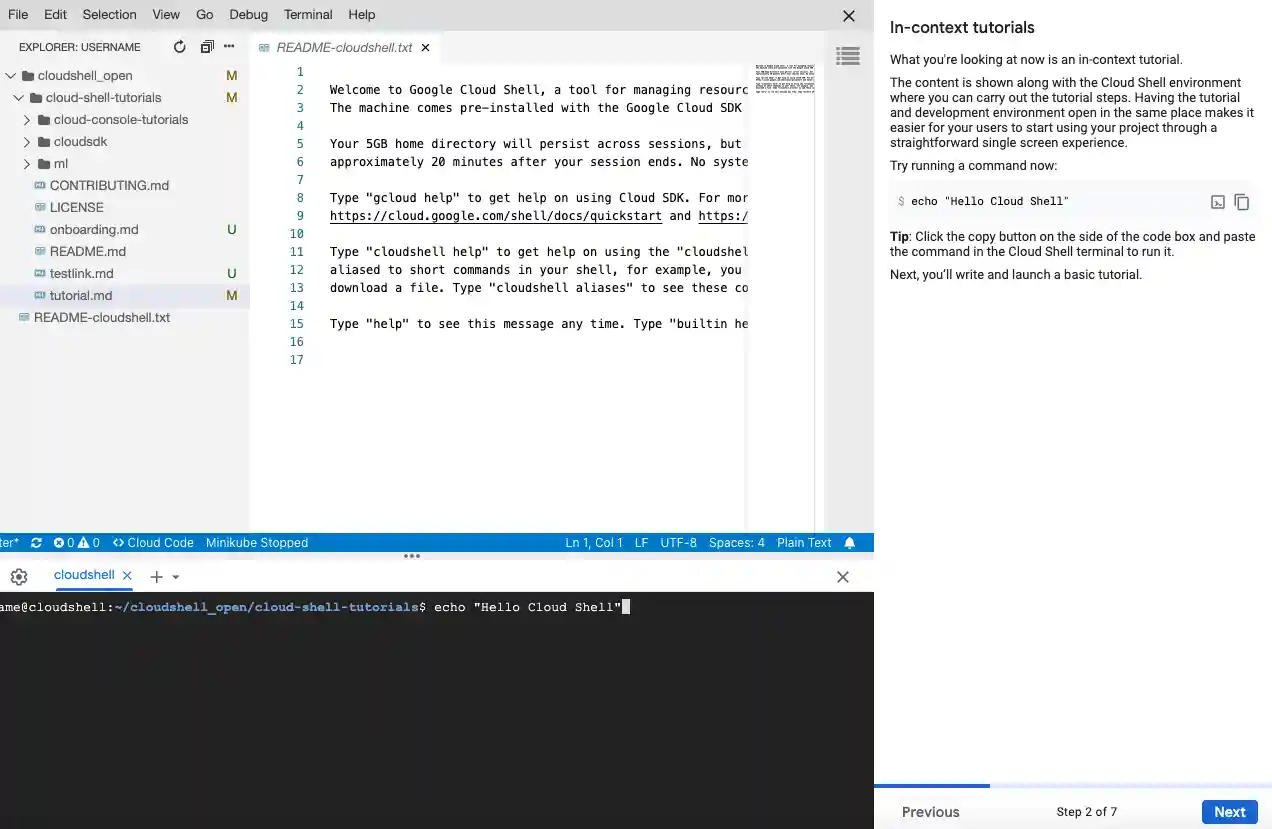
A Cloud Shell Editor session with a tutorial pane open. Users can copy code directly into Cloud Shell by clicking a button, and can move between pages with the Next and Previous buttons.
Writing style
- Keep it light: Tutorials should be informative and helpful in tone, but not overly formal.
- You, the user: Use second person pronouns (do use: you, your; don't use: we, I, our, and so on)
- Explain cause and effect: When asking users to carry out a step, explain the reasoning behind the action and the expected result.
- Have focused goals: Before writing the content for your tutorial, establish a well-defined goal you want your users to accomplish. Craft your tutorial keeping this goal in mind.
| Original | Revised | Improvement |
| On the next page, you'll learn how to create a new tutorial. | Continue on to the next step to start setting up your tutorial. | Focus on the user; use of active voice
Use of relaxed language |
| Run this command:
``` gcloud projects list --format="table[box,title=Projects](name, projectId)" ``` |
To display a tabulated list of all your projects and their ID numbers, titled 'Projects', run the following command: ``` gcloud projects list --format="table[box,title=Projects](name, projectId)" ``` | Explanation of reasoning upfront to set expectations about the output |
Let's get started!
|
Let's get started!
This guide will show you how to build your own interactive tutorial. It'll also walk you through generating a button that users can use to launch your finished tutorial. |
Clear roadmap of lessons covered in the tutorial
Make sure to keep this focus when writing content! |
Best practices
Keep it short: The unique space constraints of the tutorial pane mean that a limited amount of information can be presented to a user at a time. Avoid large chunks of text that are difficult to scan and require vertical scrolling; favor information presented in bite-sized chunks.
Aim for no more than 5 steps and 3 code snippets per page.
Paragraphs should ideally be 5 lines or fewer and should deal with a singular concept.
If a page must be long, aim to have it be a maximum of twice the length of the pane.
Code and terminal blocks should be small enough to read:
- Aim for 10 lines or less.
- Aim for 80 characters or less per line, to reduce horizontal scrolling.
- Avoid multi-command code blocks to prevent users from having to do a bulk copy-execute.
Introductory page: Start your tutorial off with an introduction.
- Set expectations: Briefly explain how your users will profit from completing this tutorial.
- Estimated time commitment: Roughly estimate how long users can expect to spend on the tutorial. Aim to create a tutorial that can be finished under 15 minutes. If your tutorial is longer (or consists of more than 15 densely worded pages), consider breaking it into a series of smaller tutorials.
- Be upfront: Clearly state any prerequisite resources or access that users might need to have set up to work through the tutorial uninterrupted.
Example Background page
- Set the scene: It's often helpful, when writing a tutorial, to furnish it with context. This might mean providing a short overview of the product or quickly running through salient features of a UI.
Example Basic Examples:
- Hello World: The first example you provide should be simple enough for your user to test without much explanation. It should be your Hello World equivalent. Use this example as a base to keep building on to exemplify concepts through the tutorial.
Example Tutorial Content
- Format with caution: Text formatting (bold, italics, etc.) is distracting; use it only when necessary and to your advantage (for warnings, key learnings, etc.).
- Consistent grammar: Use imperative tense when describing user action and be sure to end sentences with a period.
- Refer to links: Where essential for context, include supplementary links ([link text](link URL)) so that users can do their own research.
- Choose spotlighting over screenshots: Spotlighting, an action that highlights where UI elements are in the Google Cloud console, demonstrates position so that users can identify elements without searching an image.
- Alternate view: If possible, provide a link to your tutorial content offered as static content; this gives users the freedom to pick how they'd like to consume the provided information.
- Tips appreciated: Where applicable, add in tips (called out by "**Tip:**") to provide users with more intuitive solutions and best practices.
Example Summary
- Congratulations: Be sure to add in a trophy icon (<walkthrough-conclusion-trophy></walkthrough-conclusion-trophy>) to appreciate users taking the time to finish the tutorial.
- Wrap up: Summarize important lessons that you'd like users to take away from the tutorial.
- What's next: Help users along their journey by providing next steps - these might be recommended reading, supplementary resources, or even, another tutorial.
- Look out for your users: Advise them to clean up any test resources they created for the purposes of the tutorial to avoid unwanted billing charges.
Example