Java Program to List Files and Folders in Directory
This article covers a program in Java, that list and print all files and folders available in a directory.
Java Get Files and Folders in a Directory
The question is, write a Java program to print all files and folders available in a directory. The program given below is its answer:
import java.io.File;

public class CodesCracker
{
   public static void main(String[] args)
   {
      String directory = "C:\\Users\\DEV\\Documents\\NetBeansProjects\\CodesCracker";
      File fileObject = new File(directory);

      String[] filesFolders = fileObject.list();

      System.out.println("---List of Files and Folders---");
      for(String ff: filesFolders)
         System.out.println(ff);
   }
}
The snapshot given below shows the sample output produced by above Java program. This output shows all the files and folder available in the directory given to the variable directory:
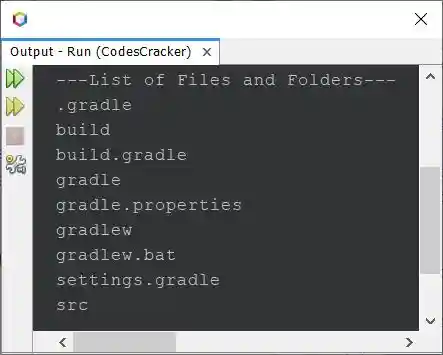
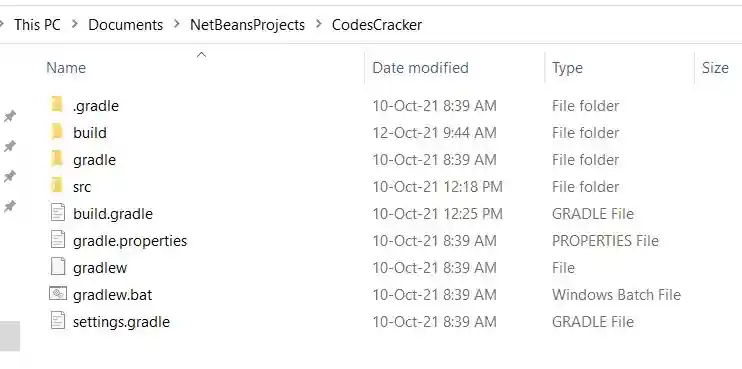
In above output, all files and folders are printed in organized way. Organized means, files and folders both are in alphabetical order. Here is the snapshot of the directory, given to above program:
Java Get all Files and Folders in a Given Directory
Here is the modified version of previous program. This program allows user to enter the directory, of which, he/she wants to find and print all files and folders:
import java.util.*;
import java.io.*;

public class CodesCracker
{
   public static void main(String[] args)
   {
      String directory;
      Scanner scan = new Scanner(System.in);

      System.out.print("Enter the Directory: ");
      directory = scan.nextLine();

      File fileObject = new File(directory);

      String[] filesFolders = fileObject.list();

      System.out.println("\n---List of all Files and Folders---");
      for(String ff: filesFolders)
         System.out.println(ff);
   }
}
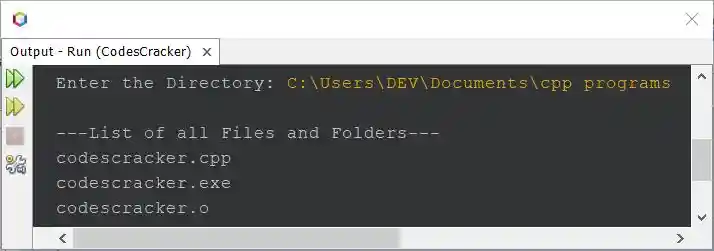
The snapshot given below shows the sample run of above program with user input C:\Users\DEV\Documents\cpp programs as directory, to print all files and folders available in this directory:
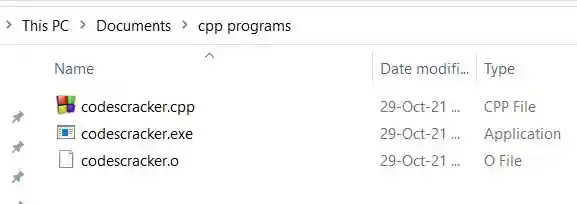
And here is the snapshot of the directory C:\Users\DEV\Documents\cpp programs:
Java Get all Files and Folders in Directory and Sub-directories
To get and print all files and folders available in current directory and its sub-directories, then use the program given below:
import java.util.*;
import java.io.*;

public class CodesCracker
{
   public static void main(String[] args)
   {
      if(args.length == 0)
         args = new String[] {".."};
      List<String> nextDir = new ArrayList<String>();
      nextDir.add(args[0]);
      try
      {
         while(nextDir.size() > 0)
         {
            File pathName = new File(nextDir.get(0)); // gets the element at the index of List
            String[] fileNames = pathName.list();     // lists all the files in the directory
            for(int i=0; i<fileNames.length; i++)
            {
               // getPath converts abstract path to path in String,
               // constructor creates a new File object with fileName name
               File f = new File(pathName.getPath(), fileNames[i]);
               if(f.isDirectory())
               {
                  System.out.println(f.getCanonicalPath());
                  nextDir.add(f.getPath());
               }
               else
                  System.out.println(f);
            }
            nextDir.remove(0);
         }
      }
      catch(IOException ioe)
      {
         System.out.println("\nException: " +ioe);
      }
   }
}
The output produced by this program will be the list of all files and folders available in the current directory and its sub-directories. The files and folders are listed along with full path, to understand, files or folders are of which directory. The snapshot given below shows a part of the sample output produced by above program.

A lot of files and folders available inside the current directory in my case, therefore it is not possible to show the complete output in single snapshot. But the thing is, you'll get the similar output.
Same Program in Other Languages
« Previous Program Next Program »
Liked this post? Share it!