Java Program to Reverse a String
This article is created to cover, one of the famous program in Java, that is to reverse a string entered by user at run-time of the program. Here are the list of programs covered in this article:
- Reverse a String using for Loop
- Reverse a String using while Loop
- Reverse a String using reverse() method
- Reverse a String using character array
- Reverse a String, word-wise
Reverse a String in Java using for Loop
The question is, write a Java program to reverse a given string. The string must be received by user at run-time. The program given below is its answer:
import java.util.Scanner;

public class CodesCracker
{
   public static void main(String[] args)
   {
      String str, strReverse="";
      int len, i;
      char ch;
      Scanner s = new Scanner(System.in);

      System.out.print("Enter the String: ");
      str = s.nextLine();

      len = str.length();
      for(i=(len-1); i>=0; i--)
      {
         ch = str.charAt(i);
         strReverse = strReverse + ch;
      }

      System.out.println("\nReverse = " +strReverse);
   }
}
The snapshot given below shows the sample run of above Java program on reversing of a given string, with user input codescracker dot com as string to reverse:
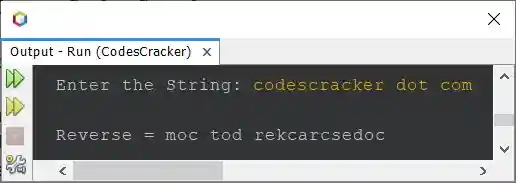
The string gets reversed with preserving the position of white spaces.
Reverse a String in Java using while Loop
This program does the same job as of previous program, but created using while loop, instead of for.
import java.util.Scanner;

public class CodesCracker
{
   public static void main(String[] args)
   {
      String str, strReverse="";
      int len, i;
      char ch;
      Scanner s = new Scanner(System.in);

      System.out.print("Enter the String: ");
      str = s.nextLine();

      len = str.length();
      i = (len-1);
      while(i>=0)
      {
         ch = str.charAt(i);
         strReverse = strReverse + ch;
         i--;
      }

      System.out.println("\nReverse = " +strReverse);
   }
}
You'll get the same output as of previous program. The above program can also be created in this way too:
import java.util.Scanner;

public class CodesCracker
{
   public static void main(String[] args)
   {
      String strReverse="";
      Scanner s = new Scanner(System.in);

      System.out.print("Enter the String: ");
      String str = s.nextLine();

      int len = str.length();
      int i = (len-1);
      while(i>=0)
         strReverse += str.charAt(i--);

      System.out.println("\nReverse = " +strReverse);
   }
}
Still, you'll get the same output.
Reverse a String using StringBuilder and reverse() Function
This program uses StringBuilder class and its method named reverse() to reverse a string.
import java.util.Scanner;

public class CodesCracker
{
   public static void main(String[] args)
   {
      Scanner s = new Scanner(System.in);

      System.out.print("Enter the String: ");
      String str = s.nextLine();

      StringBuilder sb = new StringBuilder(str);
      sb.reverse();
      String strReverse = sb.toString();

      System.out.println("\nReverse = " +strReverse);
   }
}
Reverse a String in Java using a Character Array
This program uses character array to reverse a string. The toCharArray() method converts a string into character array.
import java.util.Scanner;

public class CodesCracker
{
   public static void main(String[] args)
   {
      String strReverse = "";
      Scanner s = new Scanner(System.in);

      System.out.print("Enter the String: ");
      String str = s.nextLine();

      char ch[] = str.toCharArray();
      int len = ch.length;
      for(int i=(len-1); i>=0; i--)
         strReverse += ch[i];

      System.out.println("\nReverse = " +strReverse);
   }
}
Reverse a String Word Wise
This is the last program of this article. This program is little different from all the program given above. As this program reverse a string, but in word-wise manner.
import java.util.Scanner;

public class CodesCracker
{
   public static void main(String[] args)
   {
      String word, wordReverse;
      int tot, i, len, j;
      char ch;
      Scanner s = new Scanner(System.in);

      System.out.print("Enter the String: ");
      String str = s.nextLine();

      String words[] = str.split(" ");
      tot = words.length;
      System.out.print("\nWord Wise Reverse of String = ");
      for(i=0; i<tot; i++)
      {
         wordReverse = "";
         word = words[i];
         len = word.length();
         for(j=(len-1); j>=0; j--)
         {
            ch = word.charAt(j);
            wordReverse = wordReverse + ch;
         }
         System.out.print(wordReverse+ " ");
      }
   }
}
Here is its sample run with same user input as of first program's sample run:
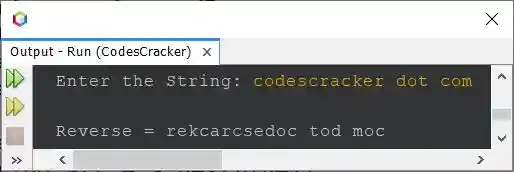
In above program, if user inputs a string that contains more than one white spaces in between any two or more words, then the program will not work perfectly. Therefore let me modify the program, and create a new one. This program also stores the reverse of string, word wise, then prints the whole string at last.
import java.util.Scanner;

public class CodesCracker
{
   public static void main(String[] args)
   {
      String strReverse = "";
      String word, wordReverse;
      Scanner s = new Scanner(System.in);

      System.out.print("Enter the String: ");
      String str = s.nextLine();

      String words[] = str.split("\\s+");
      int tot = words.length;

      for(int i=0; i<tot; i++)
      {
         wordReverse = "";
         word = words[i];
         int len = word.length();

         for(int j=(len-1); j>=0; j--)
            wordReverse += word.charAt(j);

         strReverse = strReverse + wordReverse + " ";
      }

      System.out.println("\nReverse (Word-wise) = " +strReverse);
   }
}
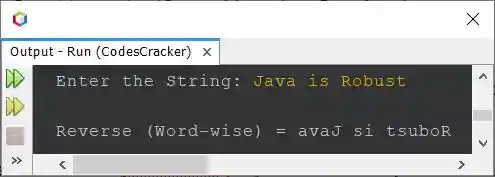
Here is its sample run with user input Java is Robust
Same Program in Other Languages
« Previous Program Next Program »
Liked this post? Share it!