Python Program to Copy Content of One File to Another
This article is created to cover some programs in Python, that copies the content of one file to another. Name of both files must be entered by user at run-time. Here are the list of programs:
- Copy Content of One File to Another without using copyfile() Method
- Using copyfile() Method
- Using with and as Keywords
- Shortest Python Code to Copy File's Content
Things to Do before Program
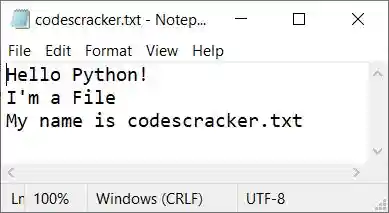
Since the program given below copies the content of one file to another, entered by user. Therefore we've to create a file inside the current directory. Current directory means, the directory where the Python source code to copy one file to another is saved. Therefore create a file named codescracker.txt with following content:
Hello Python!
I'm a File
My name is codescracker.txt
Here is the snapshot of folder where the file and the Python source code (to copy file's content) is saved:
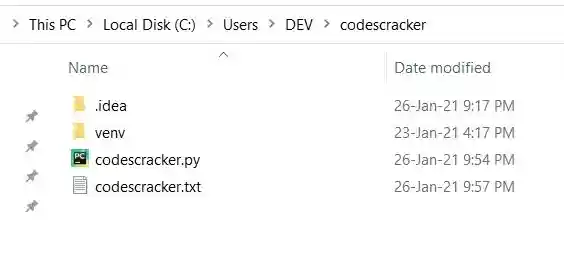
And here is the snapshot of opened file codescracker.txt:
Now let's move on to the program that copies the content of file entered by user (codescracker.txt here) to any other file, also entered by user.
Copy Content of One File to Another in Python
To copy the content of one file to another in Python, you have ask from user to enter the name of two files. The first file referred as a source, whereas the second file referred as a target file. That is, the content of source file gets copied to the target file as shown in the program given below:
The question is, write a Python program to copy one file to another entered by user at run-time. Here is its answer:
print("Enter the Name of Source File: ")
sFile = input()
print("Enter the Name of Target File: ")
tFile = input()

fileHandle = open(sFile, "r")
texts = fileHandle.readlines()
fileHandle.close()

fileHandle = open(tFile, "w")
for s in texts:
    fileHandle.write(s)
fileHandle.close()

print("\nFile Copied Successfully!")
This is the initial output produced by this Python program, asking from user to enter the name of source file. Source file is the file, of which the content gets copied to another (target) file:
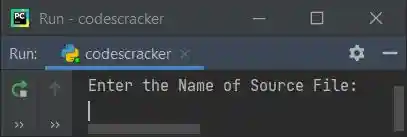
Now supply inputs say codescracker.txt (newly created file) as name of source file, press ENTER
key and then type codes.txt as name of target file, and again press ENTER key to copy the content
of source file to the target file.
If target file doesn't exist in the current directory, then a new file with same name gets created and the content of source file gets copied. Here is its sample output:
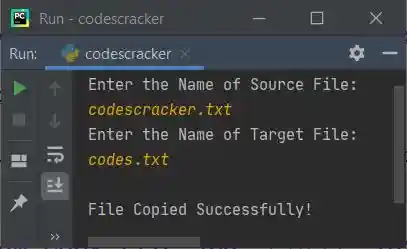
After supplying exactly these inputs as shown in this sample run. A file named codes.txt gets created inside the same folder, where the source code (above program) and the file (codescracker.txt) is saved. Here is the snapshot of the folder:
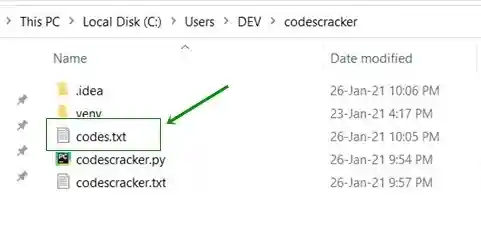
As you can see that a new file with same name as entered for the name of target file, gets created. And if you open the file codes.txt, it contains the same content as of codescracker.txt file.
Modified Version of Previous Program
This is the modified version of previous program. This program uses try-except to print error message when anything strange happens like the source file entered by user doesn't exist.
The end= is used to skip inserting newline using print(). This program also displays the copied content if user enters y as choice.
print("Enter Source File's Name: ", end="")
sfile = input()

try:
    filehandle = open(sfile, "r")

    print("Enter Target File's Name: ", end="")
    tfile = input()
    texts = filehandle.readlines()
    filehandle.close()

    try:
        filehandle = open(tfile, "w")

        for s in texts:
            filehandle.write(s)
        filehandle.close()

        print("\nContent of \"" +sfile+ "\" gets Copied to \"" +tfile+ "\" Successfully!")
        print("\nWant to Display the Content of \"" +tfile+ "\" (y/n) ? ", end="")
        chk = input()
        if chk.lower()=='y':
            try:
                filehandle = open(tfile, "r")
                contents = filehandle.readlines()
                for s in contents:
                    print(s, end="")
                filehandle.close()
                print()
            except IOError:
                print("\nError occurred while opening the file!")

    except IOError:
        print("\nError occurred while opening/creating the file!")

except IOError:
    print("\nThe file doesn't exist!")
Here is its sample run with users inputs, codescracker.txt as name of source file, cracker.txt as name of target file and y as input to see the copied content of target file:
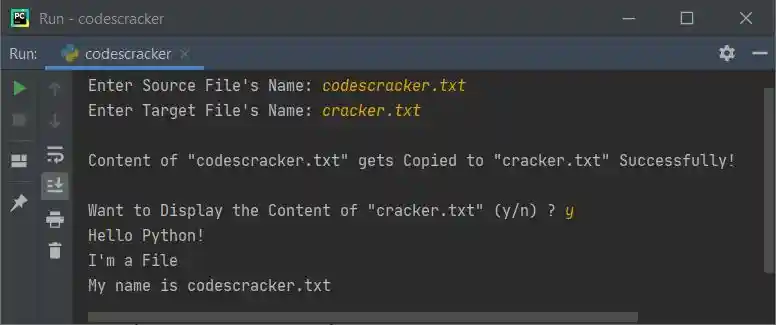
Note - If you'll open the folder, you'll see another new file named cracker.txt gets created with same content.
In above program, if the statement:
filehandle = open(sfile, "r")
written as first statement inside the body of try, raises an error like when file doesn't exist, then its counterpart, that is except's statement(s) gets executed.
Copy File using copyfile() of shutil
This program uses copyfile() method to copy the content of one file to another. But before using the copyfile() method, we've to import copyfile from shutil module like shown in the program given below:
from shutil import copyfile

print("Enter Source File's Name: ", end="")
sfile = input()
print("Enter Target File's Name: ", end="")
tfile = input()

copyfile(sfile, tfile)
print("\nContent of \"" +sfile+ "\" gets Copied to \"" +tfile+ "\" Successfully!")

print("\nWant to Display the Content of \"" +tfile+ "\" (y/n) ? ", end="")
chk = input()

if chk.lower()=='y':
    filehandle = open(tfile, "r")
    print(filehandle.read())
    filehandle.close()
This program works in similar way as of previous program. Above program can also be created by replacing the following two statements:
from shutil import copyfile
copyfile(sfile, tfile)
with
import shutil
shutil.copyfile(sfile, tfile)
Copy File using with and as Keywords
This program uses with and as keywords to do the same job of copying the content of one file to another.
print("Enter Name of Source and Target File: ", end="")
sfile = input()
tfile = input()

with open(sfile, "r") as shandle:
    with open(tfile, "w") as thandle:
        for line in shandle:
            thandle.write(line)

shandle.close()
thandle.close()

print("\nFile Copied!")
print("\nWant to Display the Content (y/n) ? ", end="")
chk = input()
if chk.lower()=='y':
    with open(tfile, "r") as fhandle:
        for line in fhandle:
            print(line, end="")
    fhandle.close()
    print()
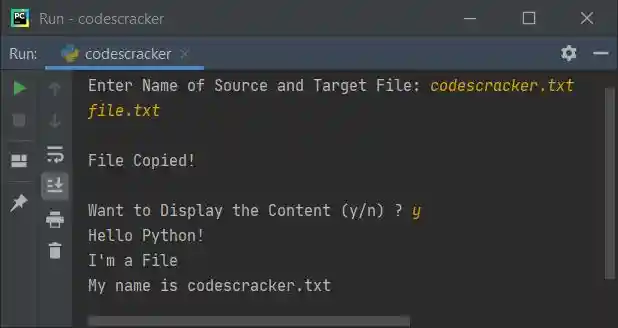
Here is its sample run with user inputs, codescracker.txt (source file's name), file.txt (target file's name), and y (choice to see the content):
Shortest Python Code to Copy File's Content
This is the shortest Python code to copy file's content with user-input.
sfile = input()
tfile = input()

with open(sfile, "r") as shandle:
    with open(tfile, "w") as thandle:
        for line in shandle:
            thandle.write(line)
Same Program in Other Languages
« Previous Program Next Program »
Liked this post? Share it!