Python bool() Function
The bool() function in Python returns the boolean value (True or False) of a specified object. For example:
x = 0
print(bool(x))

x = False
print(bool(x))

x = None
print(bool(x))

x = []
print(bool(x))

x = 10
print(bool(x))

x = [50]
print(bool(x))

x = [False]
print(bool(x))

x = [0]
print(bool(x))

x = "codescracker"
print(bool(x))
Following is the output produced by this Python program, demonstrating the bool() function:
False
False
False
False
True
True
True
True
True
Python bool() Function Syntax
The syntax of bool() function in Python is:
where obj is an object such as list, number, string etc.
Note: The bool() function always returns False, if the specified object is empty.
Note: The bool() function returns False, if the specified object is (or is equal to) False, 0, or/and None.
Python bool() Function Example
Here is an example of bool() function in Python. This program allows user to enter the value:
print("Enter a Value: ", end="")
val = input()
print(bool(val))
The snapshot given below shows the sample run of above program, with user input False:
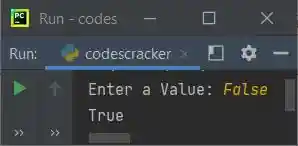
This is because, when you enter the value False as input, then using the input() method, the value
gets initialized to val. But by default, the input() method converts the value into a string type. Therefore
the value False gets treated as a string type value, not a boolean False. Same thing goes with 0
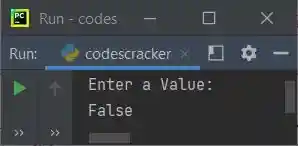
and None. But when you hit/press ENTER without typing anything, means that the variable val
becomes empty, and in that case, the output will be False. Here is the sample run:
« Previous Function Next Function »
Liked this post? Share it!