Python complex() Function
The complex() function in Python is used to convert a number or string to a complex number. For example:
x = complex(2, 5)
print(x)

x = complex("4+3j")
print(x)
The output produced by this program is:
Python complex() Function Syntax
The syntax of complex() function in Python is:
where the first parameter (real) refers to the real part of complex number, whereas the second parameter (imaginary) refers to the imaginary part of complex number.
Note: The default value of both parameters is 0.
Note: The second parameter should be omitted when we need to convert a string in the form "a+bj", to the complex number.
The complex() function returns complex number. A number in the form of a+bj, where a is real and b is imaginary part.
Python complex() Function Example
Here is an example of complex() function in Python:
z = complex(2)
print(z)

z = complex()
print(z)

z = complex(2, -3)
print(z)
The sample output produced by this Python program, is:
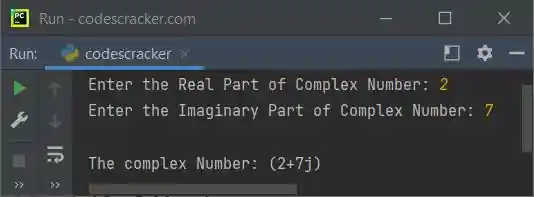
Let's create another program demonstrating the complex() function in Python. This program allows user to define the real and imaginary part of the complex number at run-time of the program:
print("Enter the Real Part of Complex Number: ", end="")
real = int(input())
print("Enter the Imaginary Part of Complex Number: ", end="")
imaginary = int(input())

print("\nThe complex Number: ", end="")
z = complex(real, imaginary)
print(z)
The snapshot given below shows the sample run with user input 2 and 7 as real and imaginary part of the complex number:
« Previous Function Next Function »
Liked this post? Share it!