Python extend() Function
The extend() function in Python, is used to add multiple elements or an iterable at the end of a list. For example:
a = [65, 7, 8]
print("The list a is:")
print(a)

a.extend([76, 890])
print("\nNow the list a is:")
print(a)

b = [1, 2, 78, 43]
a.extend(b)
print("\nNow the list a is:")
print(a)
The output produced by above Python program, demonstrating the extend() function is:
The list a is:
[65, 7, 8]

Now the list a is:
[65, 7, 8, 76, 890]

Now the list a is:
[65, 7, 8, 76, 890, 1, 2, 78, 43]
Note: It is not limited to add multiple elements using extend() every time. That is, you're free to add single element too at the end of a list, using this function.
Suggestion - If you want to add single element at the end of a list, go for append(), instead of extend(). Also, if you want to add an iterable such as list, tuples, set etc. itself at the end of a list in a way to make the list becomes nested list, then go for append().
Python extend() Function Syntax
The syntax to use extend() function is:
listName.extend([value1, value2, value3, ..., valueN])
Or
listName.extend(iterable)
iterable may be a list, tuple, set, etc.
Python extend() Function Example
Here is an example demonstrating the extend() function again, in Python:
a = ["codes", "cracker"]
b = {1, 2, 3}
a.extend(b)
print(a)

c = ['p', 'y', 't']
d = ('o', 'n')
c.extend(d)
print(c)
Here is its sample output:
['codes', 'cracker', 1, 2, 3]
['p', 'y', 't', 'o', 'n']
The program given below, also produces the same output as of above one:
a = ["codes", "cracker"]
a.extend({1, 2, 3})
print(a)

c = ['p', 'y', 't']
c.extend(('o', 'n'))
print(c)
Let's create another example program demonstrating the extend() function in Python:
a = ["codes", "cracker"]
b = (1, 2, 3)
c = {'c', 'o', 'm'}

a.extend(b)
a.extend(c)

print(a)
This program produces following output:
['codes', 'cracker', 1, 2, 3, 'c', 'o', 'm']
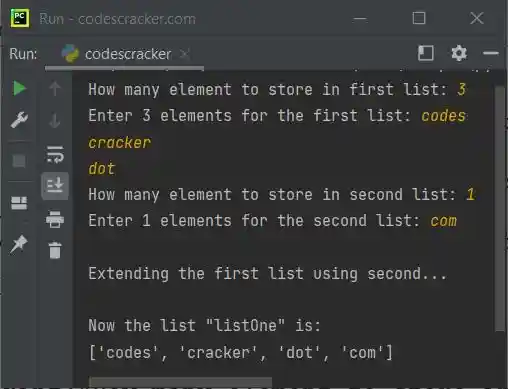
Here is another example demonstrates the extend() method in Python, with user input:
print("How many element to store in first list: ", end="")
tot = int(input())
print("Enter", tot, "elements for the first list: ", end="")
listOne = []
for i in range(tot):
    listOne.append(input())

print("How many element to store in second list: ", end="")
tot = int(input())
print("Enter", tot, "elements for the second list: ", end="")
listTwo = []
for i in range(tot):
    listTwo.append(input())

print("\nExtending the first list using second...")
listOne.extend(listTwo)
print("\nNow the list \"listOne\" is:")
print(listOne)
The snapshot given below shows the sample run of above Python program, with user input 3 as size of first list, codes, cracker, dot as its three elements, and 1 as size of second list, whereas com as its element:
Note: The + operator can also be used to extend a list.
« Previous Function Next Function »
Liked this post? Share it!