Python append() Function
The append() function in Python, used to add new element at the end of a list. For example:
mylist = [11, 22, 33, 44, 55]
print("Original list is:")
print(mylist)

mylist.append(66)
print("\nNow the list is:")
print(mylist)
The output produced by above Python code, illustrating the append() function, is:
Original list is:
[11, 22, 33, 44, 55]

Now the list is:
[11, 22, 33, 44, 55, 66]
Python append() Syntax
Here is the syntax of append() function in Python:
listName.append(new_element)
Python append() Example
Here is an example of append() function in Python. This program is created in a way to append an element entered by user to a list:
mylist = [100, 200, 300, 400, 500]
print("The original list is:")
print(mylist)

print("\nEnter an element to append: ", end="")
element = int(input())
mylist.append(element)
print("\nNow the list is:")
print(mylist)
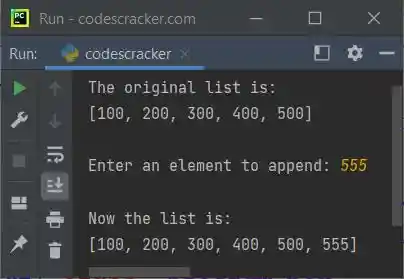
The snapshot given below shows the sample run of above program, with user input 555 as new element to append:
Note: To insert element at particular or required index, then use insert() function.
Python append() Function - Main Use
When we need to allow user to define the size of a list and with its all elements, then the append() method or function comes into play. Here is an example:
print("How many element to store in the list: ", end="")
n = int(input())
print("Enter", n, "elements for the list: ", end="")
mylist = []
for i in range(n):
    val = input()
    mylist.append(val)

mylist = mylist
print("\nOriginal list is:")
print(mylist)

print("\nEnter an element to append: ", end="")
val = input()
mylist.append(val)
print("\nNow the list is:")
print(mylist)
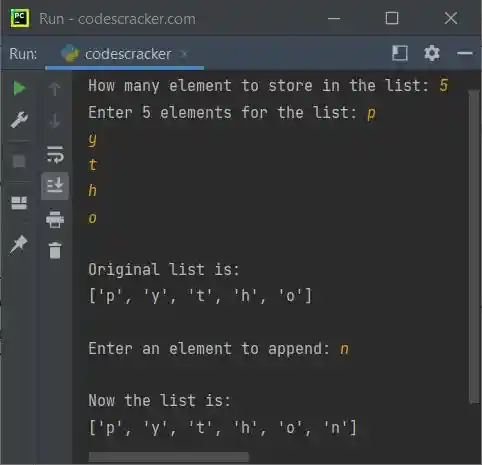
Here is its sample run with user input 5 as number of element to store, p, y, t, h, o as five elements, and n as an element to append:
Note: The input() function treats every input value as string type. If you want to work with integer values, then use int(input()).
Python append() Function - Appending List to another List
Because Python allows nested list, therefore a list can be appended to another list using the append() function. Here is an example:
listOne = [1, 2, 3]
listTwo = [4, 5, 6]
print(listOne)
listOne.append(listTwo)
print(listOne)
This program produces following output:
[1, 2, 3]
[1, 2, 3, [4, 5, 6]]
Note: To append multiple items, instead of appending a list, to avoid creating nested list. Then Python provides another function, that is extend().
« Previous Function Next Function »
Liked this post? Share it!