Python insert() Function
The insert() function in Python is used to insert an element in a list at specified index. For example:
a = [32, 43, 65, 75, 23]
a.insert(2, 100)
print(a)
The output produced by above Python program, demonstrating the insert() function is:
[32, 43, 100, 65, 75, 23]
That is, the element 100 gets inserted at second index in the list a.
Python insert() Function Syntax
The syntax of insert() function in Python is:
listName.insert(indexNumber, element)
Python insert() Function Example
Here is an example program of insert() function in Python.
print("Enter the Size of List: ", end="")
s = int(input())
print("Enter", s, "Elements for the List: ", end="")
mylist = []
for i in range(s):
    val = input()
    mylist.append(val)

print("\nEnter an Element to Insert: ", end="")
element = input()
print("At what position: ", end="")
pos = int(input())

mylist.insert(pos, element)
print("\nThe list is:")
for i in range(s+1):
    print(mylist[i], end=" ")
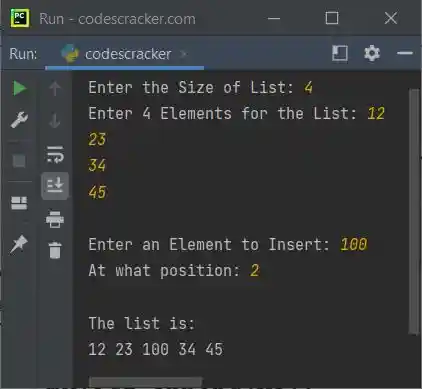
The snapshot given below shows the sample run of above Python program, with user input 4 as list size, 12, 23, 34, 45 as four elements for the list, 100 as element to insert, 2 as index:
« Previous Function Next Function »
Liked this post? Share it!