Python fileno() Function
The fileno() function in Python, used to get the file descriptor of the stream, in an integer form. That is, the fileno() function returns an integer value of the file descriptor assigned to the file object.
Python fileno() Syntax
The syntax to use fileno() function in a Python program is:
where file_object referred to the file handler or object.
Python fileno() Example
Let's create an example program, demonstrating the fileno() function. The file say codescracker.txt must be available inside the current directory. Otherwise the program raises an error. Therefore, create the file, before executing the program given below.
filehandle = open("codescracker.txt", "r")
val = filehandle.fileno()
print("Integer Value of File Descriptor is", val)
filehandle.close()
Since the file codescracker.txt is available in the current directory in my case. Therefore, here is the output produced by above program:

Since the opening mode used in above program is r, therefore the file must has to be available in the current directory. Otherwise the program will throw or raise an error. But you can also change the mode from r to w to avoid any error, while printing the integer value of the file descriptor, as done in previous program. Here is the modified version of previous program:
print("Enter File's Name: ", end="")
filename = input()
fileobject = open(filename, "w")
print("\nName:", fileobject.name)
print("Descriptor:", fileobject.fileno())
fileobject.close()
Here is its sample run with user input myfile.txt as name of file:
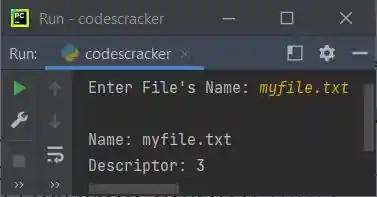
Note: The w mode used as opening mode of the file means, if the file does not exists, then a new file gets created with same name provided using user input.
Note: The end parameter skips insertion of an automatic newline using print() function.
« Previous Function Next Function »
Liked this post? Share it!